How to Create a LinkedIn Content Strategy
Learn how to create a LinkedIn content strategy with one goal, a defined audience, two or three formats, a weekly cadence and LinkedIn analytics.

Your LinkedIn content strategy is a short written plan that says who you post for, what you post, how often and how you will judge the results. Below is how to create a LinkedIn content strategy as a set of planning decisions, with the click paths left to our posting guides. Every fact comes from LinkedIn Help, LinkedIn Business or LinkedIn Marketing Academy, read on 29 October 2026.
How to Create a LinkedIn Content Strategy in Six Decisions
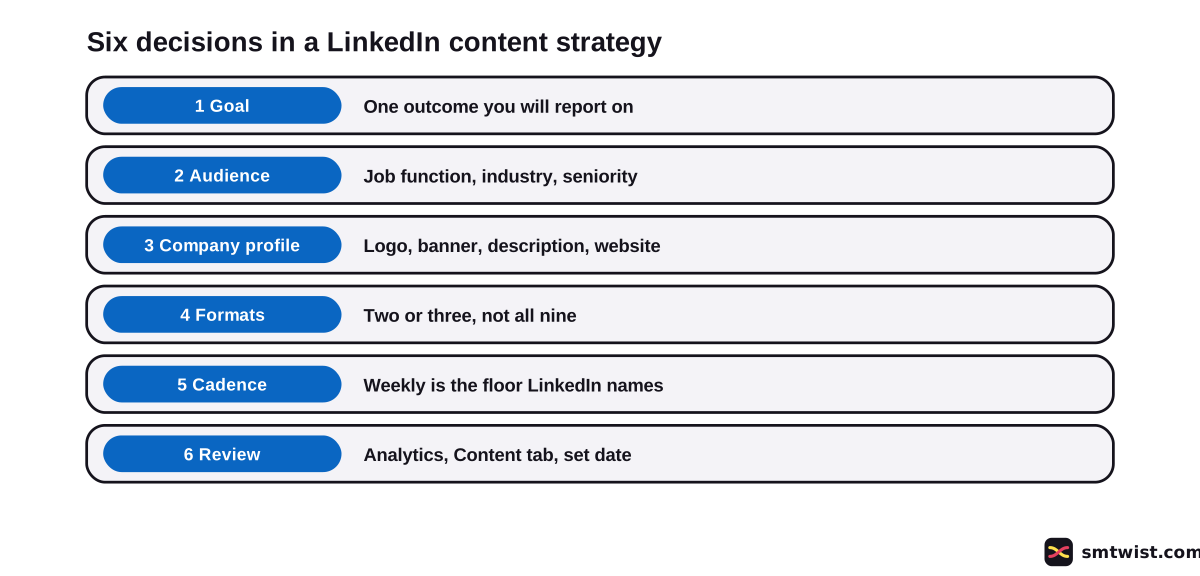
LinkedIn Marketing Academy lays out its content strategy path in a clear order. It starts with a credible company profile, moves to a steady organic rhythm, then to insights and finally to paid reach for posts that already work. Our plan follows that order with six decisions.
- Pick one goal.
- Name the audience.
- Complete the company profile.
- Choose two or three formats.
- Set a cadence you can keep.
- Review the numbers on a fixed date.
Write all six on one sheet before you draft a single post. Every decision below says what LinkedIn publishes and where we add our own advice.
What Goal should a LinkedIn Content Strategy Start With?
Your goal decides which number you watch. LinkedIn does not hand out goals, yet its analytics reports answer different questions, which lets a goal map cleanly to one of them. Six goals and the metric that shows each are below. The steps for finding each number are in how to see your LinkedIn analytics.
| Goal | Metric in LinkedIn analytics |
|---|---|
| Be seen | Impressions and members reached |
| Grow followers | Follower growth metrics |
| Send people to a site | Clicks and click-through rate |
| Start conversation | Reactions, comments and reposts |
| Be found in search | Search appearances, which show the keywords used |
| Win video attention | Video views and time viewed |
Our pairing reads the Help definitions and is not a LinkedIn rule. Choose one row. A plan that chases all six gives you no way to tell what worked. For the rhythm itself, see how often to post on LinkedIn.
Who is the Audience for Your LinkedIn Content?
Followers are described on LinkedIn by location, seniority, job function, industry and company size. Use the same fields to write your target audience as one sentence, for example senior finance leaders at mid-sized software firms. A sentence in those terms lets you check later whether the people reading match the people you meant.
A new company profile has no followers yet. Start from the customer you want, and once followers exist open follower analytics and compare. LinkedIn shows the top results for every field and groups the rest as Others, and the numbers appear only after a minimum number of unique visitors have viewed a post.
Complete the Company Profile Before You Promote It
According to LinkedIn Business, companies with complete information get 30 percent more weekly views than incomplete ones. It lists the logo, banner, description, website and contact details. It also says to lead the overview with terms that describe your mission, because members search by keyword.
The call-to-action button should match your goal, and LinkedIn says you can track who clicked it in the admin view or in visitor analytics. If you have not built the profile yet, our company profile setup guide walks through it. Treat the profile as step three of the plan and not as a side task.
Choose Formats and Topics
Nine content types for company posts appear in LinkedIn Business tips, namely custom images, video, documents, kudos, post scheduling, mentions, hashtags, targeting and articles. Choose two or three that suit your team, since formats are the fourth step in how to create a LinkedIn content strategy. Three formats you can produce every month beat nine you drop after a week.
LinkedIn Business says images bring a 2x higher comment rate and that image collages of three to four pictures perform especially well for organizations. If your topics need several slides, the LinkedIn carousel guide explains the document format. Short talking-head clips follow the rules in our LinkedIn video guide.
For topics, pick three or four themes that answer a problem your audience has. Rotate between them so no single theme fills the whole calendar. This is our advice, since LinkedIn does not prescribe a topic mix.
Set a Cadence You can Keep
Cadence is the fifth part of how to create a LinkedIn content strategy.
LinkedIn Business says companies that post weekly see a 2x lift in engagement. The source does not give the period or the sample behind the figure. For a first plan, one post a week is therefore the lowest level LinkedIn names, and it is better kept for months than started at daily and dropped.
Put the week on a calendar with a theme and a format for every slot. Scheduling saves effort, and our guide to scheduling LinkedIn posts covers the tools. LinkedIn Business also suggests asking employees to invite their contacts to follow, and it remarks that growth speeds up once a company profile passes 150 followers.
How do You Measure a LinkedIn Content Strategy?
Measurement closes the loop on how to create a LinkedIn content strategy that improves over time.
Open your admin view and click Analytics in the left menu. Then choose Content, Visitors, Followers, Search Appearances, Leads, Newsletters, Competitors or Employer Brand. Analytics are open to every company profile admin role.
The Content tab shows likes, comments and reposts for up to 365 days with the percent change from the previous period. Five definitions from LinkedIn Help matter most.
- Impressions count the times a post was shown, and LinkedIn calls the number an estimate.
- Members reached counts distinct members and excludes repeat displays.
- Clicks count taps on content, company name or logo by signed-in members, not reactions or comments.
- Engagement rate is interactions divided by impressions.
- Video views count watching for more than 2 seconds.
For a plain explanation of the first term, see our guide to impressions on LinkedIn.
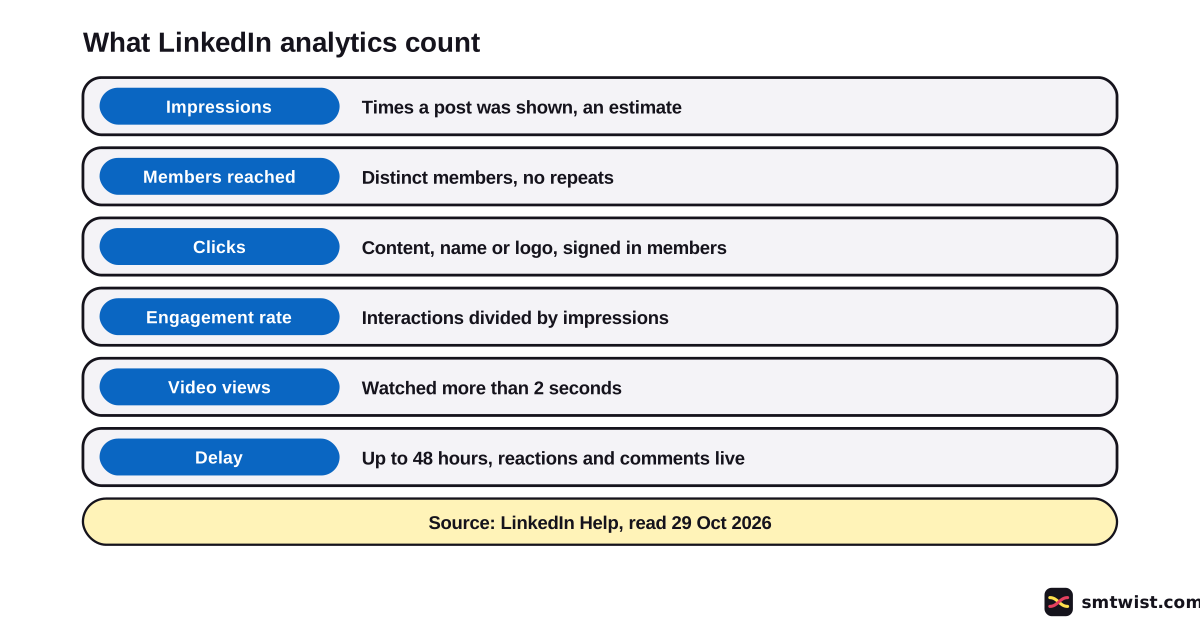
Metrics can take 48 hours to appear, but reactions and comments show in real time. Boosted posts read differently here than in Campaign Manager, because company analytics include only boosted posts in the feed.
Review on a fixed date every month, which is our suggestion. Sort every post into one of the four outcomes the Academy names, which are keep it, stop it, test a change or amplify it.
Without a company profile, the audience analytics for a member profile show total followers, new follower growth and the top five demographics. You can export them to XLSX, and a custom date range exists only in the mobile app.
What is Still Unconfirmed?
Nothing in this guide was run on a live account or company profile and Checked is the right label. The Academy lessons need a sign in, and we read only the module titles. Both LinkedIn Help analytics articles read were last updated a year before we read them, and the two LinkedIn Business articles show no date.
No LinkedIn source gives a figure for how many topics, formats or posts a plan needs beyond the weekly remark. It also does not explain how the 2x and 30 percent figures were measured. Posting ratios that appear in search results, like 70/15/15, have no LinkedIn source, and we left them out.
Where This Guide Fits
A plan is one piece of the LinkedIn Marketing for Business topic in the LinkedIn hub. For the click paths, start at LinkedIn Posting Rules and Formats.
When the profile needs work, see how to optimize your company profile.
Sources
- LinkedIn Marketing Academy: Design your winning content strategy, read 29 October 2026, the order of the learning path. The path shows no date.
- LinkedIn Business: Create a LinkedIn company profile, read 29 October 2026, the 30 percent weekly views claim. The article shows no date.
- LinkedIn Business: company profile tips, read 29 October 2026, weekly posting, images, the 150 follower remark and the content types. The article shows no date.
- LinkedIn Help: Analytics for a company profile, read 29 October 2026, the analytics types. Last updated 1 year earlier.
- LinkedIn Help: Content analytics for a company profile, read 29 October 2026, the metric definitions and the 48 hour delay. Last updated 1 year earlier.
- LinkedIn Help: Follower analytics for a company profile, read 29 October 2026, follower demographics. Last updated 1 year earlier.
- LinkedIn Help: Access your company profile analytics, read 29 October 2026, the path to Analytics. Last updated 1 year earlier.
- LinkedIn Help: Audience analytics, read 29 October 2026, analytics for a member profile. Last updated 2 years earlier.
This guide is labelled Checked. We compared every statement with the sources above and did not test anything on a live account. How we label guides explains the three labels.
FAQ
What are the steps in creating a LinkedIn content strategy?
LinkedIn publishes no fixed number of steps. This guide uses six decisions in the order of LinkedIn's own Marketing Academy path. They are the goal, the audience, the company profile, the formats, the cadence and the review.
What is the 5-5-5 rule on LinkedIn?
It is not a rule from LinkedIn. We found no LinkedIn Help or LinkedIn Business article that states one, and this guide does not use it.
What is the 4+1 rule on LinkedIn?
LinkedIn does not define it in the sources we read. Posting ratios like this one come from third party blogs, and we left them out.
How often should a company post on LinkedIn?
LinkedIn Business says companies that post weekly see a 2x lift in engagement. The source names no higher figure. One post a week is the number LinkedIn gives.
How many formats should a LinkedIn content strategy use?
Two or three is our advice, not a LinkedIn rule. LinkedIn Business lists nine content types, including images, video and documents, and a small team posts better in a few of them than in all.
What should I measure in a LinkedIn content strategy?
Measure the one metric that matches your goal. LinkedIn Help defines impressions, members reached, clicks, reactions, comments, reposts, engagement rate and video views for company posts.
How long do LinkedIn analytics take to update?
Up to 48 hours. LinkedIn Help says reactions and comments show in real time, while other metrics can take 48 hours to appear.
Do I need a company profile for a LinkedIn content strategy?
No. A personal profile also gets audience analytics with follower growth and demographics for 7 to 365 days. A company profile adds the Content, Visitors and Competitors reports.
Is there a free LinkedIn content strategy course?
Yes. The LinkedIn Marketing Academy lists a content strategy path with modules on profile, organic rhythm, insights, creative design, boosting posts and full-funnel planning. We read the module titles only, because the lessons need a sign in.
 Editor
Written by
Namrata Arora
Namrata Arora is a social media expert with two years of hands on experience on Instagram, Facebook and other platforms. She writes the how to guides on Social Media Twist and tries the steps on a real account for every guide marked Tested.
- Marks every guide Tested or Checked
- Writes about Instagram, Facebook, TikTok
- 43 guides on SMTwist
Guest posts are edited by SMTwist before they go live. Paid or affiliate links are labelled and carry rel="sponsored".