SMTwist
Social Media Twist (SMTwist) Guides Marked Tested or Checked
Social Media Twist publishes step by step guides for Instagram, Facebook, TikTok, YouTube and other apps. Every guide says if it was Tested on a real account or Checked against official help. A tested guide ends with The Twist holds one result from that test you won’t find in a help article.
Choose Your Platform
The name, explained
SM is Social Media and the Twist is What Testing Taught Us
Help articles tell you where a setting lives. They rarely say what happens after you tap it. A tested SMTwist guide gives you the official steps first. Then the Twist box shares one thing we saw in a real test, like a setting that moved or a result that surprised us. A guide we have only checked says so and carries no Twist yet.
What a Twist looks like
Example"After the update the toggle moved. On Android it now sits under Privacy, not Account. iPhone still matches the help article."
One line like this closes a tested guide: a result from our own test, with the phone, the app version and the date. This box is an example, not a real result.
Our process
How Social Media Twist Tests and Checks Guides
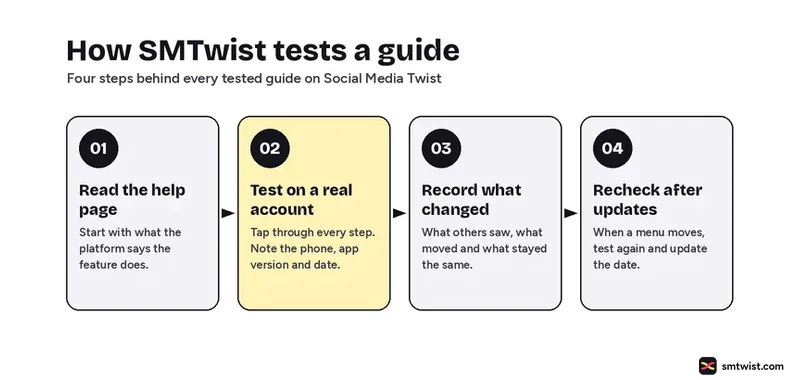
A tested guide goes through four steps. We read what the platform says a feature does. We tap through every step on a live account and note the phone, the app version and the date. We write down what other people saw and what changed. When a menu moves, we test again and update the date at the top. A checked guide stops after the first step and says so until the test is done.
 Every test is tried and written up by Namrata Arora, editor of Social Media Twist. See her guides
Captions & Ideas desk
Caption Themes
Copy ready caption lists sorted by the moment you are posting.
Browse caption themesGlossary
From the Social Media Glossary
Marketing · Tools & Data
For Brands & Marketers
Strategy, creator deals and the tools that show what worked, for people who post for a business.
Strategy
Influencer & Creator
Quick answers
Social Media Twist FAQ
Short answers on what SMTwist is, who writes it and how guides are labelled. Something missing? Email connect@smtwist.com.
What is Social Media Twist?
Social Media Twist (SMTwist) is an independent site with how to guides, caption lists and plain English updates for Instagram, Facebook, TikTok, YouTube and other platforms.
Who writes the guides?
Namrata Arora writes and edits every Social Media Twist guide. Guest posts will follow the same rule. Test the steps on a real account first, then write them up.
What do Tested and Checked mean?
Tested means Namrata Arora tried the steps on a real account. Checked means the steps were compared with the platform’s official help and not yet tried on a device. Read the editorial policy for the full rules.
Is SMTwist part of Instagram or Meta?
No. SMTwist is not linked to Instagram, Meta, TikTok, Google or any other platform. Sponsored posts are always labelled.
How often are guides updated?
When an app changes a menu or a feature, we review the guide again and change the date at the top.
Got a Playbook Worth Sharing? Write for Us
- Pitch a topic you have tested yourself
- Add your Twist: a tip only you can give
- Byline, author profile and bio link