What are Impressions on LinkedIn
What are impressions on LinkedIn? Meaning, how they differ from members reached, where to find them and how long LinkedIn keeps the data.

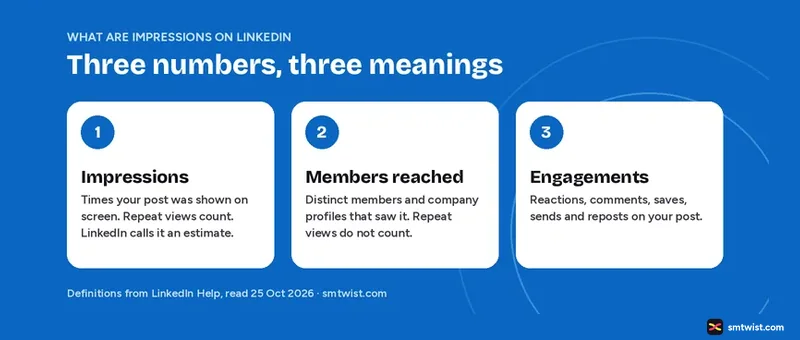
Impressions on LinkedIn tell you how many times your post appeared on a screen. This guide shows what LinkedIn counts, how impressions differ from members reached and where to find both in your account. It also lists how long LinkedIn keeps the numbers and why they are never exact.
What Counts as an Impression on LinkedIn?
LinkedIn Help defines an impression as the number of times your post was shown on LinkedIn. A viewer does not have to click, react or read it. The post only has to be displayed.
LinkedIn Help adds a warning. The numbers in post analytics are estimates and can be imprecise. Treat them as a fair guide to scale, not as a count you can audit.
Your own activity counts too. LinkedIn Help says your own views, reactions, link clicks, saves and sends are part of the analytics of your content.
Impressions, Members Reached and Engagements
Impressions on LinkedIn sit next to two other numbers in post analytics, and people mix them up. The table uses the definitions in LinkedIn Help.
| Number | What LinkedIn Help says it counts | Repeat views |
|---|---|---|
| Impressions | The number of times your post was shown on LinkedIn | Included |
| Members reached | Distinct members and company profiles that saw your post | Not counted |
| Engagements | Reactions, comments, saves, sends and reposts | Not a view count |
An example shows the gap. One member scrolls past your post three times in a week. That adds three impressions and one to members reached. When impressions are far higher than members reached, the same people are seeing your post again and again.
In Network and Out of Network Impressions
LinkedIn splits impressions into two shares.
- In network is the percentage of impressions from members who follow you or are connected to you.
- Out of network is the percentage from members who neither follow you nor are connected to you.
The out of network share is the one to watch if you want new people to see your work. A post can hit a large number and still stay inside your current audience.
Where to Find Impressions on LinkedIn
You can read impressions for one post or for all your posts together.
For One Post
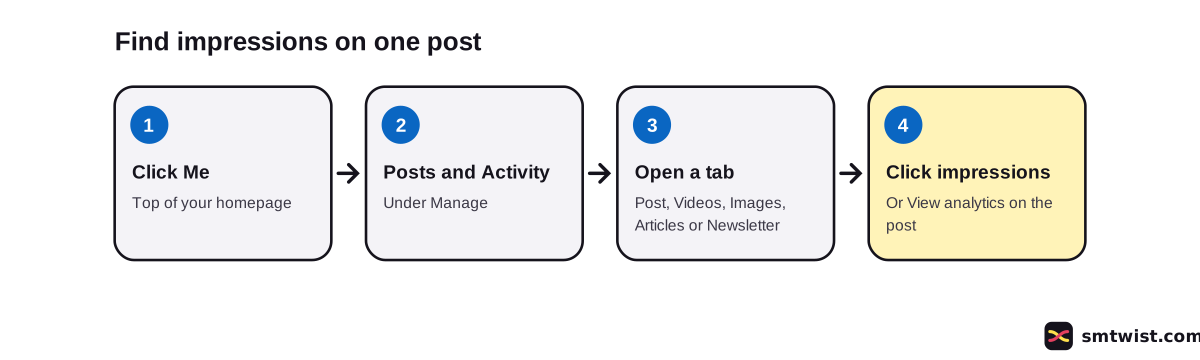
LinkedIn Help gives these desktop steps.
- Click the Me icon at the top of your LinkedIn homepage.
- Under Manage, click Posts & Activity.
- Open the Post, Videos, Images, Articles or Newsletter tab.
- Click the impressions number in the lower left corner of the post, or click View analytics in the lower right corner.
The Post analytics screen then shows Discovery, In network, Out of network, Profile activity, Social engagement and Link engagement. Video and article posts add their own sections. Boosted posts add ad spend and ad results.
For All Posts Together
Combined post analytics shows how your content performs over time. LinkedIn Help says every member can use it and that it sits in Analytics and tools.
- You can set the date range from the past 7 days up to the past 365 days.
- You can switch the view between impressions and engagements.
- You can export the data to an .XLSX file.
- The top performing posts list shows up to three posts, ranked by impressions or engagements.
LinkedIn Help says the feature is being made available step by step, so some members cannot see it yet. It lists desktop only, with mobile support coming later. The trend graph fills in up to yesterday so that every day shown is complete.
How Long LinkedIn Keeps Your Impressions Data
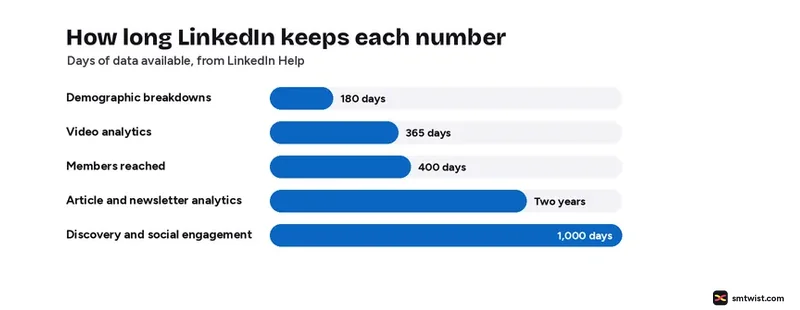
LinkedIn Help sets a different window for every number. Check this before you plan a yearly review.
| Data | How long LinkedIn keeps it |
|---|---|
| Demographic breakdowns | 180 days |
| Video analytics | 365 days |
| Members reached | 400 days |
| Discovery and social engagement, other content | 1,000 days |
| Article and newsletter analytics | Two years |
Demographic data is also hidden for posts you share only with connections or in groups. LinkedIn shows it only when enough unique viewers exist to protect privacy.
Why Impressions on LinkedIn Look Low
LinkedIn Help names two things that cut the numbers you see.
- Posting limits and automation. If LinkedIn detects excessive post creation that points to inauthentic activity, or the use of an automation tool, it can limit the visibility of those posts.
- Audience settings. A post you share with connections only reaches a smaller group, so its impressions stay lower.
We found no official figure that links one posting habit to a set number of impressions.
What is a Good Number of Impressions on LinkedIn?
LinkedIn gives no benchmark, and we will not invent one. Some blogs name a number as a rule of thumb, but we found none with a source behind it.
A fair test uses your own history.
- Compare any post with your last ten posts of the same type.
- Check whether the out of network share rises or falls.
- Look at engagements next to impressions. A post with many impressions and few engagements was seen but did not move people.
Does Posting More Raise Impressions on LinkedIn?
One study says yes, with limits. Buffer published a frequency study on 28 August 2025. It reported that accounts posting two to five times a week gained 1,182 more impressions per post than accounts posting less. Six to ten posts a week gained 5,001 and eleven or more gained 16,946.
The study compares accounts. It does not prove that adding posts causes the gain, and it comes from a scheduling tool maker. Read it as one data point.
What is Still Unconfirmed
LinkedIn Help does not say how it estimates the numbers or how frequently they update. We have not compared our own account's numbers with a count of views. The combined analytics article says some members cannot see the feature yet. Menus change, so check the steps against your own screen.
Where This Guide Fits
This guide belongs to our LinkedIn Analytics and Growth topic, inside the LinkedIn section. For posting limits, read our LinkedIn character limit guide. To look up a metric, use the social media glossary.
Sources
- LinkedIn Help: Post analytics for your content, read 25 October 2026, the definitions, the estimate warning and the data windows.
- LinkedIn Help: View post analytics for your content, read 25 October 2026, the steps for one post.
- LinkedIn Help: Combined post analytics, read 25 October 2026, the date range, toggle and export.
- LinkedIn Help: Post and share updates, read 25 October 2026, the note on limited visibility.
- Buffer: How Often Should You Post on LinkedIn, 28 August 2025, the posting frequency study.
The label on this guide is Checked, which means we compared the steps with these sources and have not tried them on an account yet. Read how we label guides.
FAQ
What is the difference between impressions and members reached on LinkedIn?
Impressions count the times your post was displayed. Members reached counts distinct members and company profiles that saw it and leaves out repeat views. Because of that, impressions are equal to or higher than members reached.
Do my own views count as impressions on LinkedIn?
LinkedIn Help says your own views, social engagements, link engagements, saves and sends count toward the analytics of your content.
Are LinkedIn impressions exact?
No. LinkedIn Help says the numbers in post analytics are estimates and can be imprecise.
What is a good number of impressions on LinkedIn?
LinkedIn gives no benchmark. Compare a post with your own earlier posts, and look at the in network and out of network split.
Can I see impressions on the LinkedIn app?
LinkedIn Help has mobile steps for post analytics. Combined post analytics is desktop only for now, with mobile support listed as coming later.
How long does LinkedIn keep my impressions data?
Discovery and social engagement counts last 1,000 days for most content. Video analytics last 365 days and article analytics two years. Members reached lasts 400 days.
 Editor
Written by
Namrata Arora
Namrata Arora is a social media expert with two years of hands on experience on Instagram, Facebook and other platforms. She writes the how to guides on Social Media Twist and tries the steps on a real account for every guide marked Tested.
- Marks every guide Tested or Checked
- Writes about Instagram, Facebook, TikTok
- 13 guides on SMTwist
Guest posts are edited by SMTwist before they go live. Paid or affiliate links are labelled and carry rel="sponsored".