LinkedIn B2B Marketing: How It Works and How to Start
LinkedIn B2B marketing explained: target by job title, company and industry, use Lead Gen Forms and Thought Leader Ads, and plan for a long sales cycle.

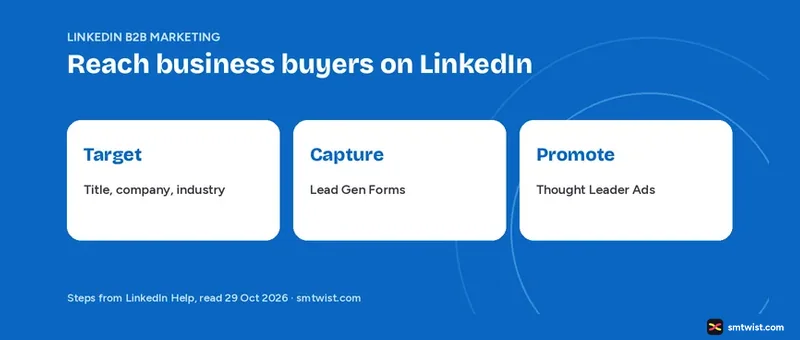
LinkedIn B2B marketing is aimed at the people at a company who research, recommend and approve a purchase. This guide on LinkedIn B2B marketing covers the targeting fields, the long buying process, Lead Gen Forms and Thought Leader Ads. All facts come from LinkedIn Help and LinkedIn Marketing Solutions resources we read on 29 October 2026.
Profiles, company profiles and organic posting are not repeated here. They sit in our LinkedIn marketing guide. Read that first if you are starting from zero.
What Changes in B2B on LinkedIn?
A business purchase involves a group. One person searches for a tool, another checks the budget and a third signs off. Your LinkedIn B2B marketing plan has to reach that group, and a single decision maker is not enough.
LinkedIn Marketing Solutions describes that shift in its lead generation resource. That resource shows no date and reads older than the Help articles.
Marketing Solutions calls the B2B buying process longer and more self-guided than before, with more people involved. The same resource says 3.1 to 4.6 groups, like IT, finance and HR, can influence a deal.
We found no cycle length in the Help articles. We give none. The AI Overview for this search quotes a figure of over 200 days, but we could not source it from LinkedIn.
LinkedIn B2B Marketing by Job Title, Company and Industry
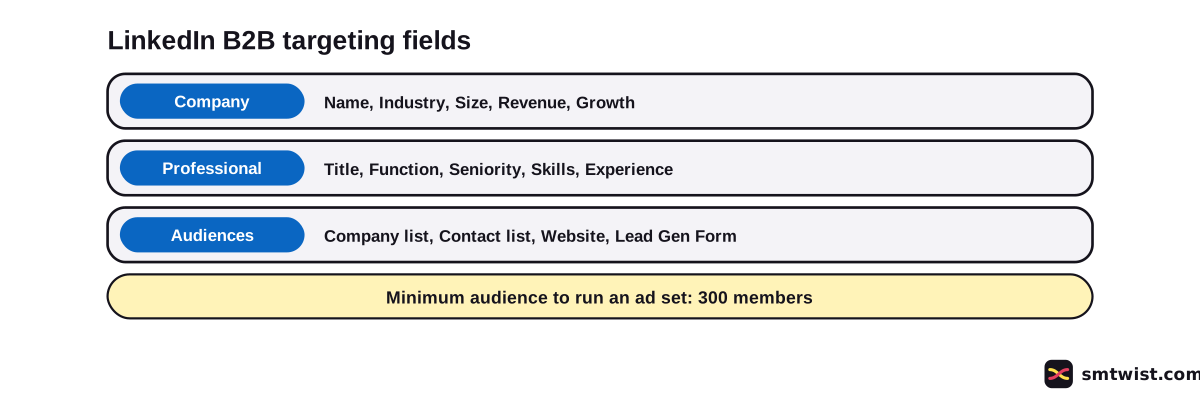
Targeting is where LinkedIn B2B marketing differs most from other social platforms. LinkedIn Help splits the options for ad sets into three groups, which are locations, audience attributes and custom audiences. The table below lists seven fields we picked for B2B.
| Field | What LinkedIn Help says |
|---|---|
| Job Title | Member input, standardized when the member picks it from a list, with some inference |
| Job Function and Job Seniority | Mapped from job titles with LinkedIn's own taxonomy and no AI inference |
| Member Skills | Keywords from the skills section, profile text and job descriptions |
| Company Name | The employer a member lists, tied to a company profile |
| Company Industry | The primary industry stated by the company, with more inferred |
| Company Size | Entered by the company profile admin, or counted from linked member accounts when blank |
| Company Revenue | An estimate of annual revenue |
Location and profile language are required before anything else. You choose between building your own audience and Auto-Targeting, which combines LinkedIn's professional audience, platform signals and your inputs.
Company Size comes first from what an admin typed. A thin company profile can place you in the wrong bucket. Where that field lives is covered in how to optimize a LinkedIn company profile.
Layer Filters Without Shrinking the Audience
LinkedIn Marketing Solutions advises layering, for example job function with seniority and skills, then testing combinations early. The goal is a precise group that is still large enough to deliver.
Two numbers from LinkedIn Help set the edges of any LinkedIn B2B marketing audience. An ad set needs at least 300 member accounts, and a narrower audience triggers an Audience Too Narrow message that blocks saving. Location and company name allow 200 selections per attribute, and most other company and professional attributes allow 100.
Reach for some attributes is limited inside the European Economic Area and Switzerland. Member Groups targeting is not available there at all.
Reach Named Accounts With Matched Audiences
Filters describe types of buyers. Matched Audiences let you name the buyers in your LinkedIn B2B marketing. LinkedIn Help describes three uses.
- Upload a list of companies or contacts.
- Retarget members who visited your website or engaged with your ads, Lead Gen Forms, company profile or events.
- Integrate contacts from a third party system.
LinkedIn will only match member accounts who opt in to this feature in their ad settings. Inside the European Economic Area and Switzerland that opt in rule limits the audience size.
Predictive audiences go one step further. LinkedIn Help says they use AI on a source like a Lead Gen Form or a contact list to build a new audience, and they refresh every day.
Lead Gen Forms for LinkedIn B2B Lead Generation
A Lead Gen Form fills in contact and profile details when a member clicks your ad button. LinkedIn Help says you can attach one to single image, carousel, video, event, message, document and conversation ads. It also states there is no extra cost for the form beyond the cost of the ad set.
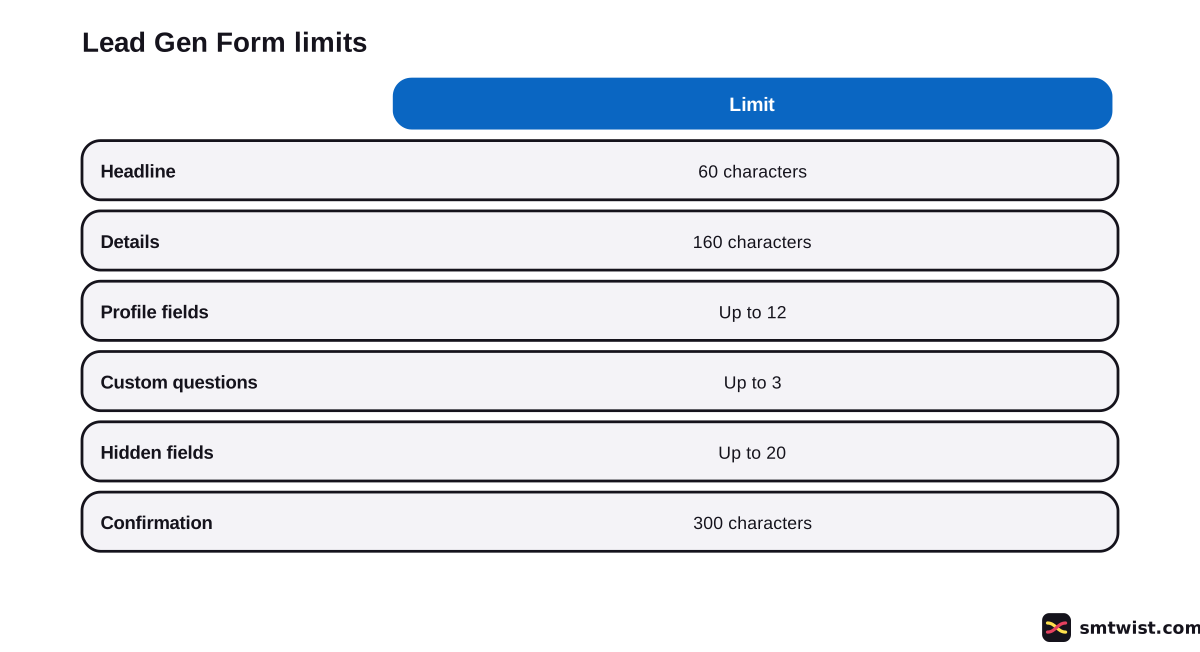
LinkedIn Help gives six limits that set how long your form runs.
- Headline up to 60 characters and details up to 160.
- Up to 12 profile fields from Contact, Work, Company, Education and Demographic groups.
- Up to three custom questions of 100 characters, which count toward the 12.
- Up to 20 hidden fields for tracking that members never see.
- A privacy policy link is required, with optional text up to 2,000 characters and up to five consent checkboxes.
- A thank you message up to 300 characters.
First name, last name and email are preselected, and you can unselect them. Keep to the details your sales team needs for the first call. That advice is our reading, not a Help statement.
LinkedIn does not send your file to the member. If you promise a whitepaper, put an ungated link in the confirmation link field.
What are Thought Leader Ads for B2B Trust?
Thought Leader Ads add a human voice to LinkedIn B2B marketing by promoting a real member's post as an ad. LinkedIn Help says the poster is an employee, a creator or a connection, and you must ask for their permission first.
LinkedIn Help sets five eligibility rules.
- The author's profile must show a full name.
- The post must be public.
- Reposts are not eligible, so you ask the original author.
- Celebrations, polls and multi image posts are not eligible.
- You cannot duplicate the ad.
You need super admin, content admin or Sponsored Content poster permission on the company profile tied to the ad account. Objectives are brand awareness and engagement, plus video views for video posts. Campaign Manager reports the results, including member follows and clicks to the member profile.
Single image, video and document Thought Leader Ads have no call to action button, though you can add URLs to the intro text. Event ones do have a button.
How do You Start LinkedIn B2B Marketing in Five Steps?
Audience comes first in this order because every later choice depends on it. For the click path inside Campaign Manager, use our guide to running LinkedIn ads.
- Write down your buyer group as job functions, seniorities and industries, not one title.
- List the companies you want and prepare the file for a Matched Audiences upload.
- Build the audience in Campaign Manager and check that the estimate stays above 300 members.
- Add a Lead Gen Form with only the fields your sales team needs.
- Ask an expert at your company for permission to promote a public post as a Thought Leader Ad.
Budget for LinkedIn B2B marketing is a separate question. Our LinkedIn ads cost guide covers it. Plan the posts that feed the ads with a LinkedIn content strategy, because a long buying process means a buyer sees you more than once.
What is Still Unconfirmed?
We tested no ad, form or audience. The label is Checked.
The targeting article was updated 14 hours before we read it and the Thought Leader Ads article 3 days before. A label or limit on your screen can differ.
LinkedIn Marketing Solutions gives no date for its lead generation resource, and its figures cannot be dated. We also found no Help statement on how long a typical B2B cycle runs or how many leads a form produces.
Where This Guide Fits
B2B is one branch of the wider topic in LinkedIn Marketing for Business inside the LinkedIn section. For ad formats and setup, see LinkedIn Ads Formats and Setup.
The editorial policy lists what Checked means.
Sources
- LinkedIn Help: Targeting options for LinkedIn Ads, read 29 October 2026, the targeting fields, Matched Audiences, the 300 member minimum and the selection limits.
- LinkedIn Help: Lead Gen Form specifications, read 29 October 2026, the form fields, character limits and cost statement.
- LinkedIn Help: Thought Leader Ads, read 29 October 2026, the permission rules, eligible posts and objectives.
- LinkedIn Marketing Solutions: Lead Generation, read 29 October 2026, LinkedIn's own advice on buying groups and layered targeting. No date is printed.
This guide is labelled Checked. We compared every number with the four sources above and ran no campaign. How we label guides explains the three labels.
FAQ
What is LinkedIn B2B marketing?
LinkedIn B2B marketing is the use of LinkedIn content and ads to reach people who influence a business purchase. LinkedIn Help lists targeting by company, job title, job function, seniority and more for ad sets.
How do you target B2B buyers on LinkedIn?
Choose a location and profile language, then add company and professional attributes in Campaign Manager. You can also upload a list of companies or contacts with Matched Audiences.
How big must a LinkedIn B2B audience be?
At least 300 member accounts. LinkedIn Help shows an Audience Too Narrow message when your targeting is below that, and you cannot save until you widen it.
How many questions can a LinkedIn Lead Gen Form have?
Up to 12 profile fields, and up to three of the 12 are custom questions of 100 characters. LinkedIn Help adds up to 20 hidden fields for tracking.
Do LinkedIn Lead Gen Forms cost extra?
No. LinkedIn Help says there is no additional cost for Lead Gen Forms beyond the cost of the ad set they belong to.
Can you promote someone else's LinkedIn post as an ad?
Yes, with approval. Thought Leader Ads need the author's permission, a public post and a profile that shows a full name. Reposts are not eligible.
Can you target LinkedIn ads by company name?
Yes. Company Name is an audience attribute with a limit of 200 selections. You can also upload a company list with Matched Audiences.
Is LinkedIn good for B2B marketing?
LinkedIn Marketing Solutions calls it uniquely suited to B2B lead generation, which is a claim from the seller. We tested no campaign. This answer rests on the targeting and form tools LinkedIn Help documents.
 Editor
Written by
Namrata Arora
Namrata Arora is a social media expert with two years of hands on experience on Instagram, Facebook and other platforms. She writes the how to guides on Social Media Twist and tries the steps on a real account for every guide marked Tested.
- Marks every guide Tested or Checked
- Writes about Instagram, Facebook, TikTok
- 43 guides on SMTwist
Guest posts are edited by SMTwist before they go live. Paid or affiliate links are labelled and carry rel="sponsored".