How to Create a LinkedIn Company Page
Learn how to create a LinkedIn company page on desktop and iOS, the account rules, the URL and name rules and why the create option goes missing.

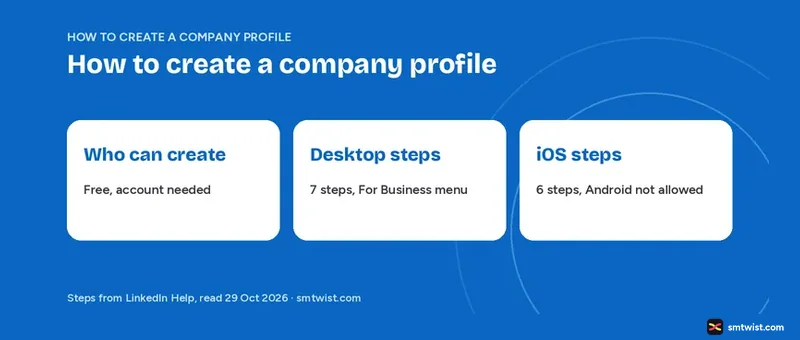
You can create a LinkedIn company profile for free from a computer or from the LinkedIn app on iOS, while Android cannot do it at all. Here is how to create a LinkedIn company profile on desktop and iOS, with the account rules LinkedIn Help sets before you start and the reasons the create option goes missing.
LinkedIn Help uses a different noun in its own menus and article titles. A label on your screen can therefore differ from our wording. Every fact below comes from the Help set we opened on 29 October 2026.
What do You Need Before You Create a LinkedIn Company Profile?
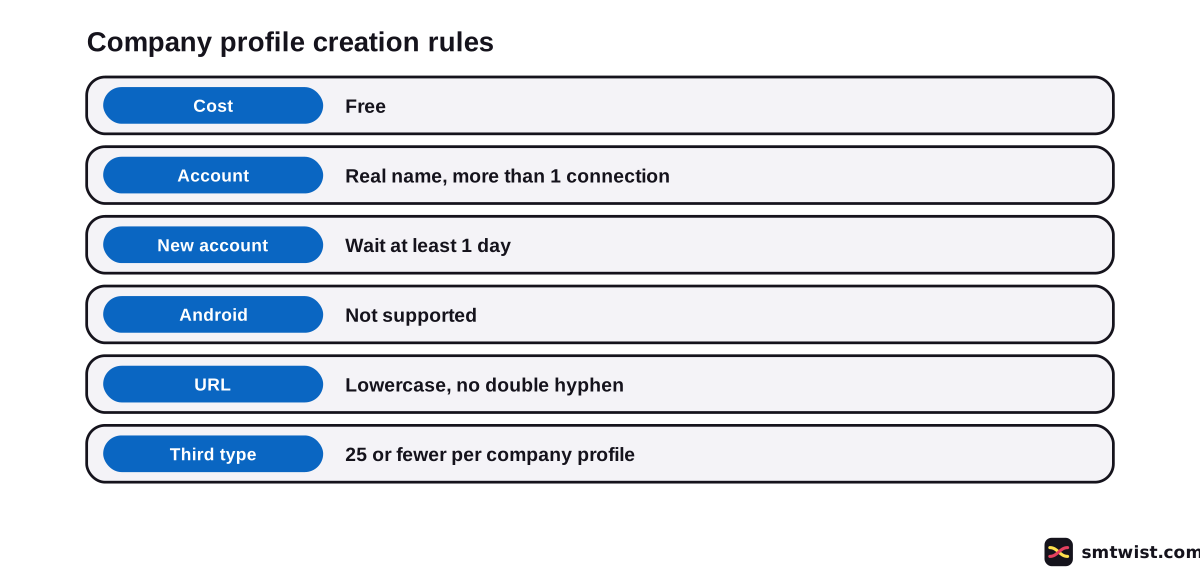
Creating a company profile costs nothing, and LinkedIn Help says you must have a LinkedIn account first. If you have none, create the account before you continue. LinkedIn Help sets six conditions.
- Your account uses your real first and last name, and the email on it is confirmed.
- The account has more than one connection with another member.
- The account is at least one day old.
- No company profile exists yet for your organization.
- Your listed work experience is verified when LinkedIn asks for it.
- You use a desktop browser or an iOS device.
If a company profile for your organization exists, request admin access instead of creating a second one. LinkedIn Help adds that an eligible employee can claim a listing that LinkedIn built.
Short on connections? Send invitations first, and the LinkedIn networking guide covers how to build a network.
Do not use a personal profile as a stand-in for a business. LinkedIn Help says LinkedIn can flag it as spam or abuse, and repeated violations can restrict the account.
How to Create a LinkedIn Company Profile on Desktop
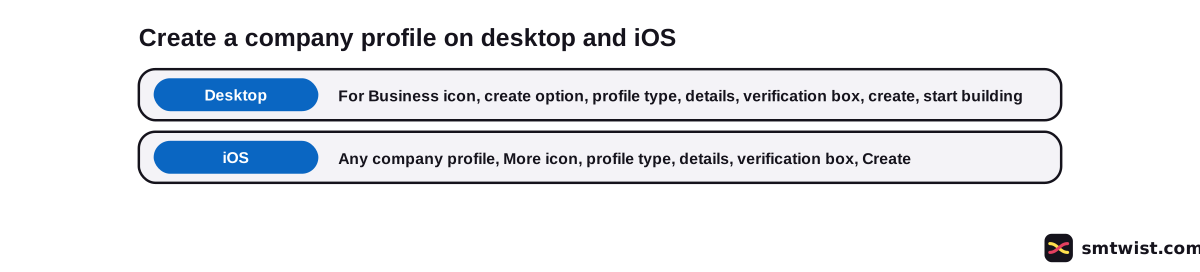
Desktop creation starts from the LinkedIn homepage. LinkedIn Help lists seven steps.
- Click the For Business icon in the upper-right corner of the homepage.
- Scroll down the menu and click the create option for a company profile.
- Select the profile type. The list shows Company, a third type that hangs under an existing company profile and Educational institution.
- Enter your identity details, your organization details and your profile details.
- Select the verification box to confirm that you have the right to act on behalf of the company or school.
- Click the create button.
- Click the start building button to complete the profile.
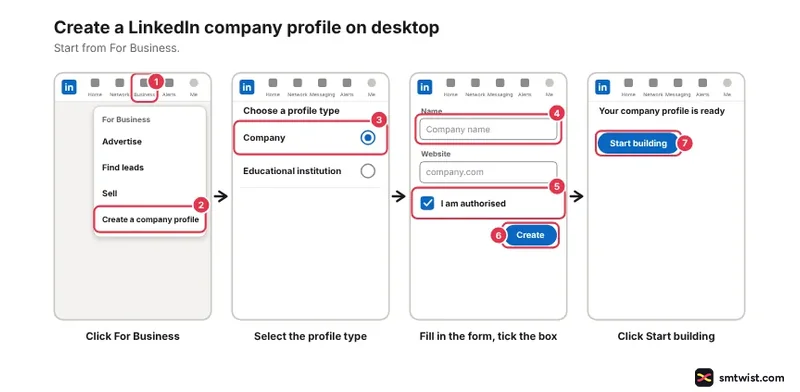
If an error shows after step 6, the troubleshooting section below lists the causes. LinkedIn Help also says an admin can convert the profile type later.
How to Create a LinkedIn Company Profile on iOS
On iOS you start from an existing company profile, not from a menu on your own feed. LinkedIn Help lists six steps.
- Go to any company profile in the LinkedIn app.
- Tap the More icon on the right and choose the create option.
- Select the profile type. The list shows Company and Educational institution.
- Fill in the form.
- Tap the verification box to confirm that you have the right to act on behalf of the company or school.
- Tap Create in the upper-right corner.
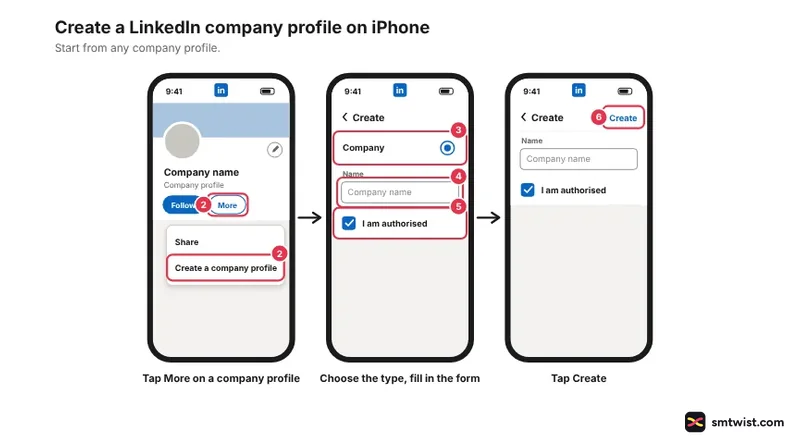
Seven details fill the iOS form. They are company name, LinkedIn public URL, website, industry, company size, company type and a tagline that is optional. LinkedIn Help lists no logo upload in either create route and does not say a logo is required at creation.
Android, iOS and Desktop Compared
LinkedIn Help states the device limit at the top of its create article. Create on the desktop version or on an iOS device.
| Device | Can you create? | Types listed |
|---|---|---|
| Desktop | Yes | Company, third type, educational institution |
| iOS app | Yes | Company, educational institution |
| Android | No, not supported | None |
The two create tabs disagree on the third type, and we report both. The desktop tab lists three types and the iOS tab lists two.
A separate Help article, 11 months old, says that third type needs an existing company or university profile. A new organization therefore starts as Company or Educational institution on any device, and both of those types need only a personal LinkedIn profile.
What are the Rules for the URL and the Name?
LinkedIn builds every public address as linkedin.com/company/ followed by your choice. Improper characters are replaced by a hyphen. LinkedIn Help gives five format rules.
- The URL contains at least one non-numeric character.
- It has no uppercase letters.
- It uses lowercase letters, digits, hyphens or Chinese, Japanese and Korean characters.
- It has no more than one hyphen in a row.
- It has no hyphen at the beginning or the end.
If another organization has your choice, add a word. LinkedIn Help gives the example of linkedin.com/company/abc taken and linkedin.com/company/abcinc free.
You can edit the URL later, but not more than once in 30 days, and a name change does not change it. Personal addresses follow other rules, covered in our guide to changing your LinkedIn URL.
LinkedIn Help sets five rules for the name.
- It reflects the organization accurately.
- It matches the name of the business, school, brand or organization.
- It contains no false or misleading information.
- It is not abusive and does not infringe on others.
- It does not use any variation of the word LinkedIn.
A verified company profile needs LinkedIn to change the name. Everyone else edits it in the super admin view.
What Happens After You Create It
Once you create the company profile, you become the super admin and can assign others as admins. Only a super admin can add admins. The person you add must be a 1st, 2nd or 3rd degree connection who follows the company profile and is not blocked either way.
LinkedIn Help advises adding more super admins early, because LinkedIn cannot provide admin information to members or replace or remove admins. It also notes that adding the company as your employer on your own profile can take 14 to 30 days to show you as an associated employee.
After you learn how to create a LinkedIn company profile, fill every section in the first week. LinkedIn Help claims a gain in weekly views for complete profiles, but its two articles word the figure differently. Our guide to optimizing a LinkedIn company profile covers the sections, the image sizes and the buttons.
Why is the Create Option Missing or Failing?
Most blocks come from the account, not from the form. LinkedIn Help names nine causes in its troubleshooting article and create article.
- You use Android, where creating is not supported.
- The account is new. Wait at least one day.
- The account has one connection or none. Send invitations first.
- You created too many in one day, which LinkedIn limits to prevent spam. Wait a few days.
- Your work experience is unverified. Verify it with a work email or Microsoft Entra Verified ID.
- A company profile with the same name exists. Check it and request admin access, or choose a URL not already taken if it belongs to another organization.
- The URL is already in use. Choose a unique one.
- A company profile already has more than 25 associated profiles of the third type. Deactivate inactive ones.
- The browser fails. Clear the cache and cookies or try a different browser.
LinkedIn Help states no domain email rule and no minimum company size for creating. Work email verification appears only under the unverified workplace error, and company size is a field on the iOS form.
What is Still Unconfirmed?
We did not create a company profile on a live account, and we label the guide Checked for that reason. LinkedIn Help updated one of these articles 2 years ago. Older button labels do not always match the app today, and the mobile edit routes say Dashboard in the upper-left corner where desktop uses a left menu.
If you plan how to create a LinkedIn company profile for several brands, note that LinkedIn Help gives no number for the daily creation limit and none above one for connections. It does not say whether the iOS list shows the third type in other app versions. It also does not say whether a logo is required at creation.
Where This Guide Fits
How to create a LinkedIn company profile is the first question in the LinkedIn Marketing for Business cluster in the LinkedIn section. It sits beside the guides on roles, Premium and paid reach.
Your own profile comes first. Set up the account if you have not. Read the editorial policy for what Checked means.
Sources
- LinkedIn Help: Create a company profile, read 29 October 2026, the desktop steps, the iOS steps and the Android limit.
- LinkedIn Help: Troubleshoot creating a company profile, read 29 October 2026, the error messages and their fixes.
- LinkedIn Help: Before and while you create a company profile, read 29 October 2026, the account checks, the URL format and the first steps after creation.
- LinkedIn Help: Company profile types and their functions, read 29 October 2026, what every profile type needs.
- LinkedIn Help: Differences between a LinkedIn profile and a company profile, read 29 October 2026, why a personal profile cannot be converted.
- LinkedIn Help: The public URL of a company profile, read 29 October 2026, the primary and secondary URL and the 30 day rule.
- LinkedIn Help: Edit your company URL, read 29 October 2026, where a super admin edits the URL.
- LinkedIn Help: Manage your company name, read 29 October 2026, the name rules.
- LinkedIn Help: Add admins to a company profile, read 29 October 2026, who qualifies as an admin.
- LinkedIn Help: Request admin access to a company profile, read 29 October 2026, what to do when a company profile already exists.
- LinkedIn Help: Complete your company profile, read 29 October 2026, the weekly views figure.
Checked is the label for this guide, since each step follows the Help articles above. We created no company profile on a live account, and the editorial policy lists the three labels.
FAQ
How do I create a LinkedIn company profile?
Click the For Business icon in the upper-right corner of your LinkedIn homepage and choose the create option at the bottom of the menu. Select a profile type, enter the details, tick the verification box and click the create button.
Is it free to create a LinkedIn company profile?
Yes. LinkedIn Help says you can create one for free. You still need a LinkedIn account first.
How many connections do I need to create a LinkedIn company profile?
More than one. LinkedIn Help gives this as the error text, saying the account must have more than one connection with another member. It names no higher number.
Can I create a LinkedIn company profile without a personal profile?
No. LinkedIn Help says you must have a LinkedIn account to create one. You become the super admin once it exists.
Can I create a LinkedIn company profile on Android?
No. LinkedIn Help says creating one is not supported on Android devices. Use a desktop browser or the LinkedIn app on iOS.
Can I create a LinkedIn company profile on the iPhone app?
Yes. Open any company profile in the app, tap More and choose the create option. The iOS list offers Company and Educational institution.
Can I create more than one LinkedIn company profile?
Yes, but LinkedIn limits how many you create in one day and gives no number. If you hit the limit, wait a few days. Every company profile needs its own public URL.
Can I turn my personal profile into a company profile?
No. LinkedIn Help says you cannot convert a profile into a company profile. Rename the profile to your real name and create the company profile separately.
Why can I not see the option to create a LinkedIn company profile?
Android does not support creating one. The option is absent there. On desktop, open the For Business menu and scroll to the bottom. If the form opens but fails, the error text names the cause.
 Editor
Written by
Namrata Arora
Namrata Arora is a social media expert with two years of hands on experience on Instagram, Facebook and other platforms. She writes the how to guides on Social Media Twist and tries the steps on a real account for every guide marked Tested.
- Marks every guide Tested or Checked
- Writes about Instagram, Facebook, TikTok
- 43 guides on SMTwist
Guest posts are edited by SMTwist before they go live. Paid or affiliate links are labelled and carry rel="sponsored".