How to See Who Viewed Your LinkedIn Profile
Learn how to see who viewed your LinkedIn profile, what a free account shows, what Premium adds and how Private mode hides your name when you visit others.

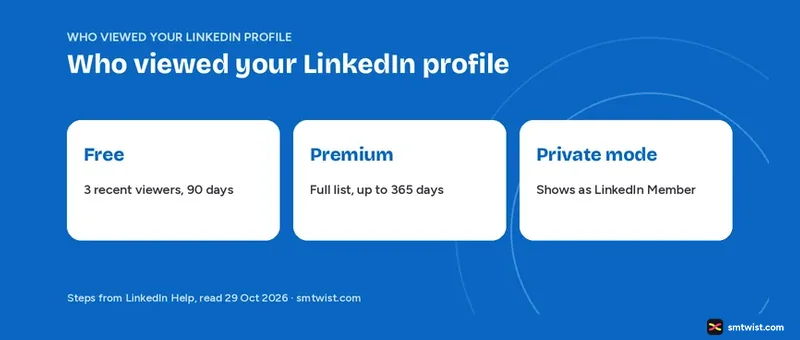
Seeing who viewed your LinkedIn profile takes four clicks on desktop, but the list you get depends on your plan and on a privacy setting you control. This guide on how to see who viewed your LinkedIn profile covers the free view of three people, the Premium list, Private mode and what blocking changes. Every number below is taken from three Help articles that we opened on 29 October 2026.
How to See Who Viewed Your LinkedIn Profile on Desktop
LinkedIn's access article shows a Premium feature label at the top, yet a second Help article gives free members a short version of the same list. Follow these four steps on a computer.
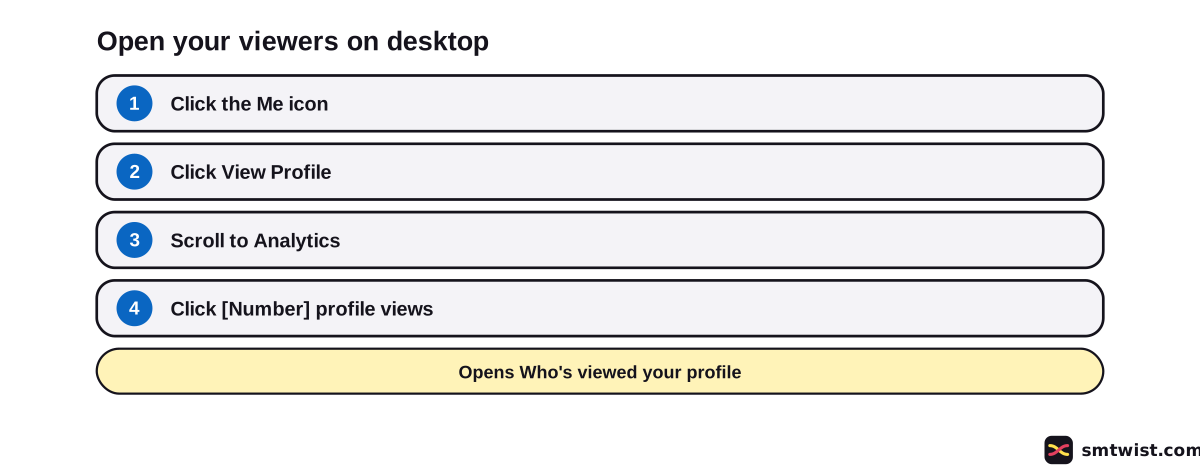
- Click the Me icon at the top of your LinkedIn homepage.
- Click View Profile.
- Scroll down to Analytics.
- Click the [Number] profile views link to open Who's viewed your profile.
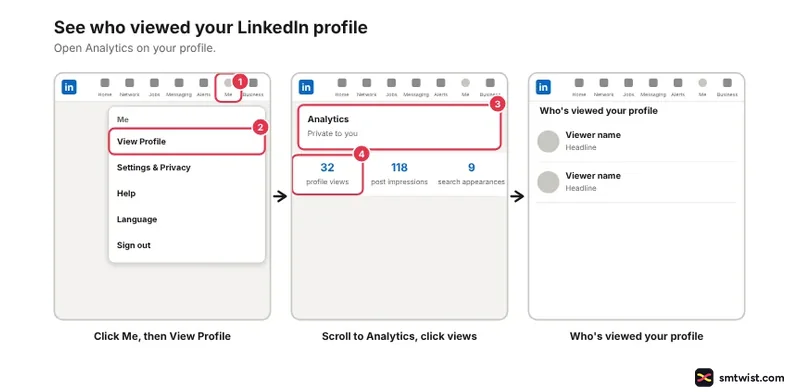
The viewer summary can also show in your feed. With no profile views in the past 90 days there is no visitor data to show. LinkedIn Help adds that viewing time frames vary and that LinkedIn tries to show a minimum of three views over any timeframe.
What is the Difference Between Free and Premium Viewer Insights?
LinkedIn Help compares the two tiers in a separate article that was updated two months before we read it. Premium here means Premium Business and Premium Career. The table lists seven differences.
| What you get | Free account | Premium |
|---|---|---|
| Time frame | Last 90 days | Up to 365 days |
| Viewer list | Three most recent viewers | Full list of viewers |
| Insights | Viewer count, interesting views, where viewers work, where they found you, job titles | The same insights |
| Filters | None | Date range, interesting viewers, company, industry |
| Date range | Fixed | 90 days by default, extendable to 365 |
| Trends | None | Weekly viewer trend graph |
| Extras | None | Show more analytics, Most recent and Most relevant tabs |
Premium also adds top locations, industries and companies under Show more analytics. Prices and the payoff of an upgrade sit in our Premium cost and value guide.
Third-party videos and forum posts give other numbers. Some claim five free viewers, and some claim 90 days for Career against 365 for Business.
LinkedIn Help says a free account sees three viewers and that Business and Career both reach 365 days, while the older access article says time frames vary. SMTwist treats the Help comparison as the source.
How to See Who Viewed Your LinkedIn Profile for Free
Free viewing works on one condition. LinkedIn Help states that a free member must choose Your name and headline to see their viewer history. These five steps set it on desktop.
- Click the Me icon.
- Click Settings & Privacy.
- Click Visibility in the left pane.
- Under Visibility of your profile & network, click Visibility when viewing other profiles.
- Choose Your name and headline.
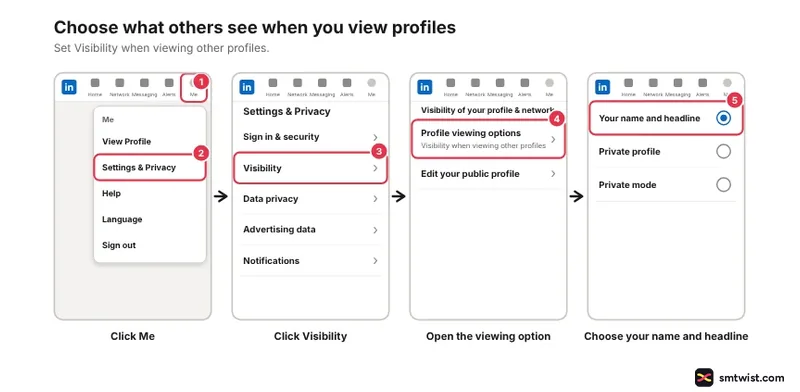
Changes save automatically. Now open Who's viewed your profile with the four steps above. You see the three most recent viewers from the last 90 days and the basic insights from the table.
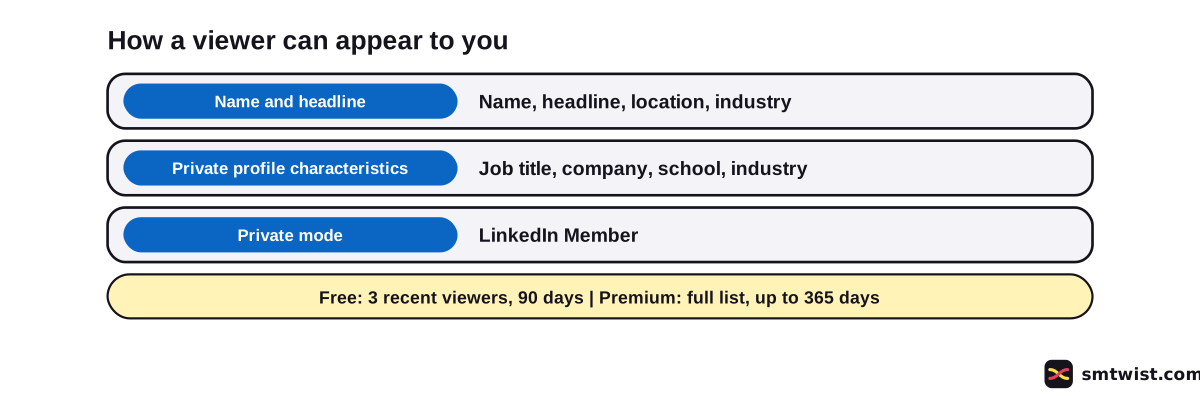
The Three Viewing Options and What Members See
LinkedIn Help names three ways you can appear when you view another profile. Your choice decides what that member reads in their own viewer list.
| Option | What the member sees |
|---|---|
| Your name and headline | Your name, headline, location and industry |
| Private profile characteristics | Job title, company, school and industry, like "Someone at Accenture" |
| Private mode | "LinkedIn Member" |
Premium does not change this. You cannot see the names of Private mode viewers even with a paid plan, and a viewer who chose Private profile characteristics shows only those details. The member who sets the option decides, not the member who reads the list.
LinkedIn also sends Who's Viewed emails. Every one has an unsubscribe link in the footer, and using it stops those emails.
Can You Hide That You Viewed a Profile?
Yes. Use the five steps above and choose Private profile characteristics or Private mode in the last step. The change applies to profiles you open afterward.
One quirk catches people.
Clicking a member's name in search suggestions opens their mini profile and counts as a profile view. LinkedIn can notify the member depending on their settings. Choose your option before you start browsing.
Once a name looks worth a message, our guide to using LinkedIn for networking is the next read. Job seekers can pair this with using LinkedIn to get a job.
What Blocking does to Your Viewer List
A member who viewed your profile before you blocked them still counts in your viewer total. Their details are not shown.
Blocking therefore removes a name from view without lowering the count, and after the block that member cannot view your profile at all.
The steps for blocking sit in our guide on how to block someone on LinkedIn. To reverse a block, how to unblock someone on LinkedIn covers the blocked list.
Why do You See No Viewers?
LinkedIn Help points to three causes when the list is empty.
- Nobody opened your profile in the past 90 days, so there is no visitor data.
- Your own viewing option is Private mode, and Help tells you to check your Private mode settings.
- You are on a free account and have not chosen Your name and headline.
Fix the second and third with the five steps in the free section. Insights open once the option is public.
What is Still Unconfirmed?
The label is Checked because we did not open a viewer list on a live account. Your screen can show different labels or steps.
LinkedIn Help does not say whether a visit from a logged-out browser is shown to the member. It also does not explain how Private mode changes your own list beyond the tip to set the option to public. We read the desktop route and did not confirm a separate mobile route.
Where This Guide Fits
Viewer limits belong with the plan choices in LinkedIn Premium and Multiple Accounts, part of the LinkedIn section.
New to the platform? Start with the LinkedIn for beginners guide. Our editorial policy lists the three labels we use.
Sources
- LinkedIn Help: Access Who's Viewed Your Profile, read 29 October 2026, the desktop steps, the 90 day rule and the Premium label.
- LinkedIn Help: Differences between basic and Premium Who's Viewed Your Profile, read 29 October 2026, the free and Premium limits, filters and trends.
- LinkedIn Help: Visibility settings for viewing other profiles, read 29 October 2026, the three viewing options, the settings path, blocking and search suggestions.
Checked is the label on this guide. Every step and number was matched against the three Help articles above, and nothing was run on a live account.
FAQ
Can I see who exactly viewed my profile on LinkedIn?
Yes, when the viewer lets LinkedIn show their name and headline. Viewers in Private mode appear as LinkedIn Member, and Premium does not reveal their names.
Can I see who viewed my LinkedIn profile for free?
Yes, but only the three most recent viewers from the last 90 days. LinkedIn Help also requires your own viewing option to show your name and headline.
How many viewers can I see on a free LinkedIn account?
Three, the most recent ones in the last 90 days. Premium Business and Career show the full list.
How far back does Who's viewed your profile go?
A free account looks back 90 days. Premium Business and Career go up to 365 days, per LinkedIn Help, although third-party videos give other numbers.
Can someone see if I viewed their profile if I'm not signed in?
LinkedIn Help does not say whether a logged-out visit is shown. Its articles cover only the three viewing options of a signed-in member.
Can I hide that I viewed someone's LinkedIn profile?
Yes. Choose Private profile characteristics or Private mode under Visibility when viewing other profiles. Private mode shows you only as LinkedIn Member.
Why can't I see who viewed my LinkedIn profile?
Either nobody viewed it in the past 90 days or your own setting is in the way. LinkedIn Help tells you to check your Private mode settings and set the viewing option to public.
Does a member I blocked still appear in my viewers?
A member who viewed you before the block still counts in your viewer total, but their details are not shown. After the block that member cannot view your profile.
Does clicking a name in search suggestions count as a view?
Yes. LinkedIn Help says the mini profile that opens counts as a profile view, and LinkedIn can notify the member depending on their settings.
 Editor
Written by
Namrata Arora
Namrata Arora is a social media expert with two years of hands on experience on Instagram, Facebook and other platforms. She writes the how to guides on Social Media Twist and tries the steps on a real account for every guide marked Tested.
- Marks every guide Tested or Checked
- Writes about Instagram, Facebook, TikTok
- 43 guides on SMTwist
Guest posts are edited by SMTwist before they go live. Paid or affiliate links are labelled and carry rel="sponsored".