Manage Multiple LinkedIn Accounts
Can you have two LinkedIn accounts? LinkedIn says no. See how to merge or close a duplicate account and manage company profiles with admin roles.

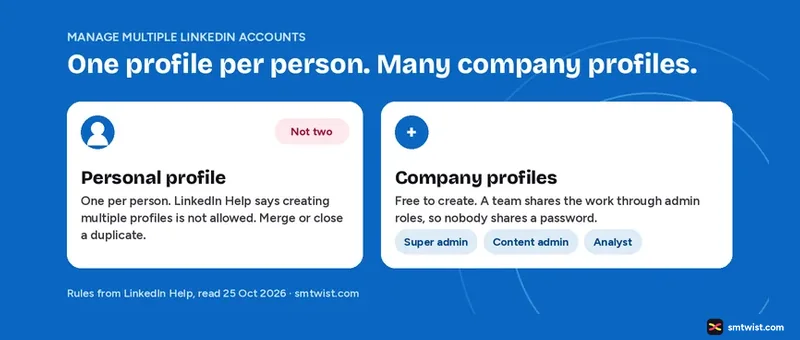
Managing multiple LinkedIn accounts starts with one rule. LinkedIn allows one personal profile per person, so the question is how to fix a duplicate and how to share work across company profiles. This guide covers both, with the steps from LinkedIn Help.
Can You have Multiple LinkedIn Accounts?
No. Multiple LinkedIn accounts for one person break the rules, and our guide on how to create a LinkedIn account lists the same one account rule. The merge article in LinkedIn Help states that creating multiple profiles is not allowed, as written in its Professional Community Policies and User Agreement. The article treats a second profile as a duplicate to merge or close.
An error that says your email is already in use does not always mean you made a second profile. LinkedIn Help lists three other causes.
- You use several different email addresses.
- You use a recycled email address, one that your employer or email provider once gave to someone else.
- You use a canonical form of an email address.
Check those before you merge or close anything.
How to Find Multiple LinkedIn Accounts of Your Own
LinkedIn Help gives a quick test. Search for your name on LinkedIn. In the results, the profile with the You icon is the account you are signed in to. A profile that carries your details but has no You icon is a duplicate.
How to Merge Multiple LinkedIn Accounts
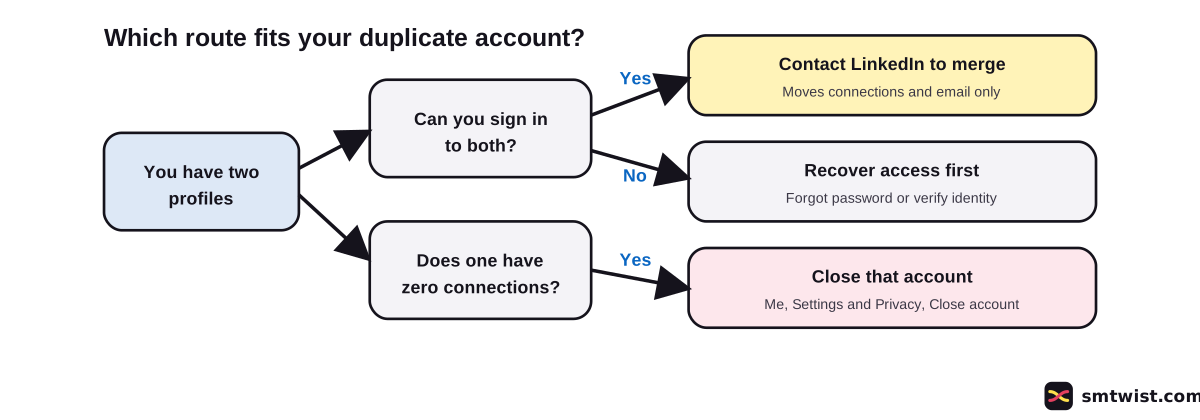
A merge works only when both primary email addresses are confirmed and you can reach both. The steps depend on what you can access.
If You can Sign in to Both
- Collect the login details and the profile URL of both accounts.
- Contact LinkedIn and ask for a merge. LinkedIn Help links a contact form in the article.
- Download an archive of the account you want to close first. The data of the closed account is purged.
If You Cannot Sign In
- For a forgotten password, go to the sign in screen of the account you want to close and click Forgot password. Enter the email address on that account and click Send code.
- Once you are back in, follow the sign in steps above.
- For no access to the email address, LinkedIn Help points you to its identity verification process. Try any address linked to the account, including old work, school or personal ones.
What the Merge Moves and What It Drops
LinkedIn Help is direct about this. A self merge moves your connections and the email address of the account you close.
| Moves to the account you keep | Does not move |
|---|---|
| Connections | Profile content, written or media |
| Email address | Edits and endorsements |
| Recommendations and saved articles | |
| Group memberships and pending invitations | |
| InMail credits, which are lost |
You also cannot merge an account with zero connections or more than 30,000.
What to Cancel Before the Merge
LinkedIn Help lists the things to finish first.
- Cancel your Premium subscription. Our guide on whether LinkedIn Premium is worth it covers cancellation and refunds.
- Cancel outstanding job postings or listings.
- Cancel all advertising campaigns.
- Cancel upcoming events if you organize them.
- Close any group you own, or transfer its ownership.
After the old account is closed, wait 48 hours. Then add its email address to the account you kept. LinkedIn Help says this can prevent more duplicates.
How to Close a Duplicate Account
Use this route when a merge is not possible, for example an account with zero connections. LinkedIn Help gives these steps.
- Sign in to the account you want to close.
- Click the Me icon at the top of your homepage and choose Settings & Privacy.
- Under Account preferences, open Account management and click Change next to Close account.
- Follow the prompts to finish.
Closing ends your access to that account's data. Download a copy first.
How to Manage Multiple LinkedIn Company Profiles
Company profiles work differently from personal profiles. LinkedIn Help says a company profile is free to create and comes in three types, Company, sub brand and Educational institution. You make one from a desktop or the iOS app.
A team shares a company profile through admin roles, so nobody shares a password.
| Role | What it covers |
|---|---|
| Super admin | Full control, including who else is an admin |
| Content admin | Posting and managing content |
| Analyst | Viewing analytics |
| Paid media roles | Ads for the company in Campaign Manager |
Every person signs in with their own profile. If you look after ten company profiles, ask every super admin for a role and switch between them from your own account.
Can a Tool Manage Multiple LinkedIn Accounts for You?
Not by logging in for you. LinkedIn Help says it does not permit third party software that automates activity on LinkedIn, and it names bots, plug-ins and extensions. It says accounts that use them can be restricted or shut down, and that the tool can stop working without notice.
LinkedIn also offers a Marketing Partner Program, and managing company profiles is one listed specialty. We found no rule on who qualifies, so we name no tool. Before you connect any tool, read the Prohibited software article in LinkedIn Help.
What is Still Unconfirmed
The merge article was last updated about two years before 25 October 2026. LinkedIn Help does not name a penalty for holding a duplicate account, so we state none. We did not try a merge or a close on a live account. Check the steps against the form LinkedIn shows you.
Where This Guide Fits
This guide on multiple LinkedIn accounts belongs to our LinkedIn Premium and Multiple Accounts topic, inside the LinkedIn section. For company profile roles in more detail, see LinkedIn Marketing for Business. To limit the notes you send from a profile, read our LinkedIn character limit guide.
Sources
- LinkedIn Help: Merge or close duplicate accounts, read 25 October 2026, the rule, the merge routes and what moves.
- LinkedIn Help: Company profile admin roles, read 25 October 2026, the roles.
- LinkedIn Help: Create a company profile, read 25 October 2026, the types and the cost.
- LinkedIn Help: Prohibited software and extensions, read 25 October 2026, the rule on automation tools.
- LinkedIn Marketing Partner Program, read 25 October 2026, the specialties list.
The label on this guide is Checked, which means we compared the steps with these sources and have not tried them on an account yet. Read how we label guides.
FAQ
Can you have two LinkedIn accounts?
No. LinkedIn Help says creating multiple profiles is not allowed as stated in its Professional Community Policies and User Agreement.
How do I merge two LinkedIn accounts?
If you can sign in to both, contact LinkedIn with the login details and the profile URL of both accounts. LinkedIn Help says a self merge moves only your connections and email address.
What do I lose when I merge LinkedIn accounts?
Profile content, edits, endorsements, recommendations, saved articles, group memberships and pending invitations do not move. You also lose all InMail credits.
Can I merge an account with zero connections?
No. LinkedIn Help says you cannot merge accounts with zero connections or more than 30,000 connections. For an account with zero connections, close it instead.
Can I manage several LinkedIn company profiles?
Yes, through admin roles. LinkedIn Help lists Super admin, Content admin and Analyst, plus roles for paid media. Every person uses their own profile.
Can a tool log in to all my LinkedIn accounts for me?
LinkedIn Help says it does not permit third party bots, plug-ins or extensions that automate activity. Accounts that use them risk restriction or closure.
 Editor
Written by
Namrata Arora
Namrata Arora is a social media expert with two years of hands on experience on Instagram, Facebook and other platforms. She writes the how to guides on Social Media Twist and tries the steps on a real account for every guide marked Tested.
- Marks every guide Tested or Checked
- Writes about Instagram, Facebook, TikTok
- 13 guides on SMTwist
Guest posts are edited by SMTwist before they go live. Paid or affiliate links are labelled and carry rel="sponsored".