How to Delete a LinkedIn Account
Learn how to delete a LinkedIn account on desktop and mobile, what you lose, the 14 day reopen window and when hibernating is the safer choice.

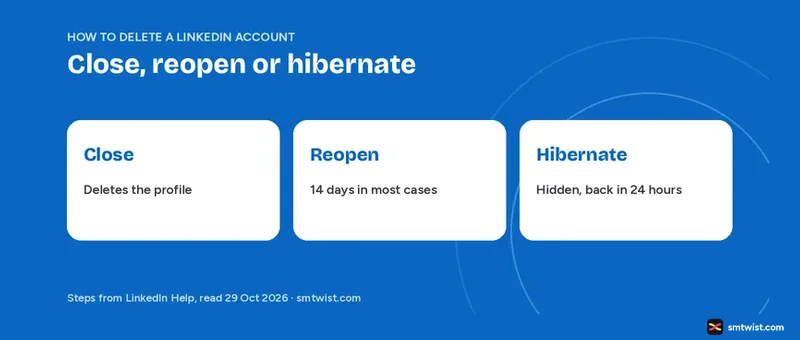
Closing is LinkedIn's word for deleting, and it permanently deletes your profile and removes your access to your LinkedIn information. This guide on how to delete a LinkedIn account covers the desktop and mobile click paths, the jobs to finish first and the 14 day window for changing your mind. Every fact comes from three Help articles, which we read on 29 October 2026.
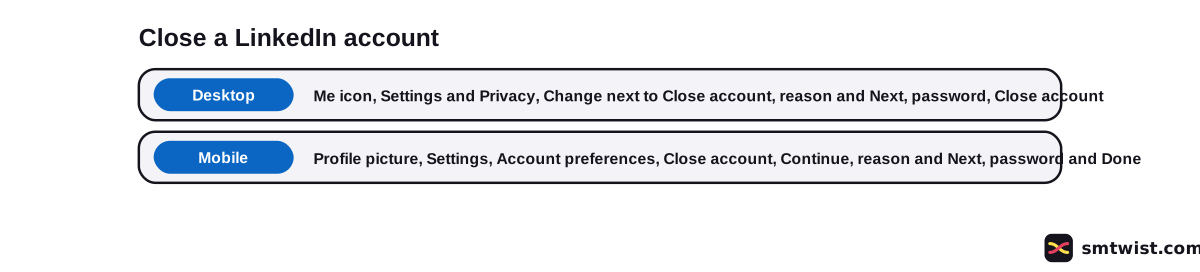
How to Delete a LinkedIn Account on Desktop
LinkedIn Help puts the setting under Account preferences. Six clicks on a computer finish the job.
- Click the Me icon at the top of your LinkedIn homepage.
- Click Settings & Privacy.
- Under Account management in Account preferences, click Change next to Close account.
- Choose the reason you are leaving.
- Click Next and enter your password.
- Click Close account.
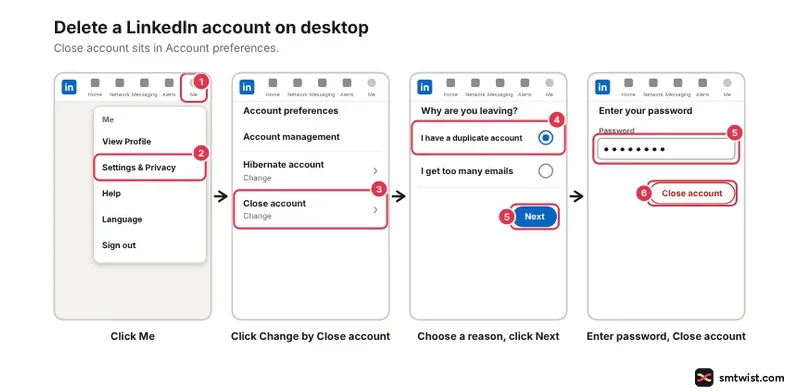
Your 14 day reopen window starts when the account closes. Read the next two sections before you click the last button.
How to Delete a LinkedIn Account on the Mobile App
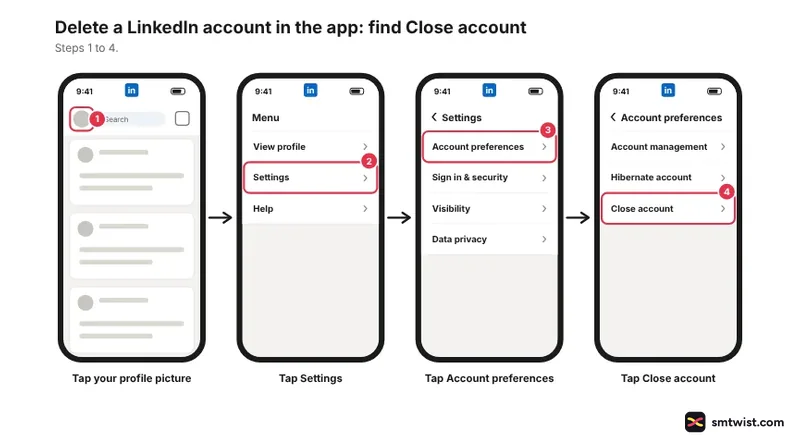
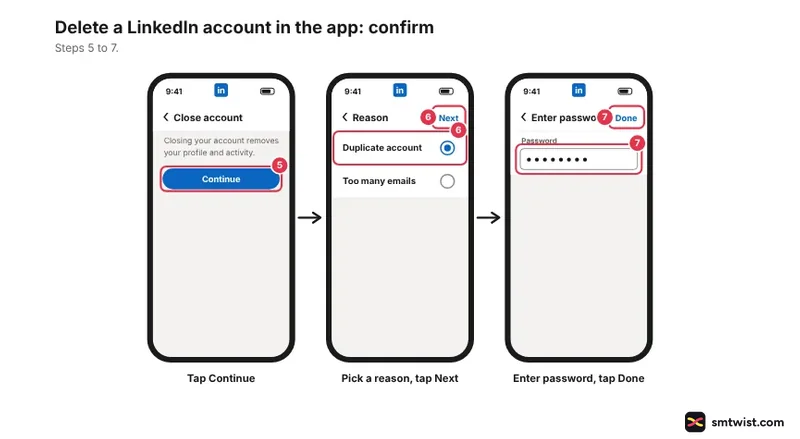
Mobile starts from your profile picture. LinkedIn Help lists seven taps for the mobile tabs.
- Tap your profile picture.
- Tap Settings.
- Tap Account preferences.
- Under Account management, tap Close account.
- Tap Continue.
- Tap the reason you are leaving, then tap Next.
- Enter your password and tap Done.
What You Lose When You Close a LinkedIn Account
LinkedIn Help names five losses from closing, and it handles your data under section 4.3 of the Privacy Policy.
- Your profile stops showing on LinkedIn.
- You lose access to your connections and the information you added.
- Recommendations and endorsements you gave and received are deleted.
- Your messages are deleted.
- Your purchase history is no longer accessible.
Help suggests downloading a copy of your data before you close. Do that while you can still log in, because the closed account gives you nothing to download.
What to Settle Before You Close Your Account
LinkedIn Help names five items to deal with first. The first three block the close until you resolve them.
- A Premium membership. You can cancel Premium and keep the free Basic account, and our Premium worth it guide helps you decide.
- A LinkedIn group you own.
- A premium account license.
- A duplicate account. If you created more than one account, delete or merge the extra one, which our guide to managing multiple LinkedIn accounts covers.
- A sign in through Google, Apple or Microsoft. Unlink that email account from LinkedIn on the third party's site.
If you only want fewer emails, Notifications settings is the smaller fix. Closing is the way to delete a LinkedIn account when you want the profile gone.
How Long can You Reopen a Deleted LinkedIn Account?
LinkedIn Help says it can reopen an account closed less than 14 days ago in most cases. After 14 days it cannot. Both the close article and the reopen article give the same 14 days.
To reopen, try to log in with your registered email and password and click Reactivate, then confirm by email. You can also use the link in the closure email. A reopen is partial, as this table shows.
| Result | What LinkedIn Help says |
|---|---|
| Comes back | Your connections |
| Does not come back | Group memberships |
| Does not come back | Followings like Top Voices and Companies |
| Does not come back | Ignored and pending invitations |
| Does not come back | Endorsements and recommendations |
Recommendations and endorsements are the sharpest loss. They are deleted when you close and they stay gone when you reopen.
Hibernate Instead of Deleting
Hibernating is the alternative LinkedIn offers when you want out of sight but not out for good. Your profile turns invisible to everyone including your connections, and it drops out of searches including Recruiter. Recommendations, messages, posts and comments remain and show A LinkedIn member in place of your name.
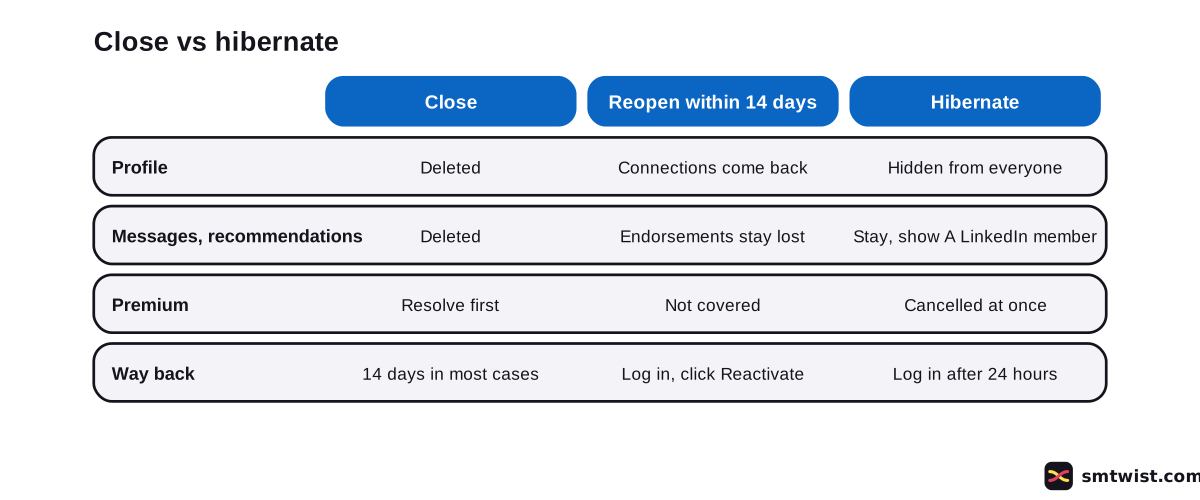
You can reactivate 24 hours after hibernating by logging in. Connection and follower counts can show wrong numbers for up to 48 hours after that. The table sets the two routes side by side.
| Close | Hibernate | |
|---|---|---|
| Profile | Deleted | Hidden from everyone |
| Messages and recommendations | Deleted | Remain, shown as A LinkedIn member |
| Premium | Resolve it first | Cancelled at once |
| Way back | Reopen within 14 days in most cases | Log in after 24 hours |
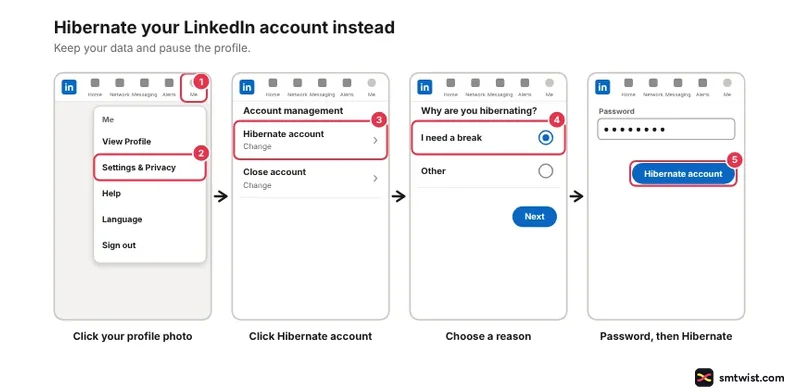
Premium ends the moment you hibernate and promo pricing is not always honored on return. If you bought Premium through Apple, cancel with Apple too. These five steps hibernate an account.
- Click your profile photo.
- Click Settings & Privacy.
- Click Hibernate account under Account management.
- Choose a reason.
- Enter your password and click Hibernate account.
Will Google Still Show Your LinkedIn Profile?
Yahoo, Bing and Google can still show your information for a while after you close. LinkedIn Help calls it temporary and gives no number of days, and search engines update on their own schedule.
How to Delete a LinkedIn Account You Cannot Access
Closing needs your password, and LinkedIn Help gives no way to close without signing in. For a locked account it points to its email access and password reset help. Regain the login first and then use the desktop or mobile steps above.
If you joined with Google, Apple or Microsoft, remember to unlink the email account on that company's site after you close.
Starting Over After You Delete a LinkedIn Account
Starting over means a fresh account, and nothing returns from the closed one. Our account creation guide covers sign-up, and the beginner plan for LinkedIn helps you rebuild connections and a profile.
What is Still Unconfirmed
No live account was closed for this guide, which sets the label at Checked. LinkedIn updated the close article a year before we read it. A button name on your screen can differ.
Help gives no figure for final deletion after the 14 days end or for search engines dropping your profile. We also did not read LinkedIn's separate article on deleting your data. This guide says nothing about it.
Where This Guide Fits
Closing, hibernating and merging accounts sit together in LinkedIn Premium and Multiple Accounts in the LinkedIn section.
The editorial policy explains how we label what we checked.
Sources
- LinkedIn Help: Close and delete your LinkedIn account, read 29 October 2026, the desktop and mobile steps and what to settle before closing.
- LinkedIn Help: Reopen your account, read 29 October 2026, the 14 day window and what does not come back.
- LinkedIn Help: Hibernate your LinkedIn account, read 29 October 2026, the hibernate steps and the 24 hour wait.
This guide is labelled Checked. We compared every step and number with the three Help articles above and did not close a live account. How we label guides explains the three labels.
FAQ
How do I delete a LinkedIn account?
Click Me, then Settings & Privacy, and click Change next to Close account under Account management. Choose a reason, click Next, enter your password and click Close account.
How do I delete my LinkedIn account on the mobile app?
Tap your profile picture, then Settings, then Account preferences. Tap Close account under Account management, tap Continue and choose a reason. Tap Next, enter your password and tap Done.
How long do you have to reopen a deleted LinkedIn account?
Less than 14 days after you close it, in most cases. LinkedIn Help says it cannot reopen an account after 14 days.
Can I delete my LinkedIn account and start over?
Yes. Closing deletes your profile, connections, messages, recommendations and endorsements, and you can then build a new profile from the sign-up steps. Nothing from the closed account is restored to the new one.
Can I delete my LinkedIn account without signing in?
No. The close steps ask for your password. If you cannot reach the account, LinkedIn Help points you to its email access and password reset help.
Do I need to cancel LinkedIn Premium before I delete my account?
Yes. LinkedIn Help says a Premium membership, a group you own or a premium account license must be resolved before you close the Basic account. You can cancel Premium and keep the free Basic account.
What do I lose if I reopen my LinkedIn account?
Group memberships, followings, ignored and pending invitations, endorsements and recommendations. Your connections come back.
Will my profile still show on Google after I close my account?
Yes, for a time. LinkedIn Help says Yahoo, Bing and Google can still show your information temporarily, and it gives no date when that stops.
What is the difference between closing and hibernating a LinkedIn account?
Closing deletes the profile, while hibernating hides it from everyone and lets you return by logging in 24 hours later. Hibernating cancels Premium at once.
 Editor
Written by
Namrata Arora
Namrata Arora is a social media expert with two years of hands on experience on Instagram, Facebook and other platforms. She writes the how to guides on Social Media Twist and tries the steps on a real account for every guide marked Tested.
- Marks every guide Tested or Checked
- Writes about Instagram, Facebook, TikTok
- 43 guides on SMTwist
Guest posts are edited by SMTwist before they go live. Paid or affiliate links are labelled and carry rel="sponsored".