How to Run LinkedIn Ads
How to run LinkedIn ads in Campaign Manager, from ad account and objective to payment and launch, with the new ad set wording and a pre launch check.

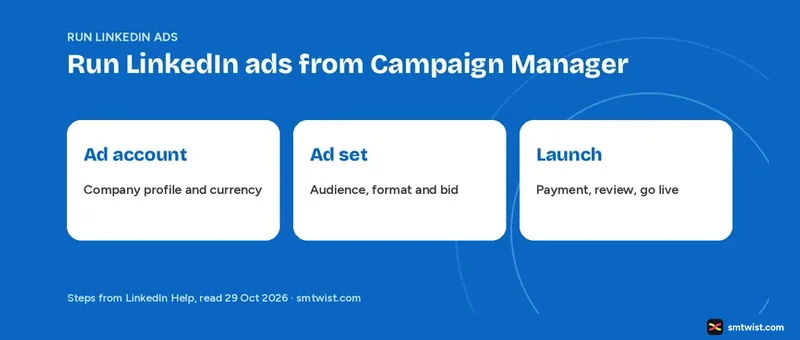
Learn how to run LinkedIn ads in the order Campaign Manager asks for the details, from the first click to the launch button. LinkedIn moved its tool to a new structure of ad account, campaign, ad set and ad, and older tutorials still show the old names. LinkedIn Help and Marketing Solutions articles read on 29 October 2026 supply every fact.
How to Run LinkedIn Ads: The Four Levels in Campaign Manager
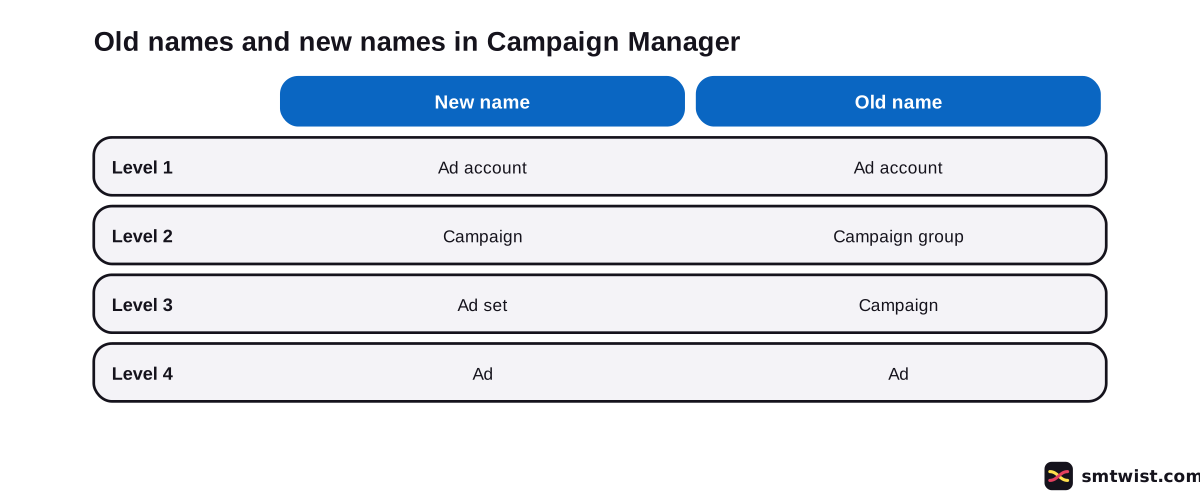
Campaign Manager is the self service tool, and LinkedIn Help splits it into four levels, listed in this table.
| Level | What it controls |
|---|---|
| Ad account | Billing setup, user roles and the company profile connection |
| Campaign | High level budget, schedule and status across ad sets |
| Ad set | Objective, audience, ad format, bidding, budget, schedule and conversion tracking |
| Ad | The creative |
Older articles on business.linkedin.com still say campaign group where Help now says campaign, and campaign where Help now says ad set. This guide uses the new names.
How do You Open Campaign Manager and Create an Ad Account?
Creating the ad account is the first step. The first part of how to run LinkedIn ads takes six steps as a new advertiser.
- Click Advertise in the upper right corner of the LinkedIn homepage. If it is missing, open the For Business dropdown and click Advertise in the My Apps column.
- On the welcome screen, review the name LinkedIn suggests in the Account name text box.
- Check the company profile. Click Change to use another one, or Add new if you are not an admin of one.
- Check the currency and click Change if it is wrong.
- Tick the checkbox that accepts the LinkedIn Ads Agreement and Advertising Guidelines.
- Click Create account.
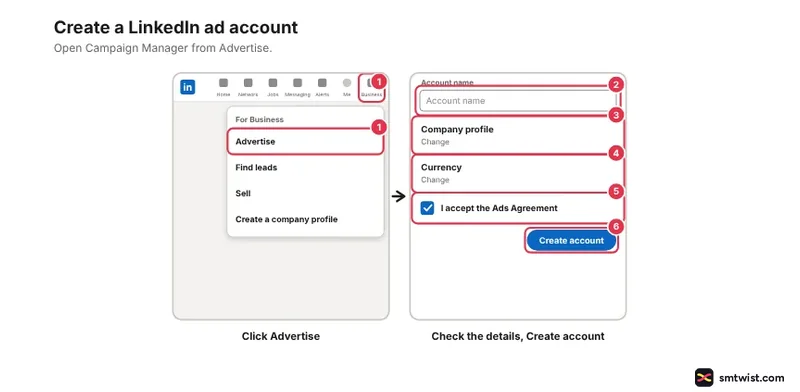
You then reach the ad set creation screen.
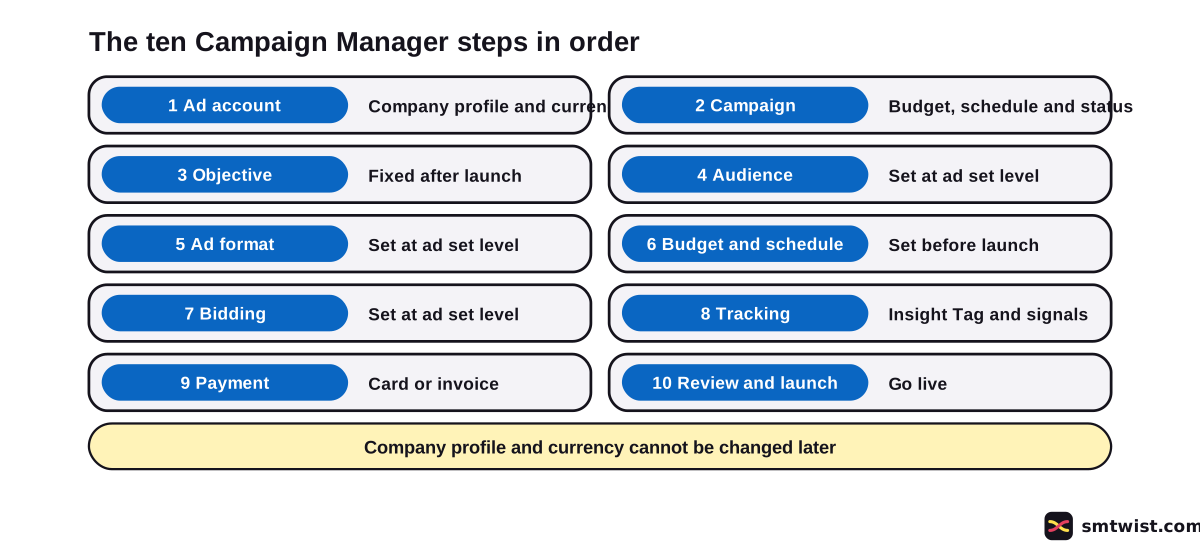
The company profile and the currency cannot be changed after the ad account exists. Check both before step 6. If you have Business Manager accounts and one is selected, you must be its admin.
How to Run LinkedIn Ads From a Company Profile
Whoever creates the ad account gets account manager and billing admin access. Three tasks need three different levels.
- Creating a campaign needs campaign manager access or higher.
- Setting the budget, schedule and bid needs account manager or campaign manager access.
- Adding or updating the card needs a billing admin.
Most ad formats need the ad account associated with a company profile, and without one only text ads work. If you have none yet, create a LinkedIn company profile before you start the ad account.
Create the Campaign and Choose an Objective for Your LinkedIn Ads
The campaign contains the objective and the high level budget. Follow these seven steps.
- In your ad account, click Advertise on the left menu.
- On the Campaigns tab, click Create and select Campaign.
- Enter a campaign name. Only people in Campaign Manager see it.
- Set the status to Active or Draft.
- Under Campaign Objective, keep the shared objective switched on and select one objective for all ad sets.
- Optionally switch on the Budget Optimization toggle for a daily or lifetime budget, a bidding strategy and a schedule.
- Click Create & use in new ad set.
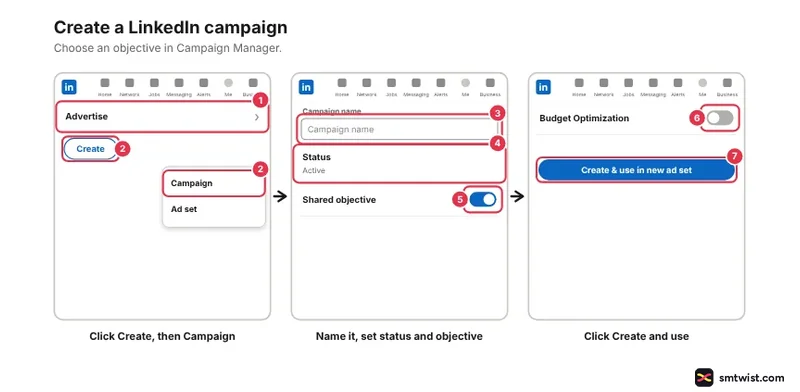
Switching the shared objective off means no budget optimization. One Help article sets the objective on the campaign and another asks for it inside the ad set steps, Expect to see the choice on either screen. After launch you cannot change the campaign objective or switch off Dynamic Group Budget.
LinkedIn Help lists eight objectives in three tiers.
- Brand awareness has one objective, brand awareness.
- Consideration has website visits, engagement and video views.
- Conversions has lead generation, website conversions, job applicants and talent leads.
Talent leads work only with an active LinkedIn Recruiter contract. If you plan video ads, read our LinkedIn video guide first.
Set the Audience and Choose an Ad Format
Inside the ad set steps, select a campaign or click New campaign, choose New from the ad set dropdown and name it. Select the objective, confirm the details and build the audience in one of two ways.
- Build your own audience with Saved Audiences, Matched Audiences or attributes.
- Use an Auto-Targeting audience.
The Marketing Solutions step guide uses location plus job title, company or industry as its example. Next, select the ad format. URL tracking parameters and the LinkedIn Audience Network checkbox are both optional, and that guide shows ads on LinkedIn and the Audience Network by default. Business buyers are reached by title, company and industry, as LinkedIn B2B marketing explains.
Image sizes and file rules sit in a separate reference. Check LinkedIn ad sizes and specs before you build the creative.
How do You Set the Budget, Schedule and Bidding?
Choose the budget type, the optimization goal and the bidding strategy in the same ad set. In the Budget & schedule section, the Budget dropdown offers daily, lifetime or both. Enter the amount and choose your dates.
Ad sets begin at 12:00 AM UTC on the start date and end at 11:59 PM UTC on the end date.
LinkedIn advises against moving a start date to within 24 hours. It does not allow same day schedule changes. For a lifetime budget with Sponsored Content and the Audience Network off, tick Set a custom schedule.
Under Bidding, review the optimization goal, using the Change button if needed, and choose one of three strategies.
- Maximum delivery is automated, charges by impressions and is the default for campaigns with budget optimization.
- Cost cap aims at an average cost per result.
- Manual bidding hands you the bid and the most control.
Impressions are explained in our LinkedIn impressions guide. Campaign Manager shows suggested bid ranges for cost cap and manual bidding.
An auction sets the price, and the cost guide explains what that means.
Our LinkedIn ads cost guide covers the budget types, the minimums and the billing rules. The minimum budget figures differ between LinkedIn articles. Read the minimum Campaign Manager shows.
Add Tracking, Payment and Launch
Conversion tracking is optional. For the Insight Tag, click Measure on the left menu, then Signals manager, then Insight Tag.
Open the I will install the tag myself dropdown, copy the code and paste it before the end of the body tag in the global footer of your website. Validation takes from a few minutes to 24 hours.
Do not install the tag on any website screen that collects or contains sensitive data like health or financial details. LinkedIn says this is not legal advice.
To count conversions, go to Measure, then Conversion tracking, click Create conversion and choose Insight Tag conversion. Image pixel conversions need no tag but are less accurate.
Payment comes before launch in how to run LinkedIn ads, and a billing admin follows these five steps.
- In your ad account, click Billing on the left menu.
- On the Billing setup tab, click Update credit card. First time users see Add payment details.
- Enter the card details.
- Add a tax ID if you want to.
- Click Save and continue.
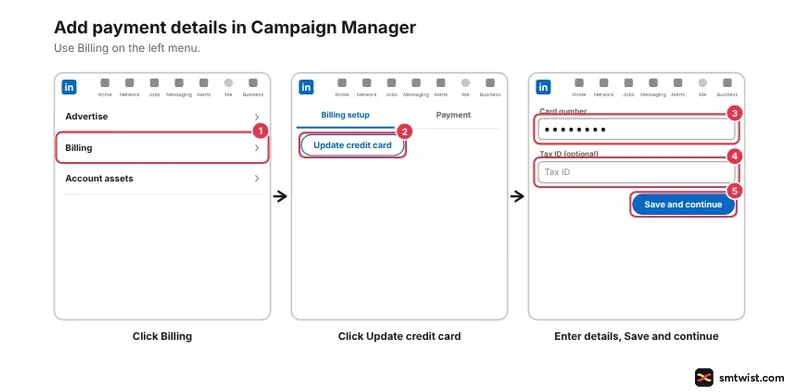
Adding a card can trigger a short verification hold that is released within 5 to 7 business days. Then create the ads for your format, click Next to review and click Launch campaign. LinkedIn reviews the ads, and approved ads can show impressions.
What should You Check Before You Launch Your First LinkedIn Ads?
Eight checks on how to run LinkedIn ads cleanly catch the mistakes LinkedIn Help says you cannot undo or cannot do late.
- Confirm the company profile and currency on the ad account.
- Confirm the objective, because it is fixed after launch.
- Match the ad format to the company profile connection.
- Check the creative against the size and text limits.
- Set the start date more than 24 hours ahead.
- Read the minimum budget Campaign Manager shows.
- Check that the Insight Tag sits only on screens without sensitive data.
- Add a valid payment form.
Start with a small first campaign before you commit a bigger plan. See LinkedIn marketing for business for where ads fit next to organic posts.
What is Still Unconfirmed?
We did not create an ad account or launch a campaign, which makes the label Checked.
A label or button can differ on your screen. Help articles are updated at different times, and the oldest one we read is a year old.
No Help article we read states a minimum audience size. We did not read Forecasted Results, and the Campaign Manager article describes the desktop steps. The live minimum budget shows only inside a logged in ad account.
Where This Guide Fits
Learning how to run LinkedIn ads is one part of the LinkedIn ads formats and setup topic in our LinkedIn topic list. Read the editorial policy for what Checked means.
Sources
- LinkedIn Help: How LinkedIn's advertising tool works, read 29 October 2026, the four levels of ad account, campaign, ad set and ad.
- LinkedIn Help: Access ad accounts in Campaign Manager, read 29 October 2026, where the Advertise button sits.
- LinkedIn Help: Create an ad account in Campaign Manager as a new advertiser, read 29 October 2026, the welcome screen, the agreement and what cannot be changed.
- LinkedIn Help: Create campaigns, read 29 October 2026, campaign steps, access level and the objective rule.
- LinkedIn Help: Create an ad set in Campaign Manager, read 29 October 2026, audience, format, tracking, review and launch.
- LinkedIn Help: Set a budget, schedule, and bid for your ad set, read 29 October 2026, the UTC times and schedule rules.
- LinkedIn Help: Marketing objectives, read 29 October 2026, the eight objectives and three tiers.
- LinkedIn Help: Campaign and ad set bidding strategies, read 29 October 2026, maximum delivery, cost cap and manual bidding.
- LinkedIn Help: Add the LinkedIn Insight Tag to your website, read 29 October 2026, the install steps and the sensitive data rule.
- LinkedIn Help: Set up Conversion Tracking for Insight Tag conversions, read 29 October 2026, the conversion steps and image pixel option.
- LinkedIn Help: Add or update your credit card information in Campaign Manager, read 29 October 2026, the billing admin steps and the card hold.
- LinkedIn Marketing Solutions: Create your first campaign, read 29 October 2026, the step guide, which still says campaign group.
Checked fits this guide because each step matches the LinkedIn articles above. No ad account was created and no campaign went live. The editorial policy defines the label.
FAQ
How do you run a LinkedIn ad?
Click Advertise on the LinkedIn homepage and create an ad account. Build a campaign, an ad set and an ad, add a payment form and click Launch campaign.
Is LinkedIn Ads free?
No. LinkedIn charges the payment form on the ad account when ads get impressions, clicks, video views or message sends. The price comes from an auction, and our cost guide explains it.
Is LinkedIn Ads CPC or CPM?
It depends on the bidding strategy. Maximum delivery and cost cap charge by impressions, which is CPM. Manual bidding charges by clicks, impressions, video views or sends depending on the objective, format and goal.
Can you run LinkedIn ads from a personal account?
Yes, with a limit. You open the ad account from your own LinkedIn login, but most ad formats need the ad account associated with a company profile. Without one you can use text ads only.
Who can create a campaign in an ad account?
Someone with campaign manager access or higher. Budget, schedule and bid changes need account manager or campaign manager access. Card changes need a billing admin.
Can you change the company profile or currency on an ad account?
No. LinkedIn Help says both are fixed after the ad account is created. Create the ad account with the right company profile and currency the first time.
What time do LinkedIn ads start?
12:00 AM UTC on the start date. Ad sets end at 11:59 PM UTC on the end date. Same day schedule changes are not allowed.
Do you need the Insight Tag to run LinkedIn ads?
No. Conversion tracking is optional in the ad set steps. Image pixel conversions work without the tag, but LinkedIn Help says they are less accurate.
What do you need before you can launch?
A valid payment form on the ad account. After you click Launch campaign LinkedIn reviews the ads, and approved ads can show impressions.
 Editor
Written by
Namrata Arora
Namrata Arora is a social media expert with two years of hands on experience on Instagram, Facebook and other platforms. She writes the how to guides on Social Media Twist and tries the steps on a real account for every guide marked Tested.
- Marks every guide Tested or Checked
- Writes about Instagram, Facebook, TikTok
- 43 guides on SMTwist
Guest posts are edited by SMTwist before they go live. Paid or affiliate links are labelled and carry rel="sponsored".