How Much do LinkedIn Ads Cost
How much do LinkedIn ads cost? LinkedIn gives no price list. See what sets the charge, the minimum budgets that differ by article and the billing rules.

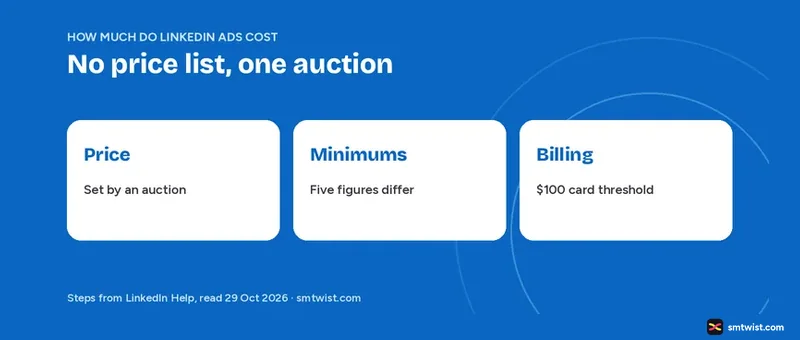
How much do LinkedIn ads cost? LinkedIn does not publish a price list, and its Help articles list no price per click or per impression. They do give the rules that set your charge, the minimum budget figures and the billing thresholds.
Our guide covers those as read on 29 October 2026. Averages and benchmarks stay out because LinkedIn names none.
The levels in Campaign Manager are now an ad account, a campaign, an ad set and an ad. Older LinkedIn articles still say campaign group for what is now a campaign and campaign for what is now an ad set. The ages given below tell you which wording an article uses.
How Much do LinkedIn Ads Cost Without a Price List?
No. LinkedIn gives no price list, and the figure shown in Campaign Manager decides what you pay. Help states that there is no set cost per result because the price comes from an auction and inventory is not fixed in advance.
Marketing Solutions says the same in its undated pricing article. Cost depends on the type of activity you pay for and on the ad auction, you start by placing a bid, and you are charged only when the billable event happens. It adds that periodic LinkedIn tests or trials can affect pricing.
What Decides How Much LinkedIn Ads Cost
LinkedIn Help names four cost factors in its advertising cost and pricing article, which was 3 months old when we read it.
- Target audience.
- Bidding strategy, meaning maximum delivery, manual or cost cap.
- Objective.
- Ad relevance score, which rises as more people click, comment, like and share.
A more relevant ad gets a lower price. The same article says the optimization goal and bidding strategy set what you are charged for, and the payment method on the ad account is charged regularly as spend builds from impressions, clicks, video views or message sends.
CPM, CPC, CPV and CPS by Objective
Help uses four names for the charge. CPM covers impressions, CPC covers clicks, CPV covers video views and CPS covers sends, and our guide on what impressions are on LinkedIn explains the first of them.
Six objectives and their charges appear in the objective based pricing article, 4 months old. Job applicants and Talent leads follow the same pattern as the others.
| Objective | Charged by |
|---|---|
| Brand awareness | Impressions, or sends for Sponsored Messaging |
| Website visits | Impressions with maximum delivery or cost cap, website clicks with manual bidding |
| Engagement | Impressions, or engagement clicks with manual bidding |
| Video views | Impressions, or video views with manual bidding |
| Lead generation | Impressions for qualified leads, maximum delivery and cost cap. Clicks with manual bidding. Sends for messaging |
| Website conversions | Impressions with maximum delivery, website clicks with manual bidding |
A video view is 2 or more continuous seconds of playback while at least 50 percent of the ad is on screen. Our LinkedIn video guide covers the video format in detail.
Bidding Strategies and What They Charge
LinkedIn Help, 3 months old, names three bidding strategies.
- Maximum delivery uses machine learning to bid, aims to use the full budget and charges by impressions. You set no bid.
- Cost cap lets you set a cost per result as an average benchmark and charges by impressions.
- Manual bidding lets you set the bid and charges by CPC, CPM, CPV or CPS depending on objective, format and goal.
For cost cap and manual bidding, Campaign Manager shows a suggested range based on current competing costs. The cost cap article adds that your actual average cost can differ from the cap and that costs fluctuate in the first 7 days of the learning phase. LinkedIn advises running a cost cap ad set for at least 15 days.
How Much do LinkedIn Ads Cost at Minimum?
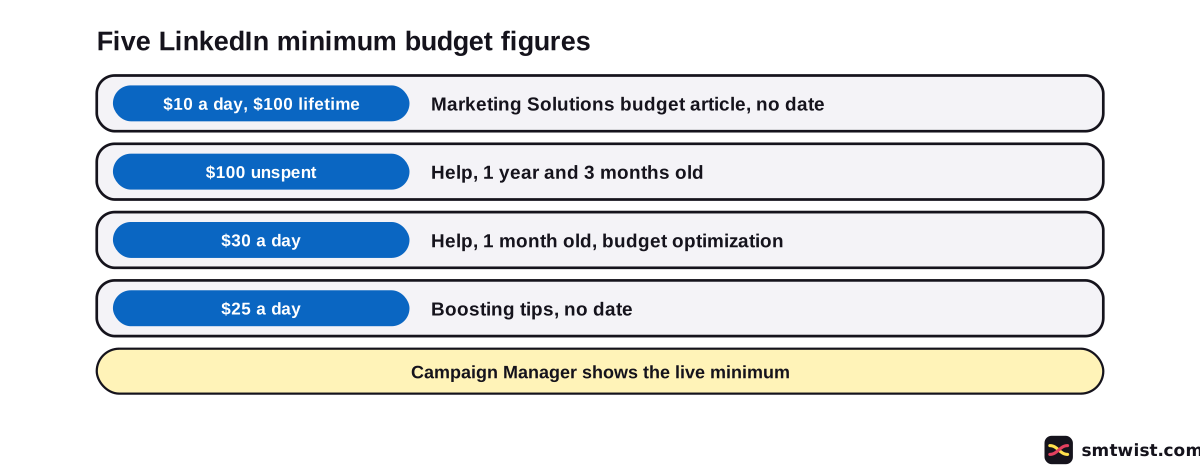
LinkedIn gives five minimum budget figures in five articles, and no article explains how they fit together. The table ties every figure to its article, its age and what it applies to.
| Figure | Article and age | Applies to |
|---|---|---|
| $10 a day and $100 lifetime | Marketing Solutions, Making the Most of Your Budget, no date shown | Any ad format. The $100 is for new inactive campaigns, and after launch the lifetime minimum becomes $10 times the days scheduled |
| $100 unspent | Help, Minimum campaign budget requirements, 1 year old, and Campaign settings, 3 months old | A campaign with a total budget needs $100 USD or equivalent unspent to launch a new ad set |
| $30 a day | Help, Dynamic Group Budget article, 1 month old | Campaign daily budget with budget optimization. Lifetime is $30 times the remaining days |
| $25 a day | Marketing Solutions, Boosting tips, no date shown | Boosting advice says to budget more than $25 a day |
Marketing Solutions still uses the old campaign group wording in its budget article. It also suggests starting at $25 a day for new advertisers and $50 to $100 for existing ones, while the LinkedIn advertise overview, also undated, says daily budgets start at just $10.
Currency changes the $100 unspent rule, with EUR 100, GBP 80, INR 5,000 and JPY 8,000 in the table. Help gives an example where $450 spent of a $500 total means raising the total to $550.
One reading is that $30 applies to budget optimization campaigns and $10 to ad set budgets. No LinkedIn article states that. Treat it as our guess and not LinkedIn's.
Setting a budget and bid is covered in a Help article that gives no minimum at all and sends you to the amount Campaign Manager shows.
Daily Budget, Lifetime Budget and Overspend
LinkedIn describes three budget types in its budget article, which was 1 month old when we read it.
- Daily budget is an average per day.
- Lifetime budget is the total across the schedule, and a custom schedule needs it.
- Daily and lifetime together work on a continuous schedule only, and the ad set ends when the lifetime budget is spent.
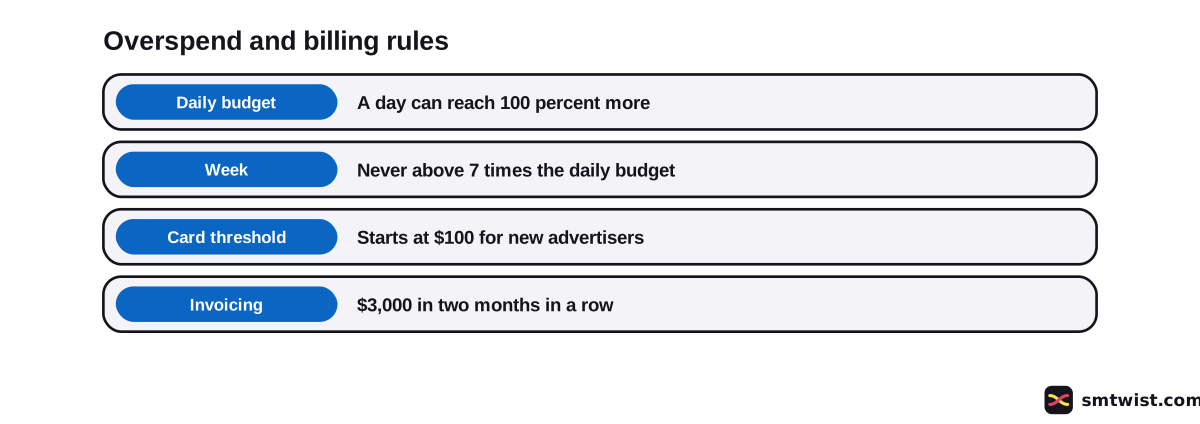
On a continuous schedule, a daily budget can spend up to 100 percent more on one day and that means $200 out of $100 in the example. A week never passes 7 times the daily budget, a ceiling of $700 there.
With a set schedule the total stays at or under the daily budget times the days, like $3,100 over 31 days at a $100 daily budget.
Lifetime budgets on a set schedule must reach a minimum that depends on the schedule length. The budget article gives no figure, and Campaign Manager shows one if your amount is too low.
For the steps that set these values, follow our guide to launching LinkedIn ads.
Billing Thresholds, Invoicing and Tax
How much do LinkedIn ads cost on your card, and when? Help says the billing threshold starts at $100 for a new advertiser, and the Billing area of the ad account shows it.
Spend over the threshold is charged the next day, sometimes several times a day. A balance below it is charged on the first day of the next month.
LinkedIn can raise the threshold after successful payments, and accounts in other currencies can have a different one. When you add a card, LinkedIn can place a temporary hold to verify it, and the hold clears in 5 to 7 business days.
Monthly invoicing is a separate route, 1 year old in Help. It applies to a Business Manager with ad accounts that spent at least $3,000 on LinkedIn Ads in two consecutive months in the last year. Amounts in Campaign Manager are estimates that differ from the invoice by less than $1.
LinkedIn charges VAT to customers in Ireland at 23 percent and to private customers in the EU. EU businesses outside Ireland with a valid VAT number are not charged, and you can add a VAT number in billing.
Boosting a Post Costs Differently
How much do LinkedIn ads cost when you boost a post? A boost is created with a lifetime budget, maximum delivery and set start and end dates, and it is charged by impressions. The Help article is 1 year old, and the undated boosting tips say to budget more than $25 a day.
Boosting is one route among the formats in our LinkedIn ads formats and setup guide, and creative sizes are in the LinkedIn ad sizes and specs guide.
Where to Read the Real Number
Before you commit money, open Campaign Manager and read the minimum and the suggested bid range it shows for your objective and currency. Then multiply the daily budget by the days and add room for one day at 100 percent over. That sum answers how much do LinkedIn ads cost for your own plan, and the screen figure replaces every number in this guide.
What is Still Unconfirmed
We did not test any of this on a live ad account. The label stays Checked for that reason. The exact minimum inside Campaign Manager needs a logged in account, and Forecasted Results was not read in detail.
LinkedIn says VAT is charged but the budget articles we read do not say whether the budget includes it. LinkedIn gives no price per click or per impression, and we use no third party figure.
Where This Guide Fits
Budget planning is one part of ad work. Formats, objectives and video specs sit beside it in LinkedIn Ads Formats and Setup, under the LinkedIn Marketing for Business hub.
Browse the full LinkedIn section for account and posting guides. The editorial policy covers what Checked means.
Sources
- LinkedIn Help: LinkedIn's advertising cost and pricing, read 29 October 2026, the cost factors and the auction.
- LinkedIn Help: Objective based pricing, read 29 October 2026, what every objective is charged by.
- LinkedIn Help: Campaign and ad set bidding strategies, read 29 October 2026, maximum delivery, cost cap and manual bidding.
- LinkedIn Help: Cost cap, read 29 October 2026, the learning phase and the 15 day advice.
- LinkedIn Help: Campaign and ad set budgets, read 29 October 2026, budget types and the 100 percent daily overspend.
- LinkedIn Help: Set a budget, schedule and bid for your ad set, read 29 October 2026, the schedule times and the lack of a minimum figure.
- LinkedIn Help: Minimum campaign budget requirements, read 29 October 2026, the $100 unspent rule and the currency table.
- LinkedIn Help: Campaign settings, read 29 October 2026, the same $100 unspent rule.
- LinkedIn Help: Dynamic Group Budget article, read 29 October 2026, the $30 minimum with budget optimization.
- LinkedIn Marketing Solutions: Making the Most of Your Budget, read 29 October 2026, no date shown, the $10 and $100 minimums.
- LinkedIn Marketing Solutions: Boosting tips, read 29 October 2026, no date shown, the $25 a day advice.
- LinkedIn Help: Budget, bidding and schedule for boosted company profile posts, read 29 October 2026, how boosts are budgeted and charged.
- LinkedIn Marketing Solutions: Advertising pricing, read 29 October 2026, no date shown, cost depends on activity and the auction.
- LinkedIn Help: Billing frequency and thresholds for credit card payments, read 29 October 2026, the $100 starting threshold.
- LinkedIn Help: Add or update your credit card information in Campaign Manager, read 29 October 2026, the temporary card hold.
- LinkedIn Help: Monthly invoicing, read 29 October 2026, who qualifies for invoices.
- LinkedIn Help: Value Added Tax and Goods and Services Tax, read 29 October 2026, who is charged VAT.
- LinkedIn Help: How LinkedIn's advertising tool works, read 29 October 2026, ad account, campaign, ad set and ad.
We gave this guide the Checked label after matching every figure to the LinkedIn articles listed above. An ad account was not used to test them, and the editorial policy says what the label means.
FAQ
How much do LinkedIn ads cost?
LinkedIn gives no price list, and no price per click or per impression appears in the Help articles we read. Campaign Manager shows the figure for your objective, optimization goal and bid, and that figure decides what you pay.
What is the minimum budget for LinkedIn ads?
LinkedIn's articles give different figures. Marketing Solutions says $10 a day and $100 lifetime, Help says $100 unspent per campaign and $30 a day with budget optimization, and boosting advice says more than $25 a day.
Are LinkedIn ads CPC or CPM?
Both, plus two more. Help names CPM for impressions, CPC for clicks, CPV for video views and CPS for sends, and the objective, format and bidding strategy decide which applies.
Is LinkedIn Ads free?
No. LinkedIn charges for the activity you pay for, and the Marketing Solutions pricing article says you are charged only when the billable event happens.
Can LinkedIn charge more than my daily budget?
Yes. Help says a day can spend up to 100 percent more than a daily budget, which lets $100 reach $200 in one day. A week on a continuous schedule never passes 7 times the daily budget.
When does LinkedIn charge my credit card?
A new advertiser starts with a $100 threshold. Spend over it is charged the next day, and a balance below it is charged on the first day of the next month.
Does LinkedIn charge VAT on ads?
Yes for some customers. LinkedIn Help says it charges VAT to customers in Ireland at 23 percent and to private customers in the EU, while EU businesses outside Ireland with a valid VAT number are not charged.
How much does a 30 second LinkedIn video ad cost?
LinkedIn lists no price by video length. Help counts a video view as 2 or more continuous seconds with at least 50 percent of the ad on screen, and the video views objective is charged by impressions or, with manual bidding, by video views.
 Editor
Written by
Namrata Arora
Namrata Arora is a social media expert with two years of hands on experience on Instagram, Facebook and other platforms. She writes the how to guides on Social Media Twist and tries the steps on a real account for every guide marked Tested.
- Marks every guide Tested or Checked
- Writes about Instagram, Facebook, TikTok
- 43 guides on SMTwist
Guest posts are edited by SMTwist before they go live. Paid or affiliate links are labelled and carry rel="sponsored".