How to Increase Engagement on LinkedIn
Learn how to increase engagement on LinkedIn posts with nine tactics from LinkedIn Help and LinkedIn Business, plus how to read your post analytics.

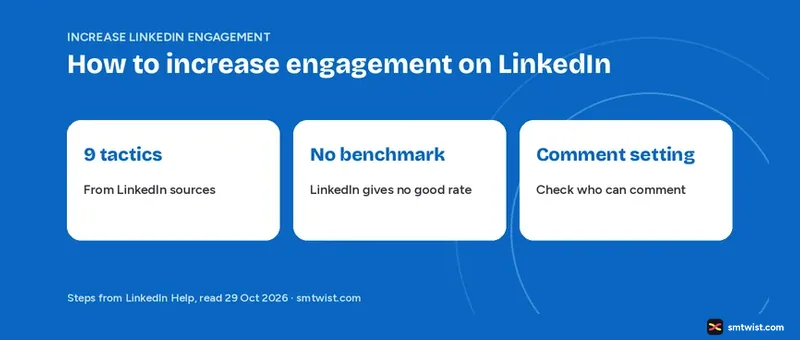
Engagement on LinkedIn means the reactions, comments, reposts, saves and sends a post earns, and LinkedIn Help counts all five in post analytics. This guide on how to increase engagement on LinkedIn gives nine tactics and ties every one to a LinkedIn Help article or a LinkedIn Business source, read on 29 October 2026. It covers single posts only and leaves follower growth out.
Nothing LinkedIn publishes predicts a result. It offers advice on content, formats and replies plus some figures from its own data, and those are the facts used below. To grow the audience that sees a post, read how to get more followers on LinkedIn.
How to Increase Engagement on LinkedIn With Nine Tactics
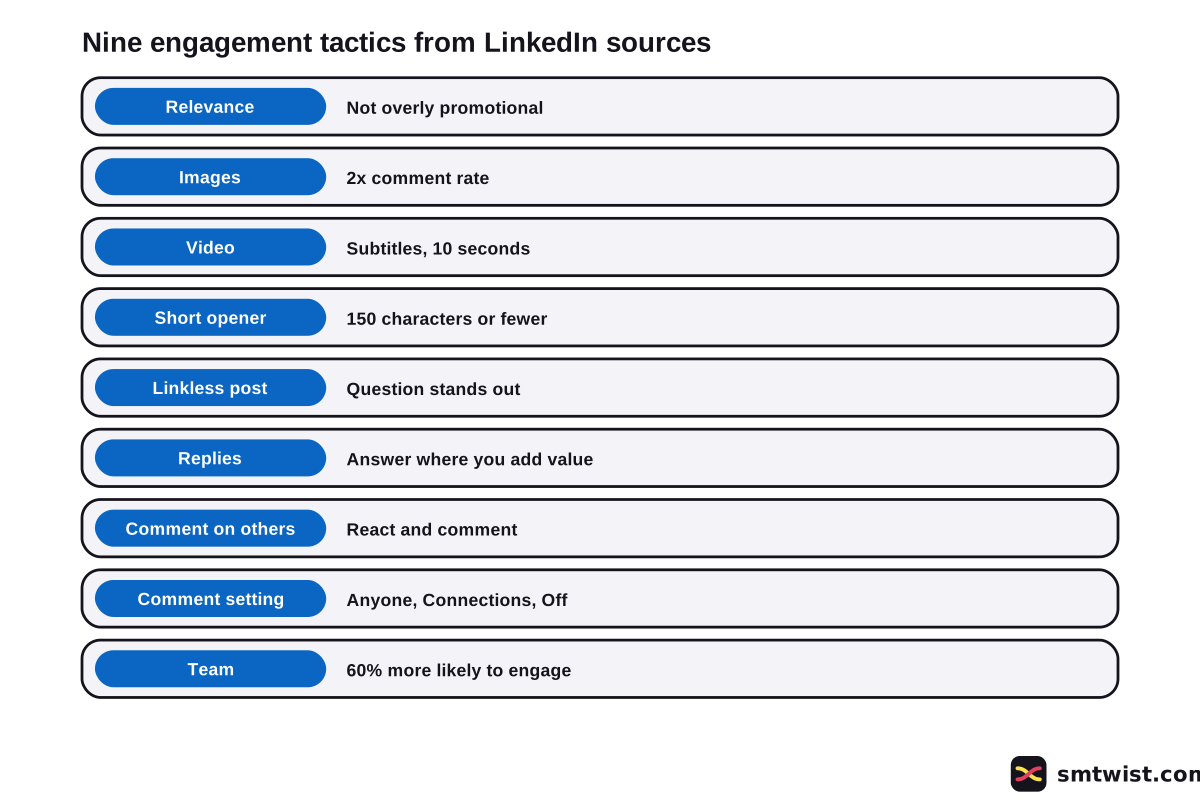
Nine tactics below come straight from LinkedIn sources. The table gives the tactic, what LinkedIn says and the age of the source.
| Tactic | What LinkedIn says | Source |
|---|---|---|
| Relevance | Relatable, professionally relevant content that is not overly promotional is distributed | Help, updated 6 days before reading |
| Images | A 2x higher comment rate | Business, undated |
| Video | Subtitles and a strong first ten seconds | Business blog, 9 Aug 2024 |
| Short opener | 150 characters or fewer, with a question | Business blog, 9 Aug 2024 |
| Linkless post | A question can stand out without a link | Business blog, 9 Aug 2024 |
| Replies | Answer comments where your reply adds value | Business blog, 9 Aug 2024 |
| Commenting | React and comment on other members' posts | Help, updated 6 days before reading |
| Comment setting | Anyone, Connections only or Off | Help, updated 3 weeks before reading |
| Team | Engaged employees are 60% more likely to engage with each other's posts | Business blog, 9 Aug 2024 |
Most numbers in the table describe company profiles. Treat them as LinkedIn's own reports and not as results you will see on a personal profile.
Write Posts That Professionals Relate To
Distribution depends on relevance, says LinkedIn Help. Content that is professionally relevant benefits from organic distribution through your network, and LinkedIn first shows a post to a subset of your connections and followers.
The Help article on distribution lists four tips for reach.
- Write content your audience can relate to.
- Cover news, deep industry insights, lessons you learned or ideas.
- Avoid being overly promotional.
- Complete and verify your profile where available.
Another Help article, on feed suggestions, adds that LinkedIn looks for posts that are not overly promotional and weighs how likely a member is to engage, based on past comments, reactions and time spent. LinkedIn also says it does not want AI slop, which it defines as low-effort content with no clear point of view. Generic or repetitive content is less likely to be widely distributed, and post analytics can show a tip when enough members flag a post as seeming like AI.
Company profiles get a 4-1-1 rule from LinkedIn Business too. For every piece about your own organization, share one update from another source and four pieces written by others, and add your own takeaway. LinkedIn writes it with two ones, and we found no LinkedIn source for the 4+1 version people search.
Should You Add Images and Captioned Video?
Images result in a 2x higher comment rate, says LinkedIn Business, and custom collages of 3 to 4 images do especially well for organizations. Its blog suggests 1200 by 627 pixels for organic updates. The undated guide gives no number for personal profiles.
The same blog, dated 9 August 2024, reports that video posts get 5x as much engagement as conventional posts and Live Video posts get 24x. We found those two figures only in that blog. It adds five video tips.
- Plan for mobile, because up to 91% of members watch video on mobile.
- Add subtitles, because only around a third of mobile viewers have the sound on.
- Show what matters in the first ten seconds.
- Keep videos for awareness goals under 30 seconds.
- Use a thumbnail that tells viewers what the video covers.
Vertical video suits mobile viewing, adds the same blog, when the shot needs no wide frame.
How to Increase Engagement on LinkedIn With Questions and Replies
Updates of 150 characters or fewer that tell the audience what is in it for them are LinkedIn Business advice, and its example ends with a question. Help allows up to 3,000 characters in a post. That makes 150 advice and 3,000 the limit, as the LinkedIn character limit guide explains.
The blog says questions that encourage comments help amplification. It also says thought-provoking or inspirational posts tend to get high engagement without a link, and that a linkless post can make a question stand out. It names no figure for either claim.
Replies come next. LinkedIn Business says answering comments shows people your profile is active and not an unmonitored message board. It advises focusing on comments where your reply adds value and sets no reply deadline.
Opening lines and layout get their own walkthrough in the LinkedIn post writing guide.
Should You Comment on Other Posts, and Who can Comment?
Reputation grows by sharing relatable content regularly and by reacting to and commenting on other members' posts and articles, says LinkedIn Help. It gives no count, time or window for that. Any rule like commenting on five posts before you publish is a third party claim.
One setting can switch replies off before the post exists. On desktop click Start a post, click the name dropdown and read Who can comment on your post? The options are Anyone, Connections only and Off.
Choose Anyone when you want replies from every member. The other two narrow or end the conversation, and the guide on turning off comments on a LinkedIn post shows how to change it later.
How do You Bring Your Team Into the Post?
Employees who are actively engaged with co-workers and their organization are 60% more likely to engage with each other's posts and 14x more likely to share the organization's content, reports LinkedIn Business. Its advice is to notify employees who want to share an important post. These tools belong to company profiles, and we found no matching tool for a personal profile.
The blog also suggests boosting a post that already earns engagement. Boosting is paid and sits outside the free tactics here.
How to Increase Engagement on LinkedIn Posts You can Measure
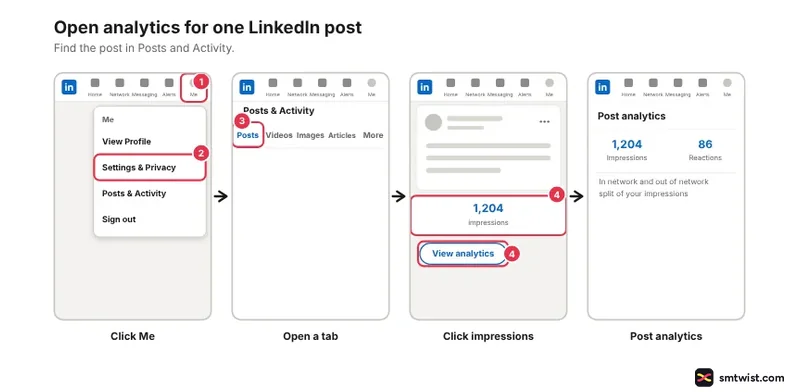
Four clicks open the numbers for one post on desktop, according to Help.
- Click the Me icon at the top of your LinkedIn homepage.
- Under Manage, click Posts & Activity.
- Click the Post, Videos, Images, Articles or Newsletter tab.
- Click the impressions count in the lower left or View analytics in the lower right of the post.
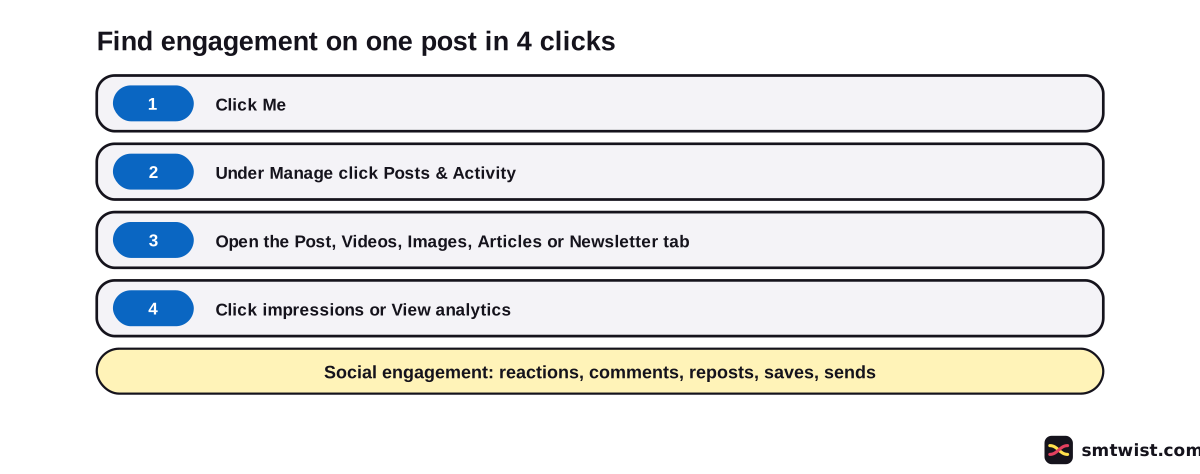
Social engagement lists reactions, comments, reposts, saves and sends on LinkedIn. Help warns that the numbers are estimates and that your own reactions and comments count toward them.
Reach numbers sit beside them and are defined in the impressions on LinkedIn explainer. Profile and company views are covered in seeing your LinkedIn analytics.
For company profiles, Help defines the engagement rate as interactions divided by impressions, where interactions include clicks, reactions, comments and shares. It gives no rate for personal posts. Use a method instead and divide the engagements by the impressions yourself and compare posts of the same format.
Company metrics can take 48 hours to update, except reactions and comments, which show in real time.
Help also gives two figures for video analytics. One article says they are available for 365 days and another says 180 days. Export what you need early.
What is Still Unconfirmed?
Five gaps remain after reading the LinkedIn sources.
- LinkedIn gives no figure for a good engagement rate.
- It names no hook length, no first hour window and no ideal time of day.
- Its blog figures date from 2024 and describe company profiles.
- The 4+1 rule has no LinkedIn source, while 4-1-1 does.
- We tested nothing on a live account, so a screen can differ from the steps above.
Where This Guide Fits
This guide sits in the LinkedIn section, under the topic on LinkedIn analytics and growth. Posting rhythm has its own LinkedIn posting frequency guide.
Our editorial policy describes what Checked means.
Sources
- LinkedIn Help: Distribution of your content on LinkedIn, read 29 October 2026, the distribution rules and four reach tips.
- LinkedIn Help: Post analytics for your content, read 29 October 2026, the engagement metrics and data windows.
- LinkedIn Help: View post analytics for your content, read 29 October 2026, the desktop steps.
- LinkedIn Help: Post and share updates, read 29 October 2026, the character limit, the comment setting and the automation warning.
- LinkedIn Help: content created with the help of AI, read 29 October 2026, the AI slop definition.
- LinkedIn Help: Recommended posts in feed, read 29 October 2026, the feed signals.
- LinkedIn Help: Content analytics for company profiles, read 29 October 2026, the engagement rate definition and the 48 hour delay.
- LinkedIn Business blog: 13 ways to boost the impact of your company profile, dated 9 August 2024 and read 29 October 2026, the image, video, question, reply and team figures.
- LinkedIn Business: tips for company profiles, undated and read 29 October 2026, the weekly posting and image figures.
We compared every claim here with the nine sources above and tested nothing on a live account, so this guide is labelled Checked. How we label guides explains the three labels.
FAQ
How do I increase engagement on LinkedIn?
Write professionally relevant posts that are not overly promotional, add an image or captioned video, end with a question and reply to comments that add value. Those four moves come from LinkedIn Help and the LinkedIn Business blog.
What is the 4+1 rule on LinkedIn?
LinkedIn Business names a 4-1-1 rule, and we found no LinkedIn source for a 4+1 rule. The blog says to share one update from another source and four pieces written by others for every piece about your own organization.
Is 10% engagement on LinkedIn good?
LinkedIn gives no benchmark for a good engagement rate. LinkedIn Help defines the rate for company profiles as interactions divided by impressions. Compare it with your own earlier posts.
Do images increase engagement on LinkedIn?
Yes, by LinkedIn's own account. LinkedIn Business says images result in a 2x higher comment rate, and it names collages of 3 to 4 images as especially strong for organizations.
Do links reduce engagement on LinkedIn?
LinkedIn gives no percentage for links. The LinkedIn Business blog from 9 August 2024 says thought-provoking posts tend to get high engagement without a link. A linkless question post is worth testing.
How often should I post to increase engagement on LinkedIn?
LinkedIn Business says companies that post weekly see a 2x lift in engagement. It gives no figure for personal profiles, and LinkedIn Help warns that excessive posting or automation tools can limit visibility.
Why is my LinkedIn engagement so low?
LinkedIn Help says your post is first shared with a subset of your connections and followers, and overly promotional or generic content is less likely to spread. Check the comment setting and your post analytics before you change anything else.
Where do I see engagement on a LinkedIn post?
Click Me, then Posts & Activity, choose a tab and click View analytics on the post. The Social engagement section lists reactions, comments, reposts, saves and sends on LinkedIn.
Can automation tools increase LinkedIn engagement?
No, not safely. LinkedIn Help says it can limit the visibility of posts when it detects excessive post creation that indicates inauthentic activity or an automation tool.
 Editor
Written by
Namrata Arora
Namrata Arora is a social media expert with two years of hands on experience on Instagram, Facebook and other platforms. She writes the how to guides on Social Media Twist and tries the steps on a real account for every guide marked Tested.
- Marks every guide Tested or Checked
- Writes about Instagram, Facebook, TikTok
- 43 guides on SMTwist
Guest posts are edited by SMTwist before they go live. Paid or affiliate links are labelled and carry rel="sponsored".