LinkedIn Character Limit
LinkedIn character limit for posts is 3,000. See the limit for a headline, comment, connection note and poll, and which ones LinkedIn confirms.

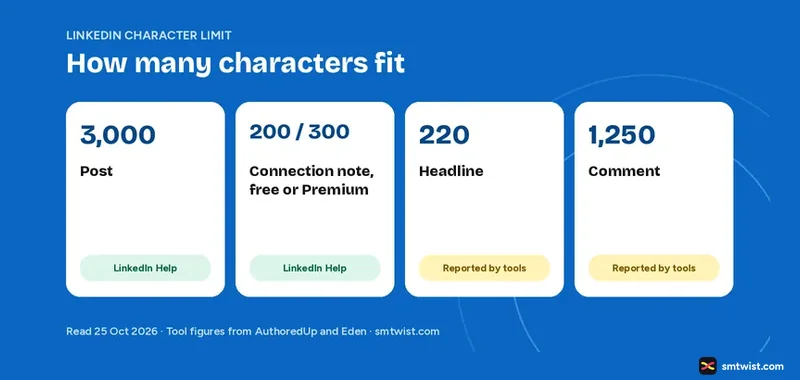
LinkedIn caps a post at 3,000 characters, and the cap differs for every other box on the site. This guide lists every limit, marks which ones LinkedIn confirms and shows what to do when your text goes past the line.
LinkedIn Character Limit at a Glance
LinkedIn Help states two limits in the articles we read. Tool makers measured the rest. The table keeps the two groups apart.
| Where | Limit | Who says so |
|---|---|---|
| Post | 3,000 characters | LinkedIn Help |
| Connection note, free account | 200 characters | LinkedIn Help |
| Connection note, Premium | 300 characters | LinkedIn Help |
| Headline | 220 characters | AuthoredUp and Eden, not LinkedIn |
| About section | 2,600 characters | AuthoredUp, no check date |
| Comment | 1,250 characters | AuthoredUp, tested March 2026 |
| Article headline | 150 characters | AuthoredUp and Eden |
| Poll question | 140 characters | Microsoft Learn API document |
| Poll option | 30 characters | Microsoft Learn API document |
| Direct message | 8,000 characters | AuthoredUp, no check date |
LinkedIn Post Character Limit
The LinkedIn character limit for posts is 3,000 characters, says LinkedIn Help. You write them in the share box at the top of your homepage.
AuthoredUp says spaces, emoji and line breaks count toward the limit. LinkedIn Help does not spell that out, so we mark it as third party. AuthoredUp also reports the limit was 1,300 before June 2023.
How to Post More Than 3,000 Characters
LinkedIn Help gives one route. If your post goes past 3,000 characters, write an article with LinkedIn's Publishing Platform instead. An article is a longer format with its own headline. Our Post on LinkedIn topic covers the other post types, how to post on LinkedIn gives the steps and how to schedule LinkedIn posts covers the scheduling window.
Where the Post Gets Cut Off
Readers see only the start of a long post before a See more link. AuthoredUp reports about 210 characters on desktop and about 140 on mobile. LinkedIn does not state the number and the cut point can change, so test it with a draft. Put your point in the first line.
LinkedIn Headline Character Limit
LinkedIn Help states no headline limit in the article we read. AuthoredUp (updated 11 August 2026) and Eden (21 August 2026) both report 220 characters. Treat 220 as likely and confirm it in the edit box, which stops you at the real limit.
LinkedIn Comment Character Limit
LinkedIn does not state a comment limit. AuthoredUp reports 1,250 characters and says it checked this in testing as of March 2026. It also notes that other sources give figures up to 1,750 and that LinkedIn can change the number without notice. Plan for 1,250 and expect a stop if you go over.
LinkedIn Connection Note Limit
LinkedIn Help gives clear numbers for the length of a personalized invitation. A free account gets 200 characters and Premium gets 300, with no cap on notes for Premium. The cap on a free account is where the articles disagree. A newer article, updated about six months before 25 October 2026, says three personalized notes a month, while an older one says five. Our LinkedIn for beginners guide plans for three. Our guide on whether LinkedIn Premium is worth it covers what else the plan includes. LinkedIn last updated that article about two years before 25 October 2026, so check the box when you write.
Other LinkedIn Character Limit Figures
Some limits matter only for a poll, an article or a message.
- Poll. LinkedIn Help says a poll has two to four options. The Microsoft Learn API document sets the question at 140 characters and the option at 30.
- Article headline. AuthoredUp and Eden report 150 characters.
- Direct message. AuthoredUp reports 8,000 characters.
The poll limits come from LinkedIn's developer document for its API. The share box can use the same numbers, but LinkedIn Help does not list them.
How to Check the LinkedIn Character Limit Before You Post
You do not need to count by hand.
- Paste your text into a plain note app that shows a character count.
- Compare the count with the table above.
- Paste the text into the LinkedIn box. The box stops you at the real limit.
- Save a draft if you are not ready. LinkedIn Help says drafts can be edited later, including from another device.
What is Still Unconfirmed
LinkedIn Help does not list the headline, About, comment, article headline or message limits in the articles we read. We did not type text into every box to test where it stops. The connection note article is about two years old. The LinkedIn character limit can change without notice, so the box on your screen is the final word.
Where This Guide Fits
This LinkedIn character limit guide belongs to our Post on LinkedIn topic, inside the LinkedIn section. To see how LinkedIn counts views on a long post, read what impressions on LinkedIn mean.
Sources
- LinkedIn Help: Post and share updates, read 25 October 2026, the 3,000 character post limit and the article route.
- LinkedIn Help: Differences between InMail messages and personalized invitations, read 25 October 2026, the 200 and 300 character notes.
- AuthoredUp: LinkedIn Character Limits, updated 11 August 2026, the headline, About, comment, article and message limits and the See more cutoff.
- Eden, 21 August 2026, the second report of the 220 character headline and 1,250 character comment.
- Microsoft Learn: LinkedIn Posts API, the poll question and option limits.
The label on this guide is Checked, which means we compared the figures with these sources and have not typed text into every LinkedIn box ourselves. Read how we label guides.
FAQ
What is the LinkedIn character limit for a post?
LinkedIn Help says a post can have up to 3,000 characters.
How do I post more than 3,000 characters on LinkedIn?
LinkedIn Help says that if your post goes past 3,000 characters, you can write an article with LinkedIn's Publishing Platform instead.
What is the LinkedIn headline character limit?
LinkedIn Help states no headline limit in the article we read. AuthoredUp and Eden both report 220 characters.
What is the character limit for a LinkedIn connection request note?
Both LinkedIn Help articles give 200 characters for free accounts and 300 for Premium. They disagree on the cap: a newer article says three personalized notes a month and an older one says five. Premium has no cap on notes.
How many characters show before See more on a LinkedIn post?
AuthoredUp reports about 210 characters on desktop and about 140 on mobile. LinkedIn does not state this figure.
Did LinkedIn change the post limit recently?
AuthoredUp says the limit rose from 1,300 to 3,000 in June 2023 and stayed at 3,000 as of March 2026. LinkedIn Help lists 3,000 today.
 Editor
Written by
Namrata Arora
Namrata Arora is a social media expert with two years of hands on experience on Instagram, Facebook and other platforms. She writes the how to guides on Social Media Twist and tries the steps on a real account for every guide marked Tested.
- Marks every guide Tested or Checked
- Writes about Instagram, Facebook, TikTok
- 13 guides on SMTwist
Guest posts are edited by SMTwist before they go live. Paid or affiliate links are labelled and carry rel="sponsored".