How to Get More Followers on LinkedIn
Learn how to get more followers on LinkedIn with the follow setting, content, audience analytics, company invitations and the Top Voice program.

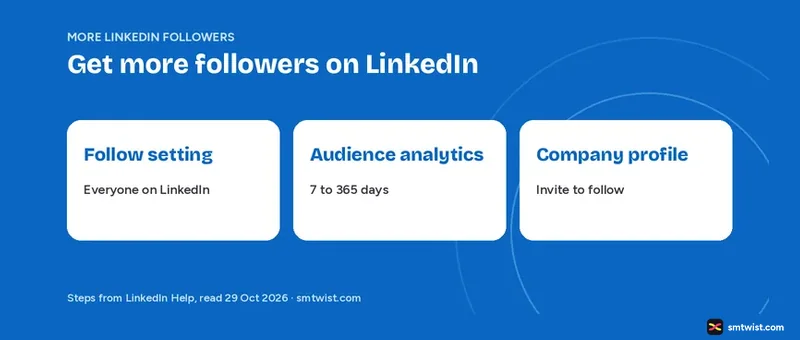
LinkedIn has no hidden trick for growth, but it has settings that decide who can follow you and what followers receive. This guide covers those settings, the content that reaches followers, audience analytics, company profile invitations and the Top Voice program. Every fact below comes from eight LinkedIn Help articles opened and read in full on 29 October 2026.
How to Get More Followers on LinkedIn With One Setting
Nothing else works if the setting blocks outside members. LinkedIn Help says your 1st-degree connections follow your posts and articles automatically, and anyone can follow you even outside your network. Follow these six steps on desktop.
- Click the Me icon at the top of your LinkedIn homepage.
- Select Settings & Privacy.
- Select Visibility on the left.
- Under Visibility of your LinkedIn activity, click Followers.
- Under Who can follow you, choose Everyone on LinkedIn.
- Under Make follow primary, switch the toggle on.
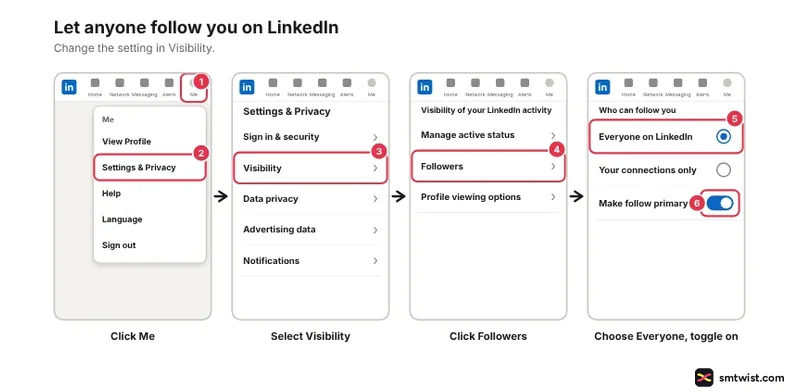
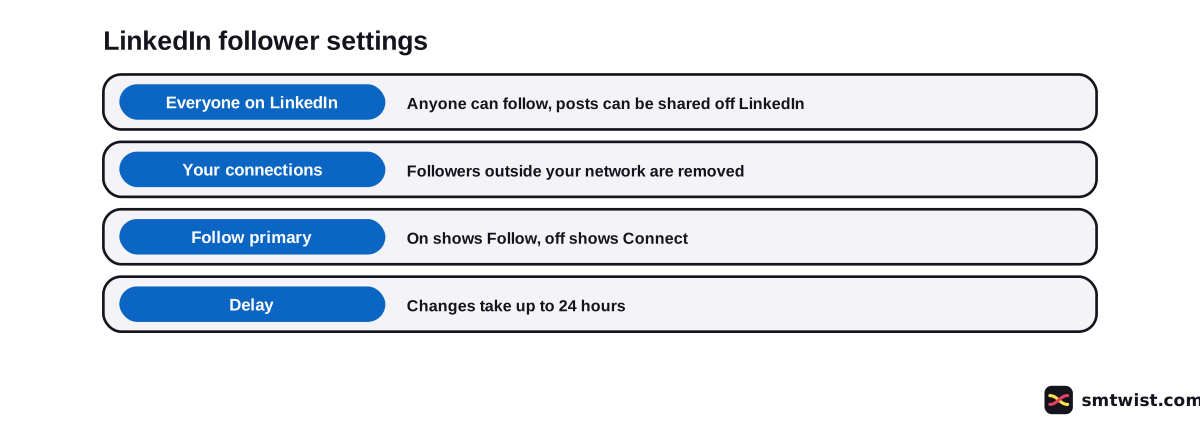
On mobile, tap your profile picture, then Settings & Privacy, the Visibility tab and Followers. The choices are the same. Changes can take up to 24 hours to take effect.
Why should You Not Limit Followers to Your Connections?
The second option, Your connections, shrinks your audience at once. LinkedIn Help lists three results.
- Followers outside your network are removed.
- Your follower number becomes your total number of connections.
- The Follow button next to your posts and articles disappears.
If your goal is more followers, leave the setting on Everyone on LinkedIn. That choice also lets your posts be shared off LinkedIn.
Make Follow the Main Button on Your Profile
The Make follow primary toggle decides what a visitor sees first. On shows Follow and off shows Connect, and LinkedIn Help gives no figure for how much it changes follows.
Follow suits a member whose goal is a reading audience. Connect suits a member who wants two-way contacts. A visitor who picks Connect from the overflow menu follows you while the invitation waits and stays a follower if you decline.
What is the Difference Between Followers and Connections?
LinkedIn Help describes following and connecting as two ways to build a network. The table sets out what changes.
| Follower | Connection | |
|---|---|---|
| Relationship | One-way | Two-way |
| Sees your public posts | Yes | Yes |
| Can message you directly | No | Yes |
| Needs an invitation | No | Yes |
| Sees your posts without your say | No | Yes, as a 1st-degree connection |
Help advises inviting only people you trust and know. Growth by cold invitations goes against that guidance, and our LinkedIn networking guide shows how to build real contacts.
What do Followers Receive From You?
Followers receive your posts, articles and shares in their home feed without being connected to you. LinkedIn Help compares this to following a Top Voice. Public posting is therefore the engine behind every plan for how to get more followers on LinkedIn.
Write for the reader first, and the guide to writing a LinkedIn post walks through the structure. The engagement guide covers the per post tactics that this guide leaves out. LinkedIn also sends you a notification whenever a non-connection starts following you.
See Your Follower Growth in Audience Analytics
All members have audience analytics, found under Analytics & tools. LinkedIn Help lists what it shows.
- Total followers, which counts connections and non-connection followers
- A graph of new followers per day
- Top demographics by job title, location, industry, seniority, company size or company, with the top five shown
You choose a date range from 7 days up to 365 days, and it applies to the new followers graph and the demographics but not to the total at the top. Only the mobile app offers a custom range.
An .XLSX export is available, and Help adds that all numbers are estimates. Read the trend and not the single digit. Our LinkedIn analytics guide covers the other reports.
To see the people themselves, click the My Network icon, open Manage my network, click Following & followers and choose the Followers tab.
How to Get More Followers on LinkedIn for a Company Profile
How to get more followers on LinkedIn works differently for a company, because the admin invites people. Super admins and content admins invite 1st-degree connections to follow from Invite to follow in the admin view. Every invitation shows the name of the member who sent it.
LinkedIn Help sets these conditions.
- Overview, Industry and Company size must be filled in
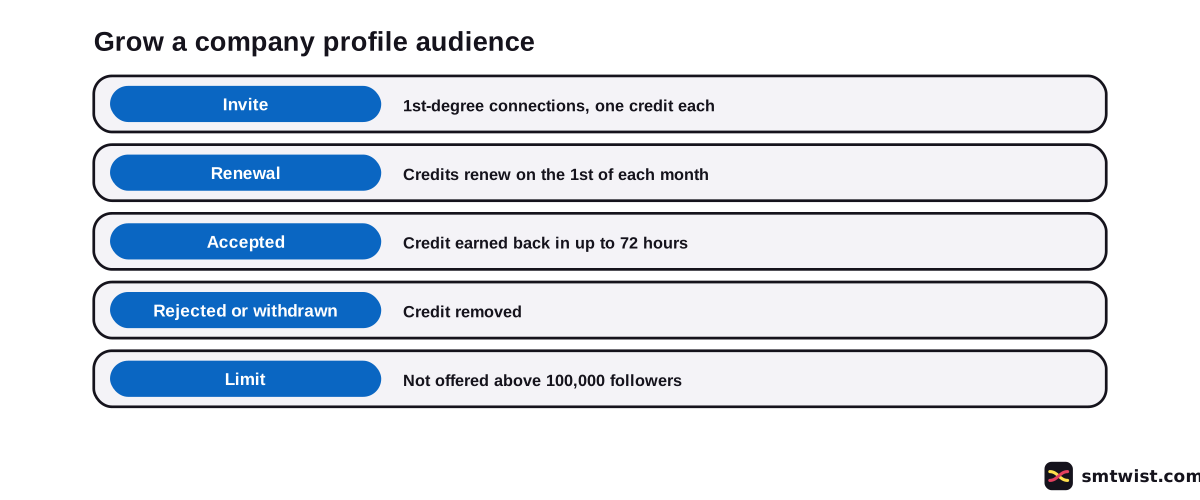
- The feature is not offered above 100,000 followers
- A minimum number of connections is required
- Invitation credits are shared by all admins and renew on the first day of every month
Sending an invitation uses one credit. An accepted invitation earns the credit back, which can take up to 72 hours, while a rejected or withdrawn one removes it.
Premium company profile subscribers can also invite followers of similar company profiles. Auto-invites reach people who interacted with your content in the past 30 days. Companies can place a Follow button on their website too.
A complete company profile gives visitors a reason to follow, and the company profile optimization guide lists the fields to fill. Admins cannot view the follower list of a company profile.
How to Become a LinkedIn Influencer
LinkedIn Help does not describe an influencer program. It describes LinkedIn Top Voices, an invite-only group that wears a blue badge. LinkedIn reviews shared content to find new Top Voices, and the badges are assessed and renewed twice a year.
Help names five factors.
- Platform presence, meaning consistent content and regular engagement
- Quality and originality
- Subject matter expertise
- Safety, trust and professionalism under the Professional Community Policies
- Prominence, which editors can grant to members with outsized influence in a local market or industry
Members who mainly promote paid services are not considered, and a follower count is not among the factors. Help also says any member can reach a wide audience whether or not they hold the badge.
You can nominate yourself or another member with the form in Help, and LinkedIn reviews nominations quarterly. Our LinkedIn SEO guide covers how people find your profile.
What is Still Unconfirmed?
We ran nothing on a live account. That makes this guide Checked and not Tested. LinkedIn updated the follower settings article four weeks before our reading, and your screen can differ.
None of the Help articles gives a follower target, no timeline for growth and no effect size for the primary Follow toggle. They also do not say how long a Top Voice invitation takes after you start posting.
Where This Guide Fits
Follower growth is one part of LinkedIn Analytics and Growth inside the LinkedIn hub. Our editorial policy defines every label we use.
Sources
- LinkedIn Help: Manage who can follow you settings, read 29 October 2026, the follower setting, the Follow primary toggle and the connections only effect.
- LinkedIn Help: Follow and connect on LinkedIn, read 29 October 2026, follow against connect.
- LinkedIn Help: Followers of your content, read 29 October 2026, what followers receive.
- LinkedIn Help: View your followers, read 29 October 2026, where to see followers.
- LinkedIn Help: Audience analytics, read 29 October 2026, follower growth and demographics.
- LinkedIn Help: Invite connections to follow your company profile, read 29 October 2026, the invite steps and requirements.
- LinkedIn Help: Invitation limits for your company profile, read 29 October 2026, invitation credits.
- LinkedIn Help: LinkedIn Top Voices, read 29 October 2026, badge rules and selection factors.
This guide is labelled Checked. Every step and figure was compared with the Help articles above, and no setting was changed on a live account. How we label guides explains the three labels.
FAQ
How do I get more followers on LinkedIn?
Allow Everyone on LinkedIn to follow you, make Follow your primary profile action and post public content. Followers receive your posts, articles and shares in their feed without being connections.
How do I become a LinkedIn influencer?
LinkedIn Help describes no influencer program. It describes Top Voices, an invite-only program with a blue badge, which means the route is regular posting and meaningful comments, plus a nomination if you want to put yourself forward.
How many followers do you need to be a LinkedIn Top Voice?
LinkedIn Help gives no number. Its factors are platform presence, quality and originality, subject matter expertise, safety and professionalism, and prominence.
Is 1000 followers a lot on LinkedIn?
LinkedIn publishes no benchmark for follower counts. We cannot rate that number from a source. Audience analytics shows your total and your new followers per day, which is a better test of growth.
Can I buy followers on LinkedIn?
No LinkedIn Help article we read supports it. The Help guidance on invitations says to connect only with people you know and trust.
Why did my LinkedIn follower count drop?
Changing Who can follow you to Your connections removes followers outside your network, and your count then equals your connections. Help also notes that a restored account can briefly show an incomplete follower list.
What is the difference between a follower and a connection on LinkedIn?
A connection is a two-way relationship between first-degree contacts who can message one another. A follower sees your public posts and articles without joining your network.
How do I get more followers on a LinkedIn company profile?
Use Invite to follow in the admin view to invite your 1st-degree connections. Every invitation uses one monthly credit, and a Premium company profile subscription adds options like inviting followers of similar company profiles.
 Editor
Written by
Namrata Arora
Namrata Arora is a social media expert with two years of hands on experience on Instagram, Facebook and other platforms. She writes the how to guides on Social Media Twist and tries the steps on a real account for every guide marked Tested.
- Marks every guide Tested or Checked
- Writes about Instagram, Facebook, TikTok
- 43 guides on SMTwist
Guest posts are edited by SMTwist before they go live. Paid or affiliate links are labelled and carry rel="sponsored".