LinkedIn Hashtags: How They Work and How to Use Them
LinkedIn hashtags explained from LinkedIn Help: what it still confirms in post text, what the old hashtag article no longer shows and how to use them.

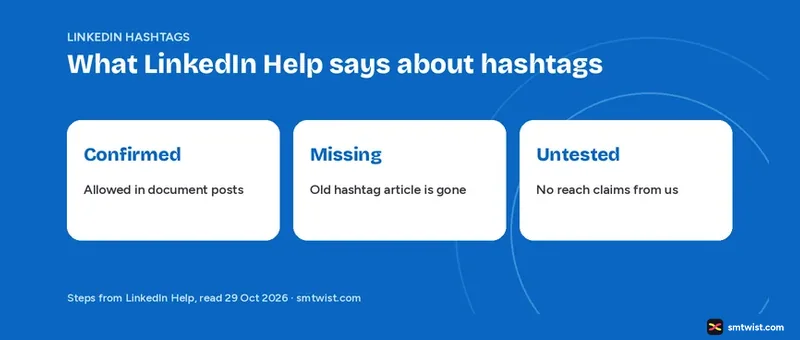
LinkedIn hashtags are among the most explained and least sourced topics in social media advice. Third-party guides give counts and follower numbers, yet the LinkedIn Help article that used to cover hashtags returned a 404 error when we opened it on 29 October 2026. This guide on LinkedIn hashtags says what Help still confirms, what it no longer shows and how we would use them.
What LinkedIn Help Confirms About LinkedIn Hashtags
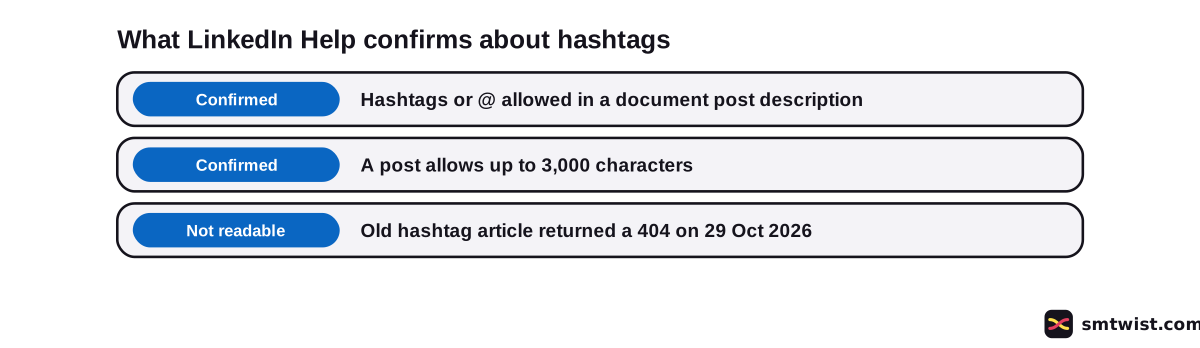
Three LinkedIn Help articles bear on hashtags, and only one names them. Here is what they say.
- Upload and share documents on LinkedIn says that when you add a description to a document post you can use hashtags or @ to mention someone. The field is optional.
- The Post and share updates article gives 3,000 characters as the limit for a post.
- Mention people in your posts explains the @ steps and says the person you mention gets email and app notifications.
The document post article is the only direct confirmation we have that LinkedIn accepts hashtags in post text. Nothing else we read describes what LinkedIn hashtags do after you post.
What Happened to the Old Hashtag Help Article
LinkedIn Help had an article titled Use Hashtags and Follow Topics on LinkedIn at linkedin.com/help/linkedin/answer/a528144. When we opened that address on 29 October 2026 it returned a 404 error with a not found message. Google still listed the title in search results the same day.
We could not read the article and say nothing about what it used to contain.
Some LinkedIn creators say hashtags were withdrawn. That is opinion and not a LinkedIn Help statement. We do not rely on it. For other ways to raise engagement on a post, read how to increase engagement on LinkedIn.
How do You Add Hashtags to a LinkedIn Post?
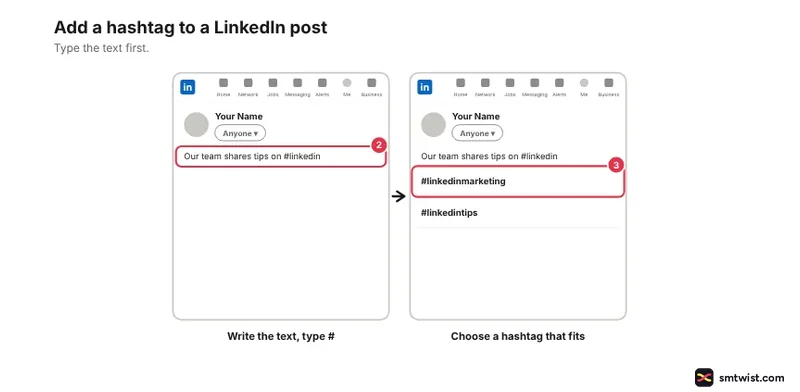
Our view of how to use LinkedIn hashtags follows, and it is not a Help instruction. The article that would confirm the typing could not be read. Follow these four steps.
- Open the post box and write your text first.
- Type # followed by a word with no space, where the word fits the sentence.
- Choose words that name the topic of the post.
- Place LinkedIn hashtags where they read naturally, inside a sentence or on a closing line.
Drafting comes before tagging, and our guide on how to write a LinkedIn post covers it. The full posting flow sits in how to post on LinkedIn.
Carousel and poll posts have their own guides on how to create a LinkedIn carousel and how to create a poll on LinkedIn. We did not check how LinkedIn hashtags behave in those formats.
What is the Difference Between LinkedIn Hashtags and Mentions?
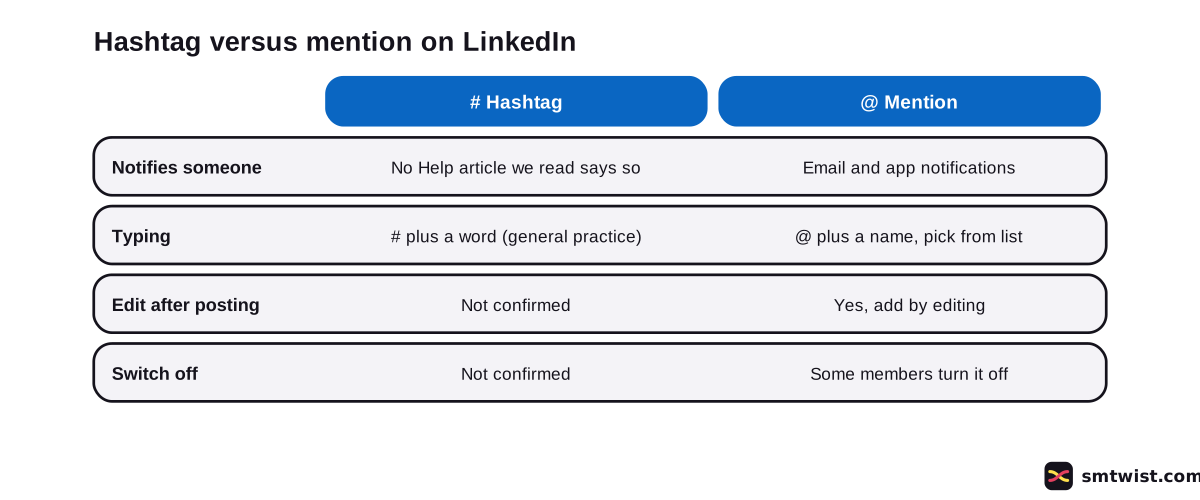
Mentions work differently from LinkedIn hashtags, and the Help article on them shows how. The table compares four points.
| Point | Hashtag | Mention |
|---|---|---|
| Typing | # plus a word (general practice) | @ plus a name, then pick from the list |
| Notifies someone | No Help article we read says so | Email and app notifications |
| Edit after posting | Not confirmed | Yes, you can add a mention by editing |
| Switch off | Not confirmed | Some members turn mentions off |
To mention someone, type @, start typing a name, pick the person from the list, finish your text and click Post. A mention reaches a named person. No Help article we read says LinkedIn hashtags reach anyone.
Do Hashtags Count Toward the Character Limit?
Post and share updates says a post allows up to 3,000 characters. LinkedIn hashtags are typed text, and we infer they count inside that total. That inference is ours and not a Help statement.
Other post limits are in the LinkedIn character limit guide.
The same article says LinkedIn can limit the visibility of posts when it detects excessive post creation that indicates inauthentic activity or an automation tool. Nothing in it links hashtags to this. We do not claim LinkedIn hashtags trigger it.
What is Still Unconfirmed?
Five points about LinkedIn hashtags have no support in any LinkedIn Help article we could read.
- Whether you can still follow a hashtag.
- Whether LinkedIn shows hashtag suggestions as you type.
- Any ideal hashtag count.
- Any effect on reach.
- Hashtag follower counts.
Third-party guides state rules like the 3-3-3 rule and follower numbers with no LinkedIn source. We do not repeat them as fact. We also tested no reach effect, which is why the label is Checked.
If you want to see what a post reached, the guide on what are impressions on LinkedIn explains that metric.
Where This Guide Fits
Hashtags are one detail of post formatting. The wider rules live in the LinkedIn section, in the topic on posting rules and formats.
Check the editorial policy for how the Checked label works.
Sources
- LinkedIn Help: Upload and share documents on LinkedIn, read 29 October 2026, hashtags or @ in the description of a document post.
- LinkedIn Help: Mention people in your posts, read 29 October 2026, the @ steps and who is notified.
- LinkedIn Help: Post and share updates, read 29 October 2026, the 3,000 character limit and the limit on excessive posting.
This guide is labelled Checked. We compared every statement with the Help articles above and posted no hashtag on a live account. How we label guides explains the three labels.
FAQ
Do hashtags work on LinkedIn?
Yes, as text. LinkedIn Help says you can use hashtags in the description of a document post. We found no readable Help article that states a reach effect, and we did not test one.
How do you use hashtags on LinkedIn?
Type # followed by a word in your post text, with no space between them. This is general practice, because the Help article on hashtags could not be opened. Choose words that fit the topic and read naturally.
How many hashtags should you use on LinkedIn?
LinkedIn Help names no ideal number in any article we read. Counts you see elsewhere come with no LinkedIn source. We do not repeat them.
What is the 3-3-3 hashtag rule on LinkedIn?
It is a third-party habit, not a LinkedIn rule. No LinkedIn Help article we read mentions it. We give none of its numbers as fact.
Can you still follow a hashtag on LinkedIn?
We cannot confirm it. The Help article titled Use Hashtags and Follow Topics on LinkedIn returned a 404 error on 29 October 2026, and we could not read it.
Do hashtags count toward the LinkedIn character limit?
Almost certainly yes, though this is our inference. LinkedIn Help says a post allows up to 3,000 characters, and a hashtag is typed text inside the post.
Does a hashtag notify anyone on LinkedIn?
No Help article we read says it does. A mention is different, because LinkedIn Help says the person you mention gets email and app notifications.
Which hashtag is trending on LinkedIn?
No LinkedIn Help article we read lists trending hashtags. We could not confirm a trending feature. Check inside your own LinkedIn account.
 Editor
Written by
Namrata Arora
Namrata Arora is a social media expert with two years of hands on experience on Instagram, Facebook and other platforms. She writes the how to guides on Social Media Twist and tries the steps on a real account for every guide marked Tested.
- Marks every guide Tested or Checked
- Writes about Instagram, Facebook, TikTok
- 43 guides on SMTwist
Guest posts are edited by SMTwist before they go live. Paid or affiliate links are labelled and carry rel="sponsored".