How to Create a LinkedIn Account
How to create a LinkedIn account with email, Google or Apple, plus the real name, age and one account rules and the fix for an email already in use.

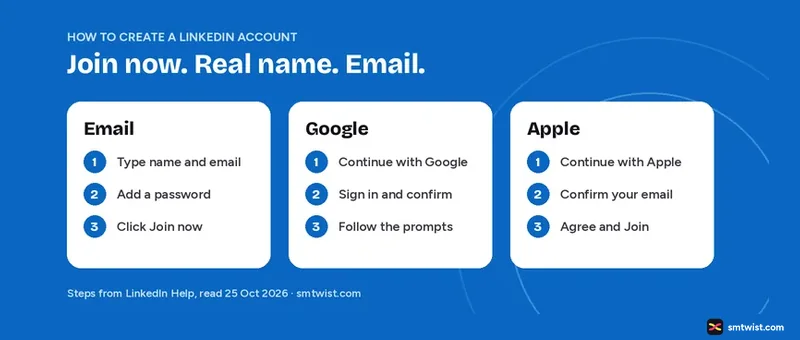
You can create a LinkedIn account with an email address, with Google or with Apple, and the account is free. This guide on how to create a LinkedIn account gives the steps for all three, the rules LinkedIn sets on names, emails and age, the fix for an email that is already in use and what you can do without an account. Every fact comes from LinkedIn Help and the LinkedIn User Agreement, read on 25 October 2026.
How to Create a LinkedIn Account Step by Step
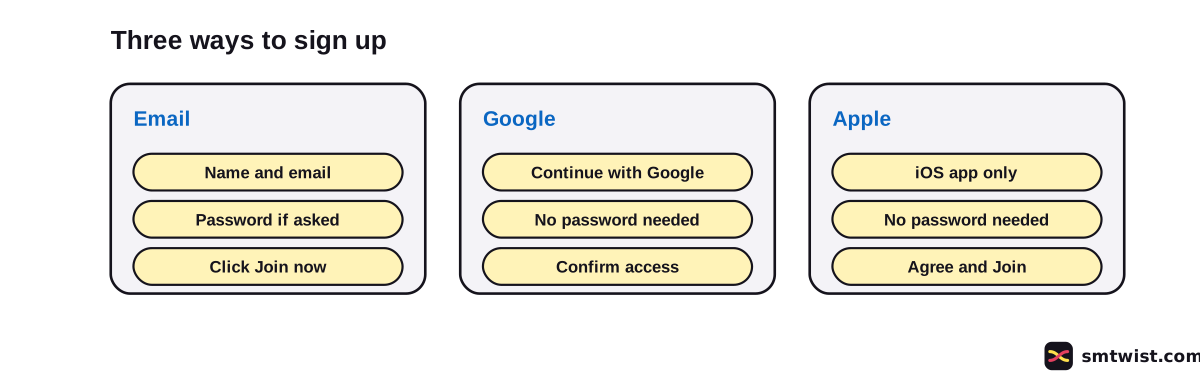
Start at the LinkedIn sign-up form. The steps below follow LinkedIn Help, and the figure shows all three routes for LinkedIn sign up.
Create a LinkedIn Account With Your Email Address
- Type your first and last name and your email address.
- Enter a password if you are prompted to.
- Click Join now.
- Finish any additional steps LinkedIn asks for.
Create a LinkedIn Account With Gmail
- Click or tap Continue with Google.
- Sign in to your Google account in the pop-up window and select Next.
- Select Confirm to let LinkedIn use your Google account.
- Follow the on-screen prompts to finish your profile.
To create a LinkedIn account with Gmail, LinkedIn Help says you must select the Continue with Google button to agree to the terms and sign up with your Gmail address. LinkedIn can show a step to import Gmail contacts, which is optional and can be skipped.
Create a LinkedIn Account With Apple
- Open the LinkedIn iOS app and select Continue with Apple.
- Confirm the email address registered with your Apple account and select Continue.
- Click or tap Agree and Join.
To sign up for LinkedIn with Apple, you must use the iOS app. After that, you can sign in with your Apple ID on iOS, Android and the web.
Rules Before You Create a LinkedIn Account
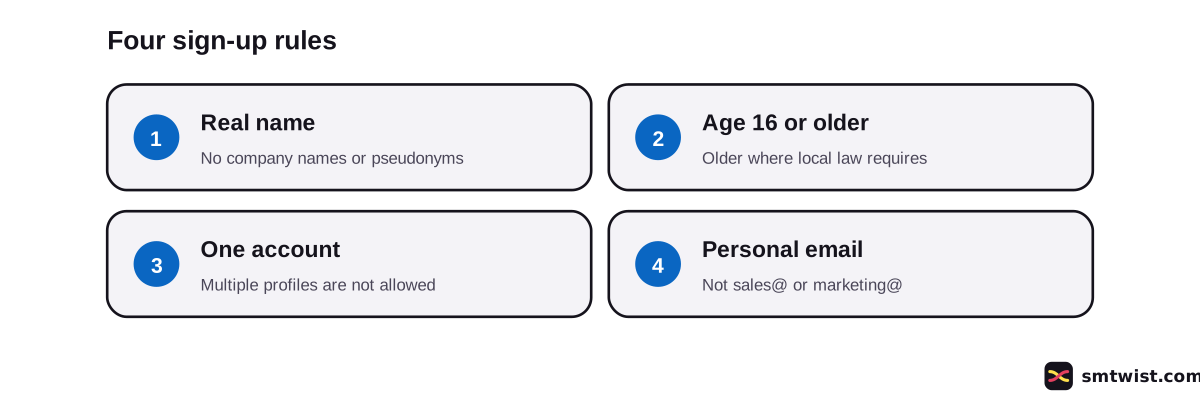
LinkedIn sets four rules for LinkedIn sign up. They come from the Help sign-up article and the User Agreement.
| Rule | What LinkedIn says |
|---|---|
| Real name | Use your true name. Company names and pseudonyms are not allowed. |
| Do not use an address tied to an office or task, like marketing@company.com or sales@business.org. | |
| Age | At least 16, or older where local law requires it. |
| One account | Creating multiple profiles is not allowed. |
The User Agreement adds that an account made with false information, including an account for someone else or for a person under 16, breaks the terms. If you hold a second profile already, read Manage Multiple LinkedIn Accounts.
Why does LinkedIn Say Your Email is Already Registered?
The email address you typed belongs to an existing account. LinkedIn Help lists four causes.
- You clicked Join now instead of Sign in.
- You accepted a LinkedIn invitation or created an account in the past.
- Your employer or internet provider reissued an address that another person used before.
- You typed a Gmail address with periods, like a.bc@gmail.com, instead of abc@gmail.com.
If you already hold an account, you do not need to create a LinkedIn account again. To get in, click Sign in and enter your email and password. For a Gmail address with periods, enter it without the periods. If you forgot the password, use the reset option on the sign-in screen.
Do Not Create a Second LinkedIn Account by Accident
LinkedIn Help gives the same warning for Google and for Apple. If you already have an account, do not click Join now. If your account uses an @gmail address, do not click Continue with Google, because that can create a new account. Sign in with your email and password instead. If a duplicate was made, LinkedIn Help says to close the new one.
Is It Free to Create a LinkedIn Account?
Yes, it costs nothing to create a LinkedIn account. LinkedIn Help says there is a basic free account and Premium subscriptions, which eligible users can try free for one month. Our guide on whether LinkedIn Premium is worth it compares the plans with the free account.
Can You Use LinkedIn Without an Account?
Only in a limited way. LinkedIn Help says a guest can apply to many jobs without signing in. On a job post, an Apply button with an arrow icon sends you to the company website. If the button has no arrow, you must sign in or create an account to apply.
Members also control a public profile, which is a simplified version that people who are not signed in can see. LinkedIn Help says not every section can be public. It does not say that a non-member can browse every profile.
Secure Your LinkedIn Account After Sign Up
After you create a LinkedIn account, set up recovery before anything else. Once that is done, our guide on how to use LinkedIn for beginners gives a 7 day plan for the profile, connections and first post. LinkedIn Help suggests adding a second email address or a phone number as a recovery method when you set up your profile. If you lose access to your main email, you can sign in with the recovery method. LinkedIn Help also recommends two-step verification as another layer of security.
After sign-up, the steps for how to post on LinkedIn cover your first post, and the LinkedIn character limit guide lists the length limits for your headline and notes.
What is Still Unconfirmed
We did not create a LinkedIn account for this guide, so the label is Checked. LinkedIn changes the screens after Join now, and the Help articles on sign-up and Apple are about three years old, so a step can have moved. LinkedIn Help gives no password length rule for LinkedIn sign up in the articles we read. It also does not say how long a new account waits before you can post or connect.
Where This Guide Fits
This guide on how to create a LinkedIn account belongs to our LinkedIn Account Setup and First Steps topic, inside the LinkedIn section. This guide on how to create a LinkedIn account fits our setup topic. For a second profile, read Manage Multiple LinkedIn Accounts. For the paid plans, read Is LinkedIn Premium Worth It.
Sources
- LinkedIn Help: Sign up to join LinkedIn, read 25 October 2026, the steps and the name and email rules.
- LinkedIn Help: Sign up with your Google login credentials, read 25 October 2026, Continue with Google.
- LinkedIn Help: Sign up with your Apple login credentials, read 25 October 2026, Continue with Apple.
- LinkedIn Help: Email address is already registered, read 25 October 2026, the causes and the fix.
- LinkedIn Help: Difference between free LinkedIn and Premium accounts, read 25 October 2026, the free account.
- LinkedIn Help: No access to email address, read 25 October 2026, the recovery method.
- LinkedIn Help: Apply for jobs as a guest user, read 25 October 2026, using LinkedIn without an account.
- LinkedIn Help: LinkedIn public profile visibility, read 25 October 2026, the public profile.
- LinkedIn User Agreement, read 25 October 2026, the minimum age and the one account rule.
The label on this guide is Checked, which means we compared the steps with these sources and have not tried them on an account yet. Read how we label guides.
FAQ
How do I create a LinkedIn account?
Open the LinkedIn sign-up form, type your first and last name and email address, add a password if prompted and click Join now. Finish any extra steps LinkedIn shows.
Is a LinkedIn account free?
Yes. LinkedIn Help says there is a basic free account as well as Premium subscriptions, which eligible users can try free for one month.
Can I use Gmail to create a LinkedIn account?
Yes. Click Continue with Google, sign in to Google, select Confirm and follow the prompts. LinkedIn Help says you must select the Continue with Google button to agree to the terms.
Can I create a LinkedIn account with Apple?
Yes, from the LinkedIn iOS app only. Select Continue with Apple, confirm your email and choose Agree and Join. After that you can sign in with Apple on iOS, Android and the web.
How old do you have to be to have a LinkedIn account?
At least 16, says the LinkedIn User Agreement. The minimum is higher where local law requires an older age to use the service without parental consent.
Can I have two LinkedIn accounts?
No. LinkedIn Help says creating multiple profiles is not allowed under its Professional Community Policies and User Agreement.
Can I use a company name for my LinkedIn account?
No. LinkedIn Help says to use your true name. Company names and pseudonyms are not allowed on a personal profile.
Why does LinkedIn say my email is already registered?
The address belongs to an existing LinkedIn account. LinkedIn Help lists four causes, from clicking Join now instead of Sign in to a Gmail address typed with periods.
Can I use LinkedIn without an account?
Partly. LinkedIn Help says a guest can apply to many jobs through the company website, and members control which profile sections show to people who are not signed in. Other features need an account.
 Editor
Written by
Namrata Arora
Namrata Arora is a social media expert with two years of hands on experience on Instagram, Facebook and other platforms. She writes the how to guides on Social Media Twist and tries the steps on a real account for every guide marked Tested.
- Marks every guide Tested or Checked
- Writes about Instagram, Facebook, TikTok
- 13 guides on SMTwist
Guest posts are edited by SMTwist before they go live. Paid or affiliate links are labelled and carry rel="sponsored".