How to Report Someone on LinkedIn
How to report someone on LinkedIn: exact steps for a profile, post, comment, message, company profile, job and ad, plus what happens after.

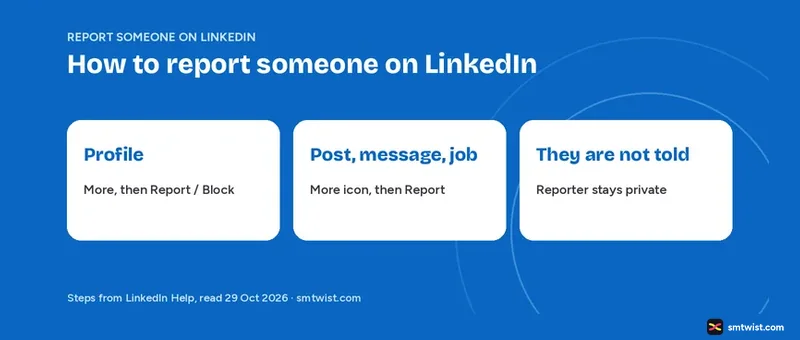
You have more than one report option on LinkedIn, and each sits in a different menu. This guide on how to report someone on LinkedIn gives the exact buttons for a profile, post, comment, message, company profile, job and ad. Every step comes from LinkedIn Help text read on 29 October 2026.
How to Report Someone on LinkedIn at a Glance
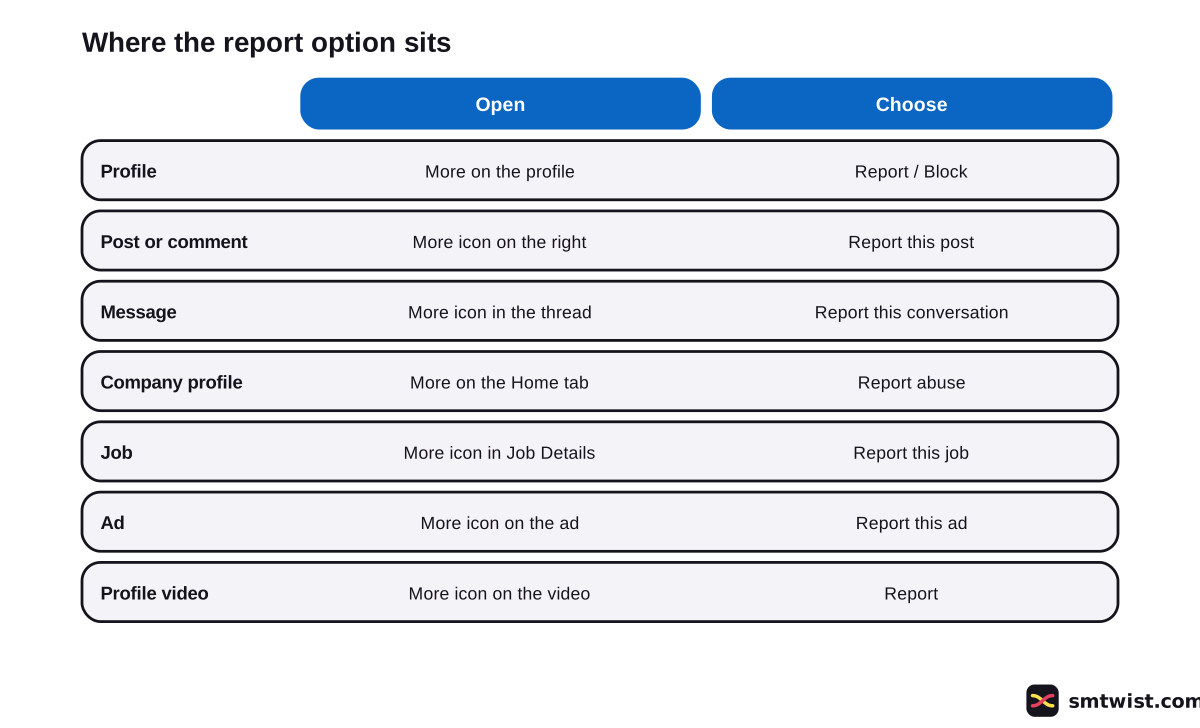
LinkedIn has no single report button. Seven items have their own route, and the table shows where each one starts.
| Item | Open | Choose |
|---|---|---|
| Profile | More on the profile | Report / Block |
| Post or comment | More icon on the right | Report this post |
| Message | More icon in the thread | Report this conversation |
| Company profile | More on the Home tab | Report abuse |
| Job | More icon in Job Details | Report this job |
| Ad | More icon on the ad | Report this ad |
| Profile video | More icon on the video | Report |
Most reports end at a pop-up titled Why are you reporting this? Choose the reason and click Submit. Choose Back to leave without filing.
How do You Report a LinkedIn Profile?
Knowing how to report someone on LinkedIn starts with the profile report, which fits when the account is fake, impersonates someone or breaks the Terms of Use. Help gives these desktop steps.
- Open the member's profile.
- Click the More icon or button.
- Click Report / Block.
- In the Report or block pop-up, choose Report [member's name] or entire account.
- Choose a reason in the pop-up that opens.
- Click Submit report.
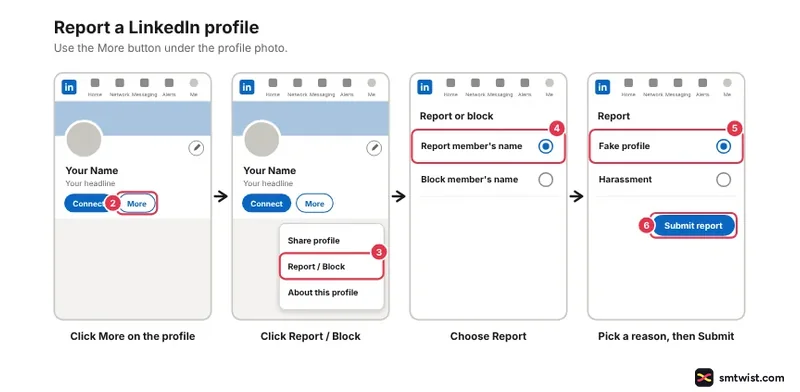
On the mobile tab, tap More and then Report or block, and the rest follows the same order.
The spam article writes Report/Block and calls the next pop-up What do you want to do? The fake profile article spaces the slash and names the pop-up Report this profile. Follow what your screen shows when labels differ.
An invitation from a stranger has a lighter route. Click the My Network icon, click Ignore and choose I don't know this person in the pop-up at the bottom left. Help says this stops further invitations from that member and is feedback LinkedIn can use to restrict the sender.
How do You Report a Post or Comment?
Posts and comments share the same report path on desktop. Help lists five steps.
- Find the post or comment.
- Click the More icon at the right corner of the post, or on the right side of the comment.
- Click Report this post.
- Choose the reason under Why are you reporting this?
- Click Submit.
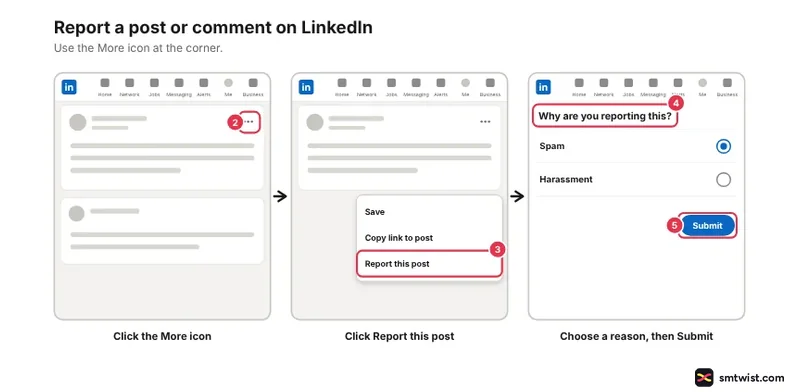
In the mobile app, tap the More icon to the right of the post and tap Report this post. For a comment, tap the number of comments below the post and tap the More icon to the right of the comment. Then tap Report on iOS or Report comment on Android and choose the reason.
A profile video has its own entry. Click More at the upper right of the video, click Report, choose a reason and click Submit.
Per Help, the video option was being rolled out gradually. If your screen lacks it, report the post instead.
Report a Message on LinkedIn
Reporting a message moves the conversation out of your way at once. Help gives these desktop steps for a thread you already opened.
- Click the Messaging icon at the top of your homepage.
- Select the message in the left rail.
- Click the More icon at the top right of the thread.
- Click Report this conversation.
- Choose the reason under Why are you reporting this?
- Click Submit.
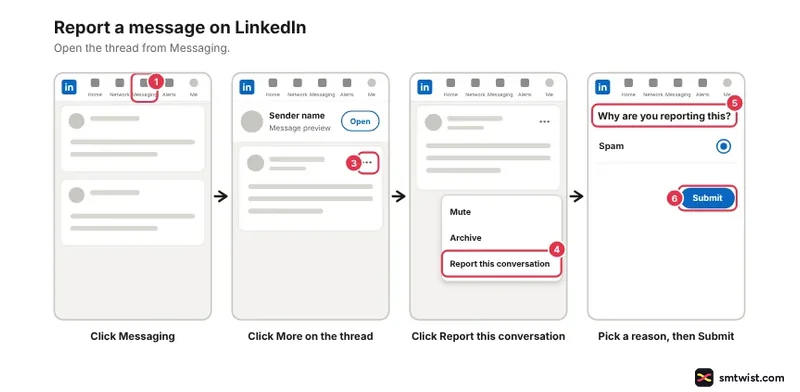
LinkedIn then offers the choice to block the member and, if you are connected, to remove them as a connection. Our guide to blocking a member covers that step.
Some messages get flagged for you.
Flagged messages show This message may contain unwanted or harmful content. Click Report under it, or click Mark content safe to dismiss it.
Help says the report sends the conversation to the spam folder and stops notifications for that thread. You can report a message even after it was edited or deleted.
Report a Company Profile, Job or Ad
Four routes sit apart from the profile report. The company profile route starts from the Home tab, and the list gives all four.
- Company profile on desktop. Open the company profile, click More on the Home tab, click Report abuse, choose an option and click Submit.
- Company profile on iOS. Open the company profile, tap More, tap Report abuse, choose an option and tap Submit.
- Job. Click the job title to open Job Details, click the More icon and click Report this job.
- Ad. Click the More icon on the right of the ad, click Hide or Report this ad and click Report this ad.
The job report is the one place where Help prints the full reason list. After Report this job, you choose one of three groups under Why are you reporting this? and then a detail.
| Group | Details |
|---|---|
| I think it's spam or a scam | Scam, phishing or malware. Promotional or spam. Illegal good or service |
| I think it's discriminatory or offensive | Discriminatory. Offensive or harassing. Extreme violence or terrorism |
| I think something is broken or incorrect | Job closed. Incorrect company. Incorrect location. Incorrect formatting. Does not belong on LinkedIn |
Job reports start only inside a specific job's details. LinkedIn teams review the report and correct or remove the job as needed. Our LinkedIn job search guide covers the other side, finding real roles.
Ads follow Marketing Solutions Help, which adds that text ads under Promoted open the More icon and ask you to choose the ad first. Then choose a reason and click Submit.
Report a Fake Profile on LinkedIn
Knowing how to report someone on LinkedIn for a fake profile starts with the signals. Help lists little or no information, mismatched details, unusual photos, suspicious behavior and impersonation. Suspicious behavior covers asking for money or sensitive data, moving the chat off LinkedIn and offering unrealistic jobs.
Not every incomplete profile is fake, says Help, and an empty profile alone is weak evidence.
Follow the profile steps above and choose This person is impersonating someone or This account is not a real person in the Report this profile pop-up. Click Submit report.
Deceptive media in a post has its own form, and Help points to it. We did not open that form.
Report Harassment on LinkedIn
How to report someone on LinkedIn for harassment follows the normal report route with one choice changed. Click the More icon on the message or post, or on the right side of the comment, click Report this post or Report, and choose Harassment under Why are you reporting this?
Threats and abuse have a second route. LinkedIn Help links its Reporting Harassment or a Safety Concern form, which asks for your first name, last name, email, the URL of the sender's profile and the message content and other details. You can add an attachment before you click Submit.
On suicide or self-injury, Help names befrienders.org, the US line 988 or 1-800-273-8255, and the police in imminent danger. Do not wait for a LinkedIn review in that case.
What to do if a LinkedIn Account is Hacked
Two different routes exist, depending on whose account was taken. For your own account, submit the Report Unauthorized Account Access or Changes form from the Help article. Then change your password, switch on two-factor authentication and review your active sessions, email and phone.
If a connection is the one hacked, report the profile with Report or block, Report [member's name] or entire account and This person is impersonating someone. You can also block the member and unblock them once they regain control, or remove the connection.
How to Report Someone on LinkedIn Without Them Knowing
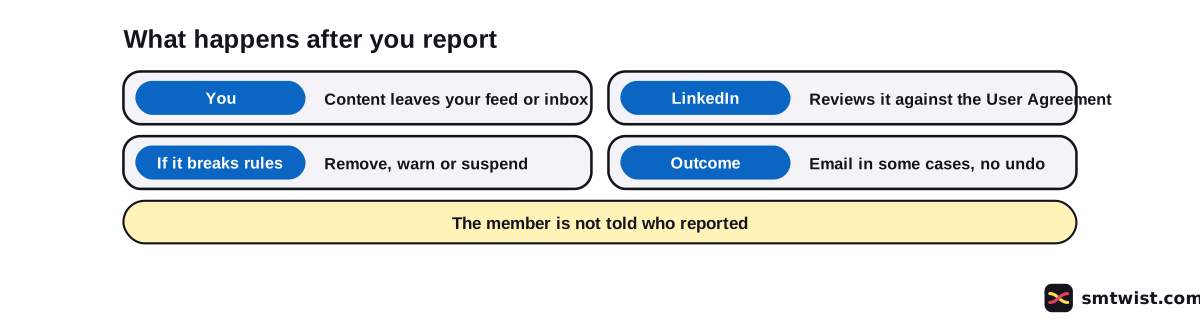
Nobody tells the member who reported them. The harassment article says LinkedIn does not notify the person you report, and the content article calls sharing the flagger's identity a breach of the Privacy Policy.
One exception sits in a different route. When a super admin of a company profile reports inaccurate work history on a member's profile, the member is told the experience was reported, though not by whom. That route is closed to ordinary members.
What Happens After You Report Someone on LinkedIn?
LinkedIn Help names five outcomes after a report.
- You should no longer see the content or conversation in your feed or messaging inbox.
- LinkedIn reviews it against the User Agreement and Professional Community Policies.
- If it breaks the rules, LinkedIn can remove the content, warn the author or suspend the account.
- In some cases you receive the outcome by email.
- There is no undo, and the content stays up if the team finds no violation.
Learning how to report someone on LinkedIn also means knowing the limit. Report only what breaks the Community Guidelines and User Agreement, since a difference of opinion is not a reason to flag something. LinkedIn also has limited power over content outside its platform unless it breaks the brand.
To manage the updates you get about reported content, open your Settings. The comments and moderation tools you control on your own posts are in the LinkedIn comments and moderation tools topic.
What is Still Unconfirmed?
We filed no report from a live account. The label is Checked for that reason. Menu names differ between Help articles and devices, and the article ages run from 6 days to 2 years.
Help does not print the full reason list for a profile, post, comment or message report. It also gives no report status screen, no response time and no promise that every report ends with an email. The Safety Center article was not opened, and the steps for reporting a group or a service or product profile were not read.
Where This Guide Fits
Reporting is the second step after blocking in the LinkedIn section. The LinkedIn Comments and Moderation Tools topic gathers the rest, and our delete a comment guide covers removing one under your own post.
The Checked label is defined in our editorial policy.
Sources
- LinkedIn Help: Recognize and report spam, inappropriate, and abusive content, read 29 October 2026, the post, comment, message and profile steps and what happens after.
- LinkedIn Help: Report fake profiles, read 29 October 2026, the fake profile signals and the profile report steps.
- LinkedIn Help: Report harassment or a safety concern, read 29 October 2026, the Harassment reason, the safety form and the not notified line.
- LinkedIn Help: Report inappropriate or offensive updates in your LinkedIn Feed, read 29 October 2026, the post and comment steps on desktop and mobile and the no undo line.
- LinkedIn Help: Report message content, read 29 October 2026, the flagged message warning and the spam folder.
- LinkedIn Help: Report abuse on a company profile, read 29 October 2026, the company profile steps on desktop and iOS.
- LinkedIn Help: Reporting jobs on LinkedIn, read 29 October 2026, the job steps and the three reason groups.
- LinkedIn Marketing Solutions Help: Report inappropriate and offensive ads, read 29 October 2026, the ad steps.
- LinkedIn Help: Report a compromised account, read 29 October 2026, the own account form and the connection route.
- LinkedIn Help: Inaccurate information on another member's profile, read 29 October 2026, the route open only to super admins of a company profile.
- LinkedIn Help: Report inappropriate content, messages, or safety concerns, read 29 October 2026, when to report and the identity rule.
The Help articles listed above back every route in this guide. No report was filed from a live account, which makes the label Checked in the sense our editorial policy gives it.
FAQ
How do I report someone on LinkedIn?
Open their profile, click More and click Report / Block. Choose Report [member's name] or entire account, choose a reason and click Submit report.
Will someone know I reported them on LinkedIn?
No. LinkedIn Help says the member is not told who reported them, and sharing the identity of the flagger is against the Privacy Policy. One exception exists for a company profile super admin who flags an inaccurate job on a profile, where the member learns the experience was reported but not by whom.
What happens if I report someone on LinkedIn?
You stop seeing the reported post or conversation. LinkedIn reviews it against the User Agreement and Professional Community Policies and can remove the content or suspend the account. In some cases you get the outcome by email.
Can I report someone for lying on LinkedIn?
Only in the ways Help names. Impersonation and accounts that are not a real person go through the fake profile report. Only a super admin of a company profile can report inaccurate work history on a profile, and a difference of opinion is not a valid reason.
How do I report a LinkedIn account that has been hacked?
If it is your own account, submit the Report Unauthorized Account Access or Changes form and change your password. If it is a connection's account, report that profile with This person is impersonating someone.
How do I report a message on LinkedIn?
Open the message, click the More icon at the top right of the thread and click Report this conversation. Choose a reason and click Submit.
Can you undo a report on LinkedIn?
No. LinkedIn Help says there is no way to undo a reported item. The content stays up if the team finds it does not break the User Agreement.
How do I report a fake profile on LinkedIn?
Click More on the profile, click Report / Block and choose Report [member's name] or entire account. Choose This person is impersonating someone or This account is not a real person and click Submit report.
How do I report harassment on LinkedIn?
Click the More icon on the message, post or comment, click the report option and choose Harassment under Why are you reporting this? For threats and abuse, LinkedIn Help also points to its Reporting Harassment or a Safety Concern form.
 Editor
Written by
Namrata Arora
Namrata Arora is a social media expert with two years of hands on experience on Instagram, Facebook and other platforms. She writes the how to guides on Social Media Twist and tries the steps on a real account for every guide marked Tested.
- Marks every guide Tested or Checked
- Writes about Instagram, Facebook, TikTok
- 43 guides on SMTwist
Guest posts are edited by SMTwist before they go live. Paid or affiliate links are labelled and carry rel="sponsored".