How to Change Your LinkedIn URL
How to change your LinkedIn URL on desktop and mobile, the characters allowed, the limit of five changes in six months and what happens to your old link.

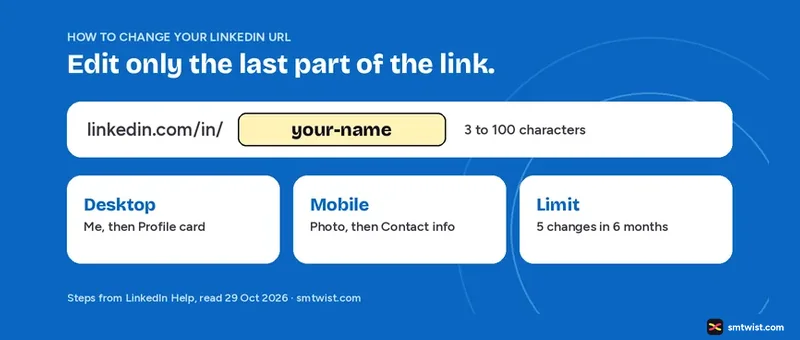
You can change your LinkedIn URL in under a minute, but the ending you choose is limited by character rules, by a cap on how often you edit it and by what happens to the old link. This guide on how to change your LinkedIn URL gives the desktop and mobile steps, the rules for the ending and the six month and seven day timings. Every fact comes from the LinkedIn Help article on managing your public profile URL, read on 29 October 2026.
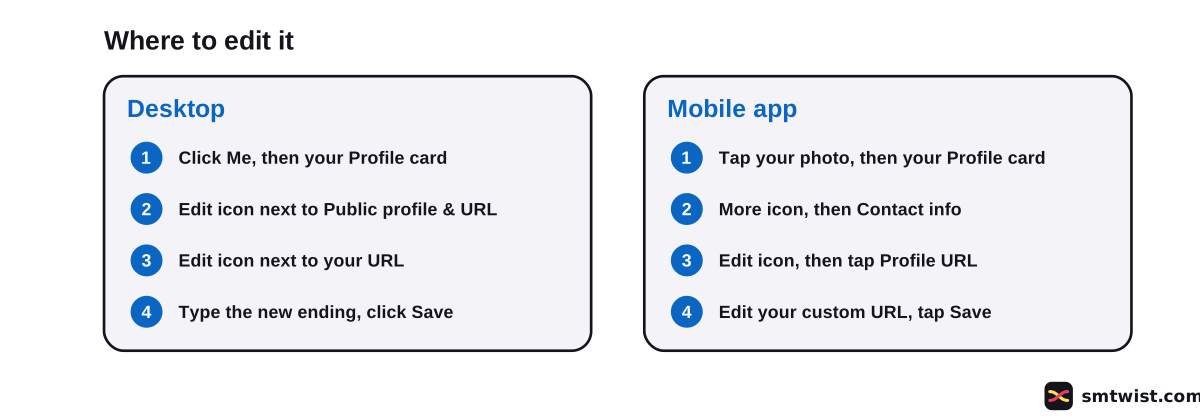
How to Change Your LinkedIn URL on Desktop
The result is a custom public profile URL in LinkedIn terms. The link always starts with linkedin.com/in/ and you edit only the last part. Follow these six steps on a computer.
- Click the Me icon at the top of your LinkedIn homepage.
- Click your Profile card in the dropdown.
- On your profile, click the Edit icon next to Public profile & URL in the right pane.
- Under Edit your custom URL, click the Edit icon next to your public profile URL.
- Type the new last part of the URL in the text box.
- Click Save.
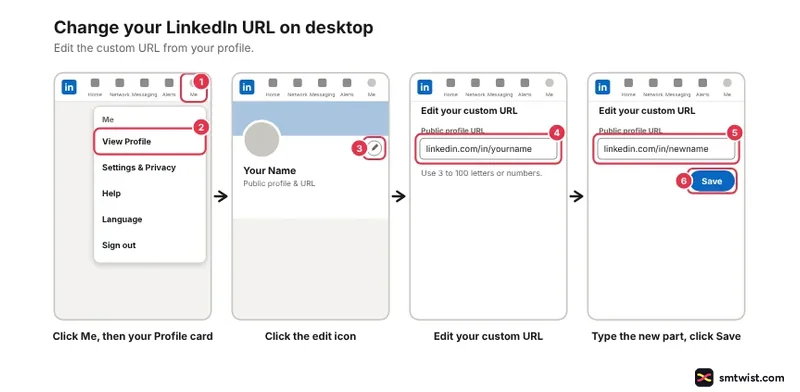
If the ending is free, it is yours as soon as you save. If it is taken, LinkedIn asks you to pick another.
Change Your LinkedIn URL on the Mobile App
The mobile app hides the setting one level deeper, inside Contact info. LinkedIn Help lists nine taps for the app.
- Tap your profile photo in the upper-left corner.
- Tap your Profile card on the navigation panel.
- Tap the More icon next to the Add section button.
- Tap Contact info.
- Tap the Edit icon in the upper right.
- On the Edit contact info screen, tap your Profile URL.
- On the Public profile settings screen, tap the Edit icon next to your URL under Edit your custom URL.
- Type the new last part.
- Tap Save.
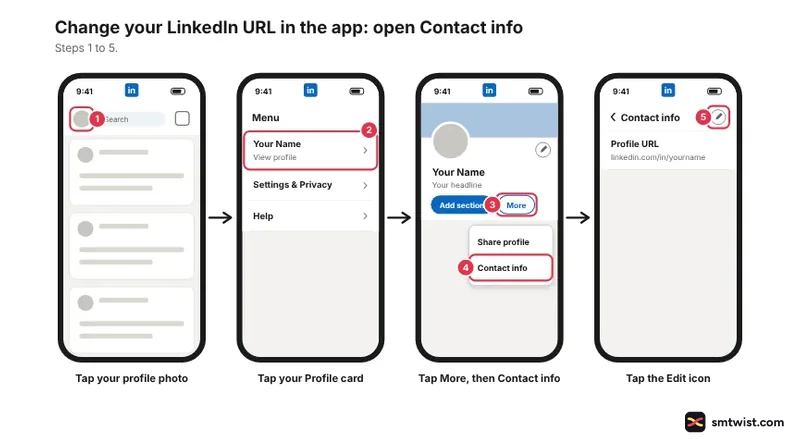
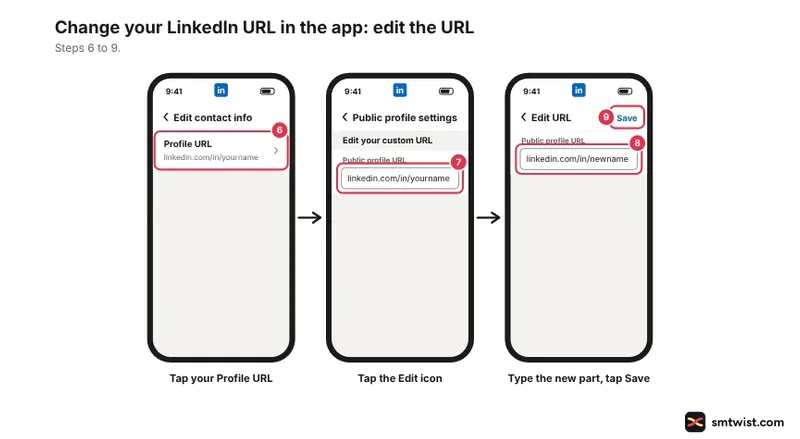
Help also has a Mobile Browser tab. We read the desktop and app tabs in full, and the browser steps follow the desktop route in a mobile browser.
What You can Use When You Customize a LinkedIn URL
Five rules from LinkedIn Help govern the ending of your LinkedIn custom URL. They apply the moment you press Save. A clean ending also helps people recognise you in search, a point covered in LinkedIn SEO.
| Rule | What LinkedIn says |
|---|---|
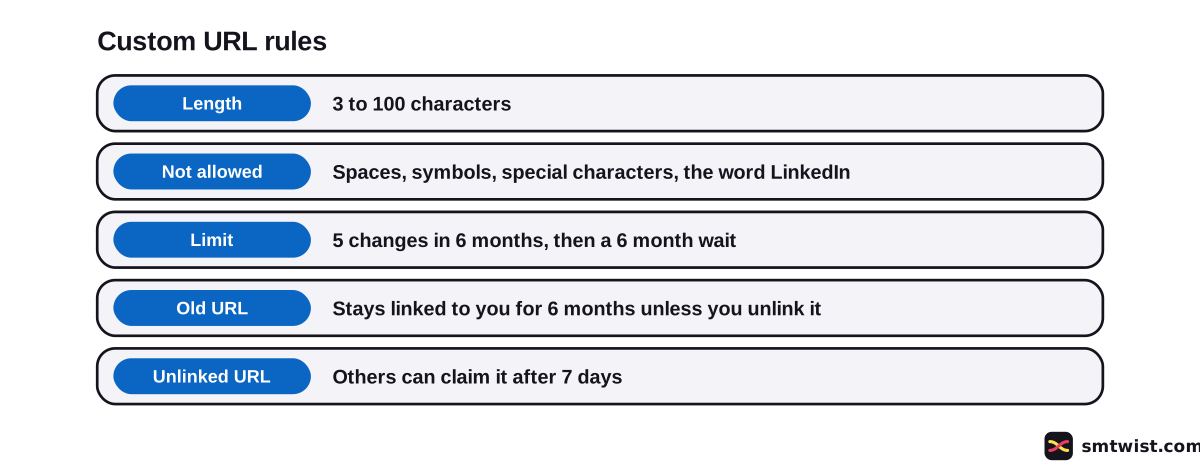
| Length | 3 to 100 characters |
| Not allowed | Spaces, symbols, special characters and the word LinkedIn |
| Capital letters | Ignored. JohnSmith, johnsmith and johnSmith open the same profile |
| Availability | First come, first served. LinkedIn cannot release a taken URL on request |
| Number | One custom URL at a time |
Choose a variation of your name or your professional brand, as LinkedIn recommends, because you share the URL with people and job applications often ask for it. If johnsmith is gone, a middle initial or a field word is a cleaner fix than a string of numbers.
How Often can You Change Your LinkedIn URL?
Five changes within six months is the cap in LinkedIn Help. After the fifth change you wait six months before the next edit. The same article warns that changing it many times makes it harder for people to find you.
If you change your mind straight after saving, LinkedIn Help says you should be able to return to the old URL immediately. If that fails, contact LinkedIn. Count a revert against your five, because it is still a change.
What Happens to Your Old LinkedIn URL?
Your old URL does not disappear after the edit. LinkedIn Help gives three timings.
- The old custom URL stays linked to you for six months unless you unlink it, and other members cannot claim it in that time.
- If you unlink it, other members cannot see it for seven days and can claim it after that.
- Opening a URL that someone claimed earlier and dropped can show a Profile Not Found message.
To see or unlink old URLs, return to Edit your custom URL, click See prior custom URLs that might be linked to you and click unlink next to the one you want to drop. Unlink only when you are sure no resume, email signature or business card still uses it, because the link then stops working for anyone who has it.
Can You Change Your Assigned LinkedIn URL?
LinkedIn assigns a public profile URL when you create your profile, and the screen labels it Assigned URL cannot be changed. Per the Help article, only a name update changes it. That text does not explain how a name edit alters the link, which leaves the custom URL as the one you edit and share.
The sign-up rules in our account guide cover the name rule LinkedIn sets when the profile is made.
Additional language profiles use the same URL with a language field added at the end. A French profile, for example, gets fr. If you close your account, the custom URL becomes available again 180 days after the close date.
After You Change Your LinkedIn URL
Update every place that shows the old link. Start with your resume, email signature and any job application profile. Then check the website bio and social profiles that point to LinkedIn.
The new URL is also the one to share in first connection notes, which have their own length limit in the LinkedIn character limit guide. If you are still building the profile, the 7 day plan for LinkedIn beginners places the custom URL in your first week.
Is Changing a Company URL the Same?
No. A company profile on LinkedIn has its own Help article. Its super admin opens the admin view, clicks the edit option in the left menu, opens the info tab and types the new name in the LinkedIn Public URL box.
LinkedIn Help adds that the old company URL can then be used by another company profile. Our steps cover personal profiles only.
What is Still Unconfirmed
We did not change a URL on a live profile, and that is why the label is Checked. LinkedIn updated the Help article two days before we read it. A label or step can differ on your screen.
The Help text does not say whether a failed attempt on a taken URL counts toward the five changes. It also does not say how the six month limit is counted, from the first change or from a rolling date.
Where This Guide Fits
Editing the URL is one step of profile setup. It belongs with the rest of LinkedIn Account Setup and First Steps in the LinkedIn section.
No profile yet? Create the account first. The editorial policy explains the Checked label.
Sources
- LinkedIn Help: Manage your public profile URL, read 29 October 2026, the steps, the character rules, the change limit and the old URL rules.
- LinkedIn Help: Edit your LinkedIn company URL, read 29 October 2026, the company profile steps.
This guide is labelled Checked. We compared each step with the two Help articles above and did not change a URL on a live profile. How we label guides explains the three labels.
FAQ
How do I change my LinkedIn URL?
Click Me, open your Profile card and click the Edit icon next to Public profile & URL. Click the Edit icon beside your URL, type the new ending and click Save.
How do I change my LinkedIn URL on the mobile app?
Tap your photo, open your Profile card, tap More next to Add section and tap Contact info. Tap the Edit icon, tap Profile URL and then the Edit icon beside your URL. Type the new ending and tap Save.
How many times can you change your LinkedIn URL?
Five times within six months, says LinkedIn Help. After the fifth change you cannot change it again for six months.
How many characters can a LinkedIn URL have?
3 to 100. LinkedIn Help says the ending cannot contain spaces, symbols, special characters or the word LinkedIn.
Can I change the part before the name in a LinkedIn URL?
No. The part before your custom ending, linkedin.com/in/, is fixed. You edit only the last part.
What happens to my old LinkedIn URL after I change it?
It stays linked to you for six months unless you unlink it, and other members cannot claim it in that time. If you unlink it, it is hidden for seven days and then another member can claim it.
Can I go back to my old LinkedIn URL?
Yes. LinkedIn Help says you should be able to return to the old URL right after the change. If it does not work, contact LinkedIn.
Why is my LinkedIn custom URL not available?
Someone else has it. LinkedIn Help says custom URLs go to the first member who claims them, and LinkedIn cannot make a taken URL available on request.
Can I change my company URL on LinkedIn the same way?
No. A company URL is edited by a super admin under Edit, then Info. It follows a separate LinkedIn Help article.
 Editor
Written by
Namrata Arora
Namrata Arora is a social media expert with two years of hands on experience on Instagram, Facebook and other platforms. She writes the how to guides on Social Media Twist and tries the steps on a real account for every guide marked Tested.
- Marks every guide Tested or Checked
- Writes about Instagram, Facebook, TikTok
- 43 guides on SMTwist
Guest posts are edited by SMTwist before they go live. Paid or affiliate links are labelled and carry rel="sponsored".