LinkedIn Auto Comment: What the Rules Say
LinkedIn auto comment is not allowed under LinkedIn Help. See the Section 8.2 wording, the penalties, the visibility limit and what Help does not cover.

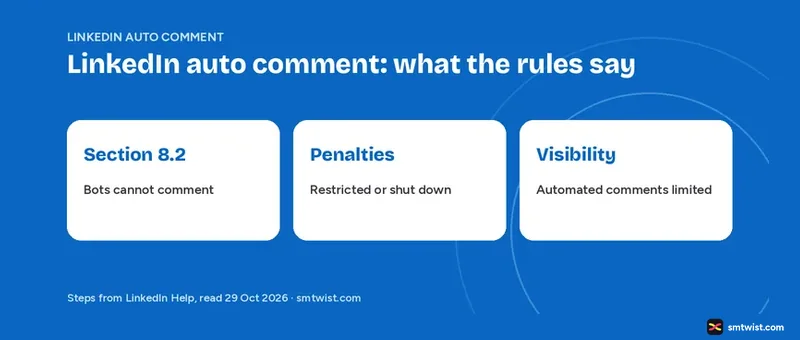
LinkedIn auto comment tools run against LinkedIn's rules, because LinkedIn Help bans outside software that automates activity and the User Agreement names commenting. This guide on LinkedIn auto comment gives the exact wording, the penalties, the visibility limit and the areas where Help says nothing. All facts below trace to the LinkedIn Help articles under Sources, read on 29 October 2026.
Is LinkedIn Auto Comment Allowed?
No. LinkedIn Help rules out any third party software that scrapes, changes the look of or automates activity on its website. Its article on prohibited software names crawlers, bots, browser plugins and browser extensions, and says all of them violate the User Agreement.
Fake accounts and fake engagement are barred too, including tools or services that try to manipulate content algorithms. Section 8.2 goes further and names commenting directly. For anyone searching for an auto comment tool, that is the clearest line.
A data reason is given as well. The automated activity article says this software can export or scrape data and affect authenticity, sometimes without consent. It adds that the practice can violate privacy law in some places. The same rules cover every other kind of bot, and the LinkedIn automation guide lists them with the penalties.
| Help article | Updated when read | Covers |
|---|---|---|
| Prohibited software and extensions | 2 years ago | Policy, Section 8.2, penalties |
| Automated activity on LinkedIn | 4 weeks ago | Policy, restriction steps |
| Account restrictions | 1 year ago | Automated tools violations |
| Comment on posts and reply to a comment | 4 months ago | Comment limits, visibility |
Two years separate the oldest and newest articles, yet both say the same about bots and extensions. We found no difference in what they ban.
What Section 8.2 of the User Agreement Bans
Section 8.2 of the User Agreement is quoted in Help, and the quote bans six things.
- Using bots or other unauthorized automated methods to access the Services, add or download contacts, send or redirect messages, comment on, like or share posts, or otherwise drive inauthentic engagement.
- Scraping or copying the Services with scripts, robots or plugins.
- Overlaying or modifying the appearance of the Services.
- Copying content without the owner's consent.
- Bypassing access controls or use limits.
- Interfering with how the Services operate or placing an unreasonable load on them, including spam and gaming algorithms.
Item one matters most here because it lists commenting, liking and sharing by name. Help quotes only this section, and we did not open the full User Agreement.
What are the Penalties for Using a LinkedIn Auto Comment Tool?
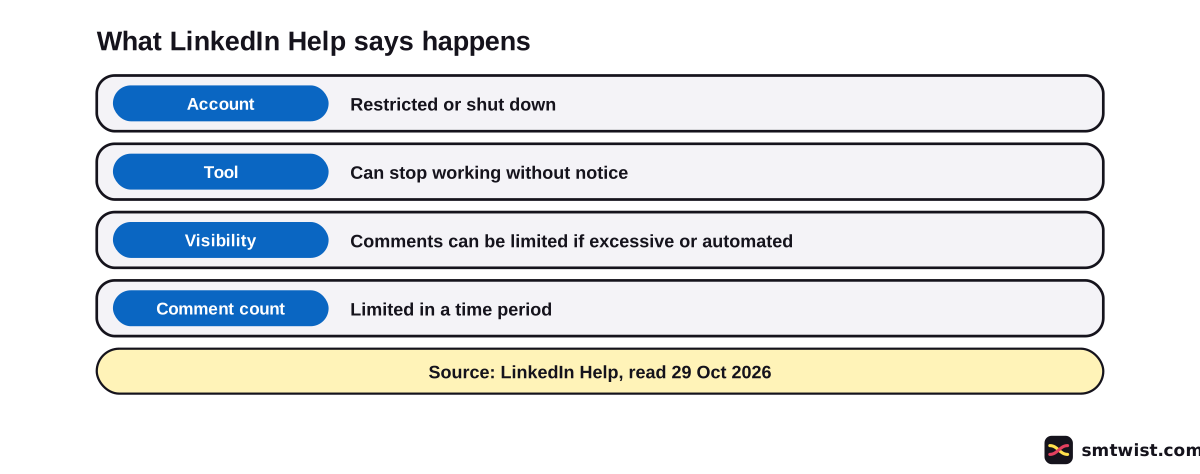
Two direct penalties are named for automated commenting and other automation. Members who use these tools risk a restricted or closed account, and the tools can quit working with no warning. LinkedIn also says it continues to improve its technical defences against scraping and automation.
In the account restrictions article, automated inauthentic activity sits under Automated tools violations. It says the violation can lead to a temporary or permanent restriction of the account.
What Help Says to do After a Restriction
Help gives three steps after a restriction for auto commenting or any other restriction for automated activity.
- Review and disable the software or browser extension.
- Wait for the account to be re-enabled automatically at the time on your suspension notification.
- Contact LinkedIn with more details if you want a second look.
A separate route exists for members who use third party software for productivity and want LinkedIn to consider partnering with the app. LinkedIn says that route is rolling out gradually and only some members see it. Help also advises changing your password regularly.
The Visibility Limit on LinkedIn Auto Comment Activity
Two limits come from the comments article. LinkedIn can cap how many comments a member or company profile makes in a time period. If it detects excessive comment creation or use of an automation tool, Help says LinkedIn can limit how visible those comments are.
Note where the visibility line sits. It is in the comments article (a524166), not in the automated activity article (a1340567). We read both, and only the comments article contains it.
Verifying your company profile and its admins' workplace or identity is also suggested, to help content creation and visibility. The same article says members can stop other members and company profiles commenting on their posts, and the topic on how to block someone on LinkedIn explains that manual control.
What Manual Comment Features does Help Describe?
The comments article describes the comment box, replies, mentions, GIFs, images and emoji. Every one is a manual action, and Help describes no built-in feature that posts comments for you. Your own comments under your own post get an Author tag.
Members and company profiles can also switch comments off, which stops anyone else from commenting. Our steps to turn off comments on a LinkedIn post show how.
Spam is defined in Help as advertising a product for monetary gain or posting irrelevant content for high visibility. If unwanted comments reach your posts, our guide on how to delete spam comments on LinkedIn covers removal.
What LinkedIn Help Says and What It Leaves Out
On bots and extensions that automate activity, Help is direct. It is silent on two tool types that people connect to these searches, and the graphic shows both sides.
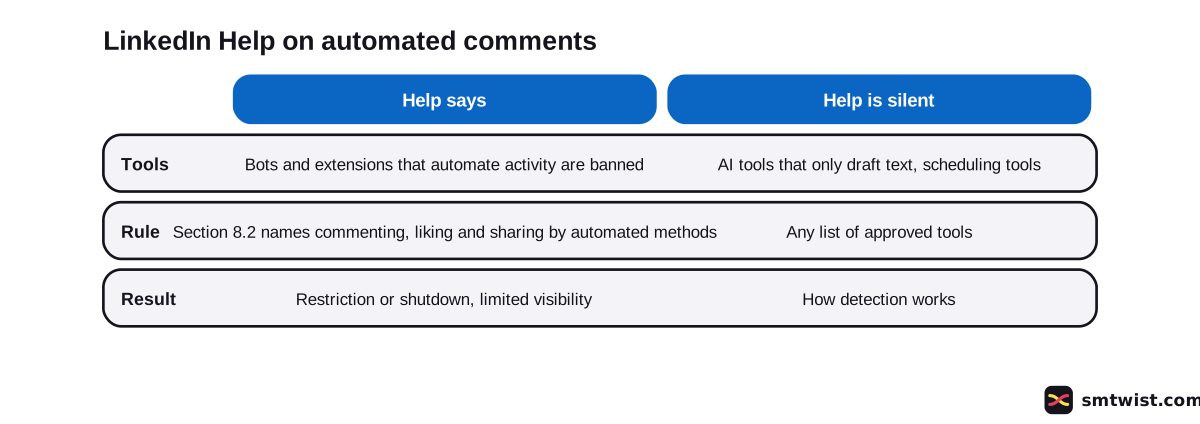
One is the AI comment drafting tool, meaning software that writes text which you read and post yourself. Scheduling tools are the other. We label both unconfirmed and make no claim about either.
What is Still Unconfirmed?
Seven points stay open after reading these Help articles.
- Whether an AI tool that drafts a comment you post yourself breaks the rule. Help is silent.
- Whether scheduling tools count as automation. Help is silent.
- Which tools, if any, LinkedIn approves. Help names no tools and gives no approved list.
- How LinkedIn detects automation. Help does not explain it.
- How long a temporary restriction lasts. Help says only that the account is re-enabled at the time on the notice.
- What the full User Agreement says beyond Section 8.2 as quoted by Help.
- Who qualifies for the partnership route, since LinkedIn says it reaches only some members.
We tested nothing on a live account. The label is Checked, and a Help article can change after our reading date.
Where This Guide Fits
LinkedIn auto comment rules are one part of comment safety. The rest sit in LinkedIn Comments and Moderation Tools inside the LinkedIn section.
SMTwist names and recommends no tool here. Our editorial policy covers how Checked guides are made.
Sources
- LinkedIn Help: Prohibited software and extensions, read 29 October 2026, the ban on bots and extensions, the Section 8.2 wording and the penalties.
- LinkedIn Help: Automated activity on LinkedIn, read 29 October 2026, the policy, the data reasons and the steps after a restriction.
- LinkedIn Help: Account restrictions, read 29 October 2026, the automated tools violations section.
- LinkedIn Help: Comment on posts and reply to a comment, read 29 October 2026, the comment limit, the visibility line and the manual comment features.
- LinkedIn Help: Recognize and report spam, inappropriate, and abusive content, read 29 October 2026, how Help defines spam.
Five Help articles support the claims above. We ran no tool on a live account, so the label is Checked under the rules in our editorial policy.
FAQ
Is LinkedIn auto comment allowed?
No. LinkedIn Help rules out third party software, bots, browser plugins and browser extensions that automate activity. Section 8.2 of the User Agreement names commenting by bots or other unauthorized automated methods.
What happens if you use a LinkedIn auto comment tool?
Your account risks restriction or shutdown, and the tool can quit working with no warning. Help describes automated inauthentic activity as a violation that can lead to a temporary or permanent restriction.
Does LinkedIn limit the visibility of automated comments?
Yes. In the comments article LinkedIn Help says that LinkedIn can reduce how visible comments are if it detects excessive comment creation or an automation tool. The same article says LinkedIn can limit how many comments a member or company profile makes in a time period.
How long does a LinkedIn restriction for automation last?
Help gives no fixed length. After you review and disable the software or extension, the account is re-enabled automatically at the time on your suspension notification.
Can I appeal a LinkedIn restriction for automated activity?
Yes. LinkedIn Help says you can contact LinkedIn with more details for a second look. Review and disable the software or extension first.
Can AI write a LinkedIn comment for me?
The Help articles we read do not say. They cover bots and automation, and they do not mention AI tools that only draft text you post yourself. Section 8.2 does ban bots that comment on posts.
Does LinkedIn Help mention scheduling tools for comments?
No. The Help articles we read name no scheduling tools. They also name no approved tools of any kind.
Does LinkedIn have a built-in auto comment feature?
No. The comment features Help describes are manual. They are the comment box, replies, mentions, GIFs, images and emoji.
 Editor
Written by
Namrata Arora
Namrata Arora is a social media expert with two years of hands on experience on Instagram, Facebook and other platforms. She writes the how to guides on Social Media Twist and tries the steps on a real account for every guide marked Tested.
- Marks every guide Tested or Checked
- Writes about Instagram, Facebook, TikTok
- 43 guides on SMTwist
Guest posts are edited by SMTwist before they go live. Paid or affiliate links are labelled and carry rel="sponsored".