Pinterest topic
Pinterest for Business, Selling and Creators Explained
Pinterest marketing is the work of getting a brand, a shop or a creator seen on Pinterest through a business account, Pins and optional ads. This topic gathers what Pinterest's own material says about that. No guide in this topic is published yet. Four are planned. They cover Pinterest marketing, how to sell on Pinterest, brands that market well on Pinterest and a Pinterest creator portfolio. The facts below come from Pinterest Help and Pinterest Business. We have not tried a Pinterest campaign ourselves.
Pinterest Marketing Starts With a Business Account
Pinterest Business lists the order below for getting started. It was not tried on an account.
- Get a business account Create a new one or convert a personal account. Pinterest says it is free.
- Claim your website Pinterest says this makes your brand name appear on every Pin people create from your site.
- Make Pins Use images or videos to show what you are about and what you sell.
- Check analytics and add ads Review how every Pin performs and audience insights. Convert Pins into ads if you want more people to see them.
Two rules come from Pinterest Help as well. A new business account can only be created from a desktop device. A personal account must be public before you convert it, because business accounts are public.
How Pins Get Seen
Engagement decides what Pinterest shares, says Pinterest Help. Language, location, seasons, holidays, formats and trending topics can affect that engagement. It also says there is no set engagement window, so a Pin can gain attention hours, days, months or even years after it is published. Its advice is a short list that fits any Pinterest marketing plan:
- Post original content regularly. Pinterest suggests aiming for something new every week.
- Match the image, text and keywords to where the Pin links and avoid broken links.
- Use vertical visuals with a title, a description and the right board.
- Look at Pinterest Trends and seasonal topics before you plan a Pin.
- Read your analytics and do more of what people save.
How to Sell on Pinterest
Selling is one part of Pinterest marketing. Pinterest Shopping gives the route below. It says listing products is free and that Pinterest takes no commission. Pinterest does not handle checkout. It sends shoppers to your site or app. Selling is also one of five channels in ecommerce marketing.
- Create a business account This is needed before anything else.
- Upload your catalog Upload the full product catalog or connect a Shopify store.
- Tag products Anyone with a business account can tag products and create product Pins. Tagging is free.
- Pass merchant review Needed for shopping ads and more distribution. Applying for the Verified Merchant Program is optional.
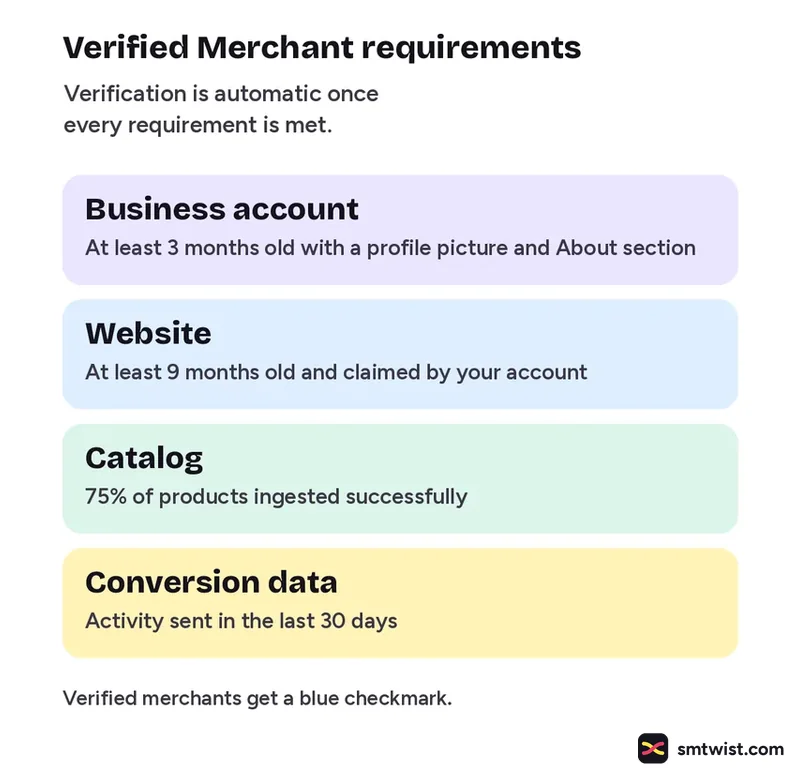
The Verified Merchant Program has requirements, listed by Pinterest Help. Verification is automatic once every requirement is met. Verified merchants get a blue checkmark on their profile and Pins.
| Area | Requirement |
|---|---|
| Business account | At least 3 months old with a profile picture and About section |
| Website | At least 9 months old and claimed by your account |
| Catalog | 75% of products ingested successfully |
| Conversion data | Activity sent in the last 30 days |
Pinterest Marketing for Creators
Pinterest Create says anyone can create and grow on Pinterest and that it is free. It lists tools to create, customize and cross post content. It describes no brand partnership program. Pinterest Help covers a separate paid partnership label, which we cover in How to Make Money on Pinterest: Four Routes Pinterest Lists. A creator portfolio is a planned topic and we have no verified source for it yet.
What is Still Unconfirmed
The Pinterest sources we read carry no dates. The Verified Merchant Program article lists no eligible countries, so we cannot say whether it is open where you are. A figure from Pinterest Business says 85% of weekly US Pinners have bought something based on brand Pins. It sits in a footnote and we did not see the study behind it. We read no case studies of brands, so we make no claim about which Pinterest marketing strategies work. Check every step in your own account.
Where This Topic Fits
This topic sits inside our Pinterest section, next to Pinterest Ads: Formats, Video Specs and Setup and Claim Your Instagram Account on Pinterest. A guide appears here the day it goes live and is marked Tested or Checked, as our editorial policy explains. Changes are logged on our change log. Namrata Arora edits this section. To look up a term, use the social media glossary or our site search.
Sources: Pinterest Help on getting a business account, Pinterest Business getting started, Pinterest Help on Pin performance, Pinterest Business on selling products, Pinterest Help on the Verified Merchant Program and Pinterest Create.
FAQ
Is a Pinterest business account free?
Yes. Pinterest Help says you can set up a free business account to get analytics on your Pins and the ability to place ads. You can create a new account or convert a personal one.
Does Pinterest take a commission on sales?
Pinterest Shopping says listing products is free and Pinterest takes no commission on sales. It also says Pinterest does not handle checkout and sends shoppers to your site or app.
Can I convert my personal Pinterest account into a business account?
Yes, according to Pinterest Help. A private personal account must be made public first because business accounts are public. Your Pins and followers stay the same and you can switch back later.